Bitstorm Inc. Bad Boy Xtreme N & MJ
www.bitstorm.com 5
Step 4
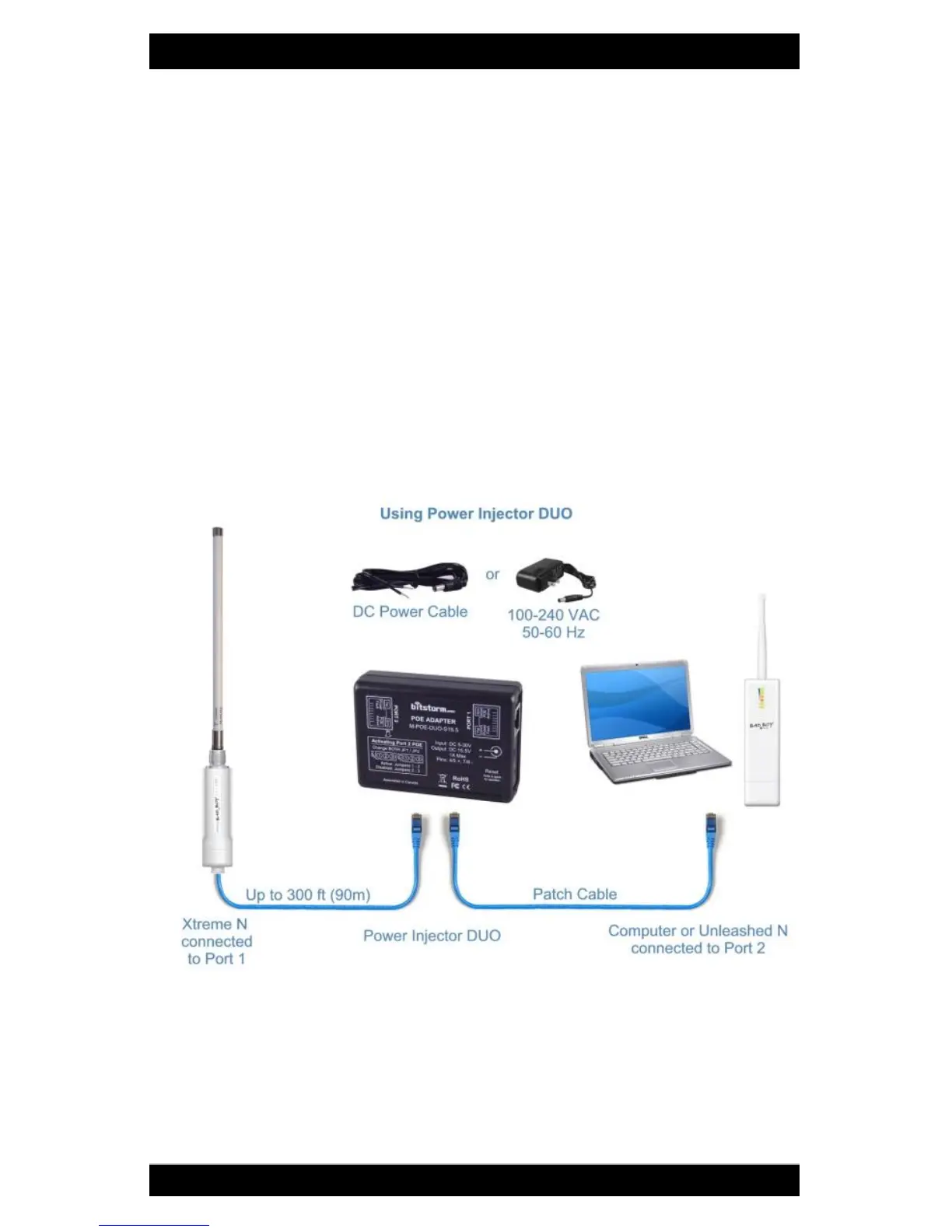
Remove bottom cover from Xtreme and plug in 75 ft (23m) black cable. Plug
other end of cable into POE Adapter Port 1. See illustration on Page 3 for
location. Note: Xtreme requires power to operate and should be connected
to Port 1 which always supplies power.
Caution: Do not connect anything other than Bitstorm BAD BOY devices
to Port 1.
Step 5
Plug patch cable (included) into Port 2 of the DUO. Connect other end to
computer, networking devices or optional Unleashed. Observe that the
green LAN LED illuminates on Xtreme and Unleashed if included.
Note: If using a computer or networking device, ensure Power Injector’s
Port 2 green power LED is NOT lit.
Step 6
Continue to Chapter 3 - Operation. Surf the web to verify your system is
operating correctly. If not, check troubleshooting section in the back of this
guide. (Appendix F - Troubleshooting).


 To Next Page