● Rugged carrying case
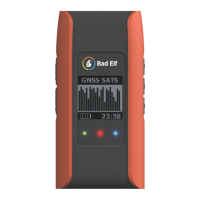
● Bad Elf Flex
● Wall charger
● Vehicle charger
● 1m USB charging cable
● USB OTG adapter cable
● Pole mount adapter
● Quick start guide
Supported devices
You can connect a Flex receiver to a handheld device, phone, or tablet powered by the
following
operating systems:
● iOS version 11 or newer
● Android versions 4.1x or newer
● Windows 10.x or newer
● Mac OS X 10.4 or newer
Using the Bad Elf Flex
We’ve designed the Flex to be as simple and intuitive as possible.
Charging the Bad Elf Flex
● How to charge & charge indicators
● Operation while charging
● Compatible chargers
● Temperature - charge limitations
● Low battery - device behavior
Turning on and off the receiver
To turn the receiver on, press and hold the power button for 3 seconds. The Flex will take
approximately 20 seconds to start up and begin looking for satellites.
To turn the receiver off, press and hold the power button for 3 seconds.


 To Next Page