4
BF-UM-C-DP E12-EN November 2019
7.6 NORMAL OPERATION
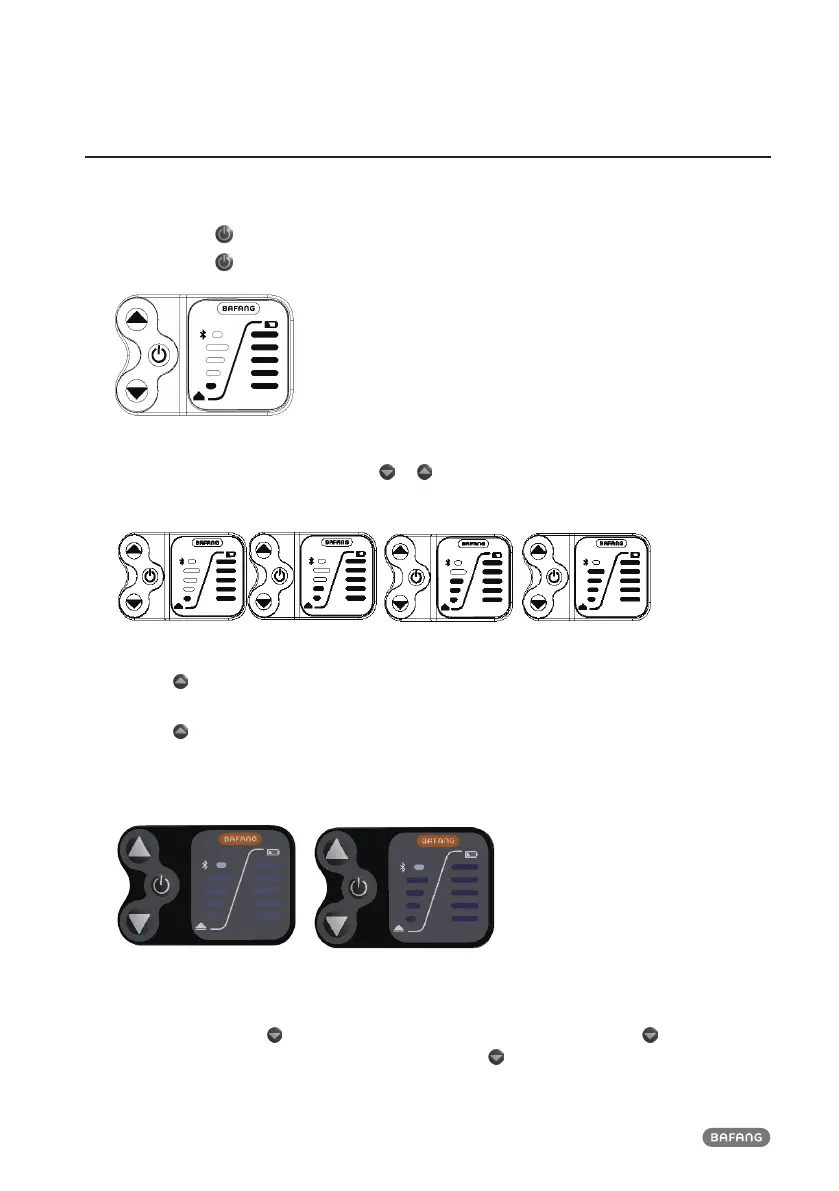
7.6.1 Switching the System ON/OFF
Press and hold (>2S) on the display to turn on the system.
Press and hold
(>2S) again to turn off the system.
7.6.2 Selection of Support Levels
When the display is turned on, press the or (<0.5S) button to switch to the support level, the
lowest level is 1, the highest level is 4. When the system is switched on, the support level starts in
level 1. There is no support at level 0.
7.6.3 Headlights / backlighting
Hold the (>2S) button,level and battery indication will turn dimmed and the controller turn on the
lights.
Hold the
(>2S) button again, level and battery indication will turn brighter and the controller turn
off the lights. (If the display is turned on in a dark environment, the display backlight/ headlight will
be turned on automatically. If the display backlight/headlight are turned off manually, they also need
to be turned on manually afterwards)
7.6.4 Walk Assistance
The Walk assistance can only be activated with a standing pedelec.
Activation: Briefly press
continuously until to level 0. At this point, briefly press again and the
indicator of the highest level will start to flash, then press and hold, the level indicator will flash
successively from 1st to 4th. Then the walk assistance mode is activated and the pedelec moves
approx. 6 km/h.


 To Next Page