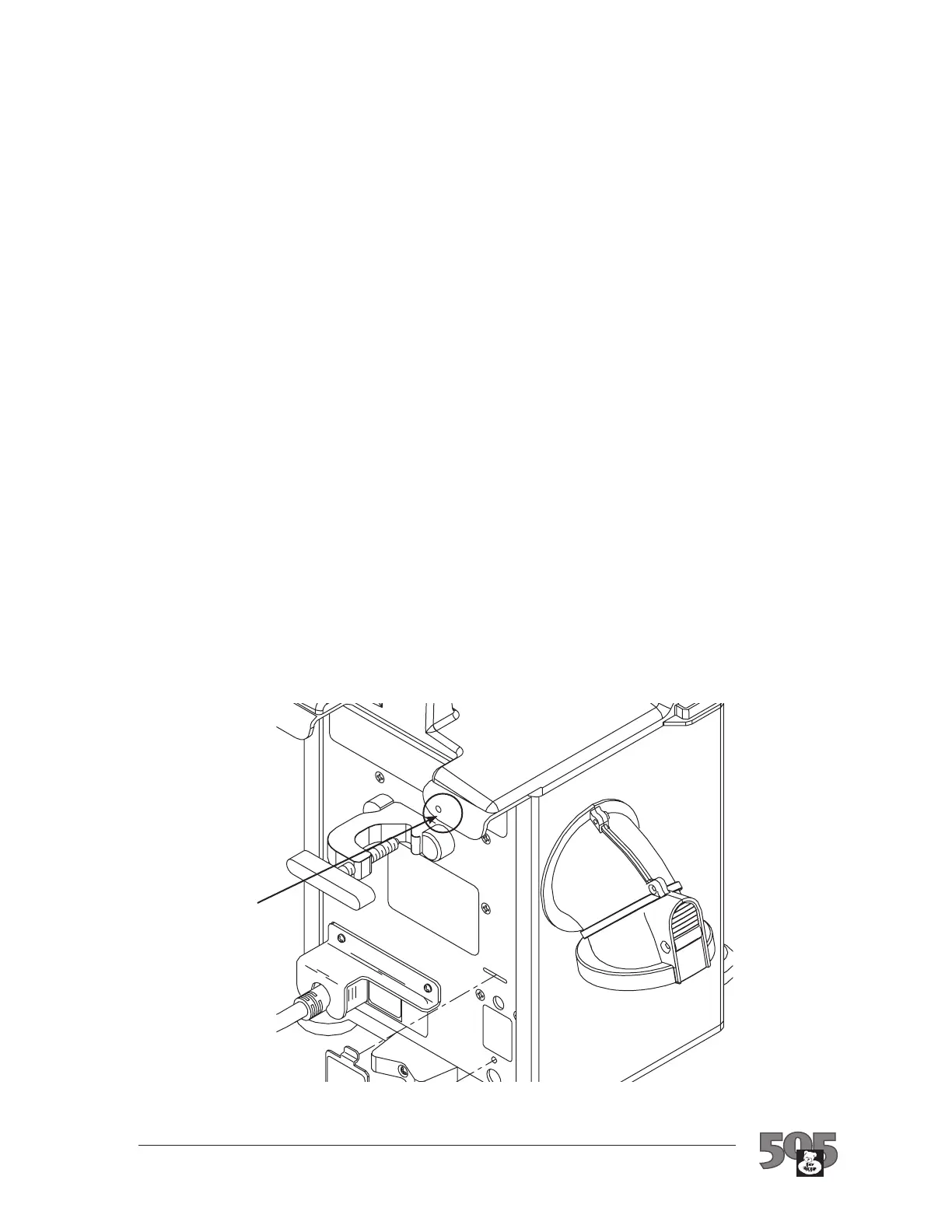
Figure 9. Location of
Operating Temperature
Adjustment Potentiometer
Normal Operating Temperature Adjustment
Insert the slotted screwdriver in the potentiometer access 3.
hole. You must access the potentiometer blindly, so carefully
move the screwdriver until it fits into the slot of the
potentiometer.
• Ifthetestedoperatingtemperaturewasbelow specified
limits, turn the screwdriver CLOCKWISE to increase
the operating temperature.
• Ifthetestedoperatingtemperaturewasabove specified
limits, turn the screwdriver COUNTERCLOCKWISE
to lower the operating temperature.
Adjust the potentiometer until the temperature read-out 4.
meets the limits specified in Table 4 for the HIGH
temperature setting (correlated to ambient temperature as in
Figure 8).
Verify that the MED and then LOW temperature settings 5.
are also within specified limits. If the HIGH range is
properly set, and MED and/or LOW do not meet specs, call
Technical Service.
Turn the warming unit power OFF and remove the hose 6.
from the port on the temperature test device.
Record the maintenance action taken and hours of 7.
operation (read from the hour meter) in the Maintenance
Log section.
Operating temperature
potentiometer access
Bair Hugger Model 505 Service Manual
18


 To Next Page