3
**For a color copy of instructions, visit your vehicle specific application on BajaDesigns.com **
Tools Required
To begin, make sure the vehicle is in park, on level ground and the parking brake is engaged.
*T-15 Torx *10mm Socket
* Trim removal tool * 4mm Allen wrench * Sharp blade
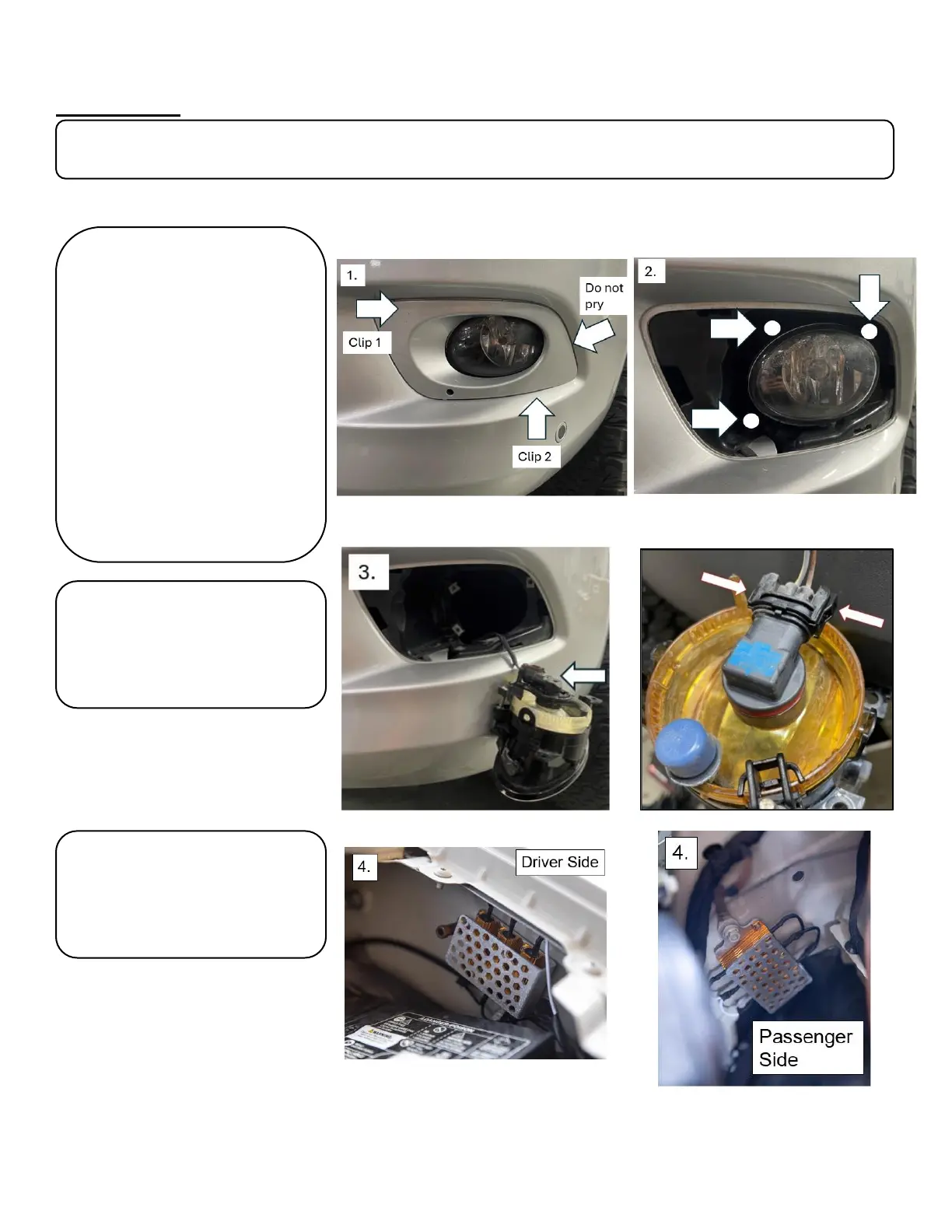
1. Using a trim removal tool, remove
the plastic fog light bezel by
disengaging the two clips. Tabs are
marked with arrows. (Driver side
shown).
*Do not pry at the outer edge as this
could damage the bezel*
2. Using a T-15 Torx bit, remove the
three fasteners (See photo) securing
the light to the vehicle and carefully
remove the light. Keep hardware as it
will be reused.
*Careful to not drop a screw behind
the bumper as some areas are not
easily accessible*
3. Push the release tabs on the OEM fog
light connector. Carefully unplug the
light from the harness. Put the light
away in a safe place.
4. Locate a bolt on the inside of the
engine bay such as the chassis ground
pictured. Remove the bolt and install the
resistor bracket using the provided
mounting location. Run the wires down
into the fog pocket location.



 To Next Page