3
’19 Chevy Silverado Fog Pocket Kit Instructions
Tools Required
7mm socket (1/4” drive)
9/16” wrench
9/16” socket
4mm Allen wrench
2.5mm Allen wrench
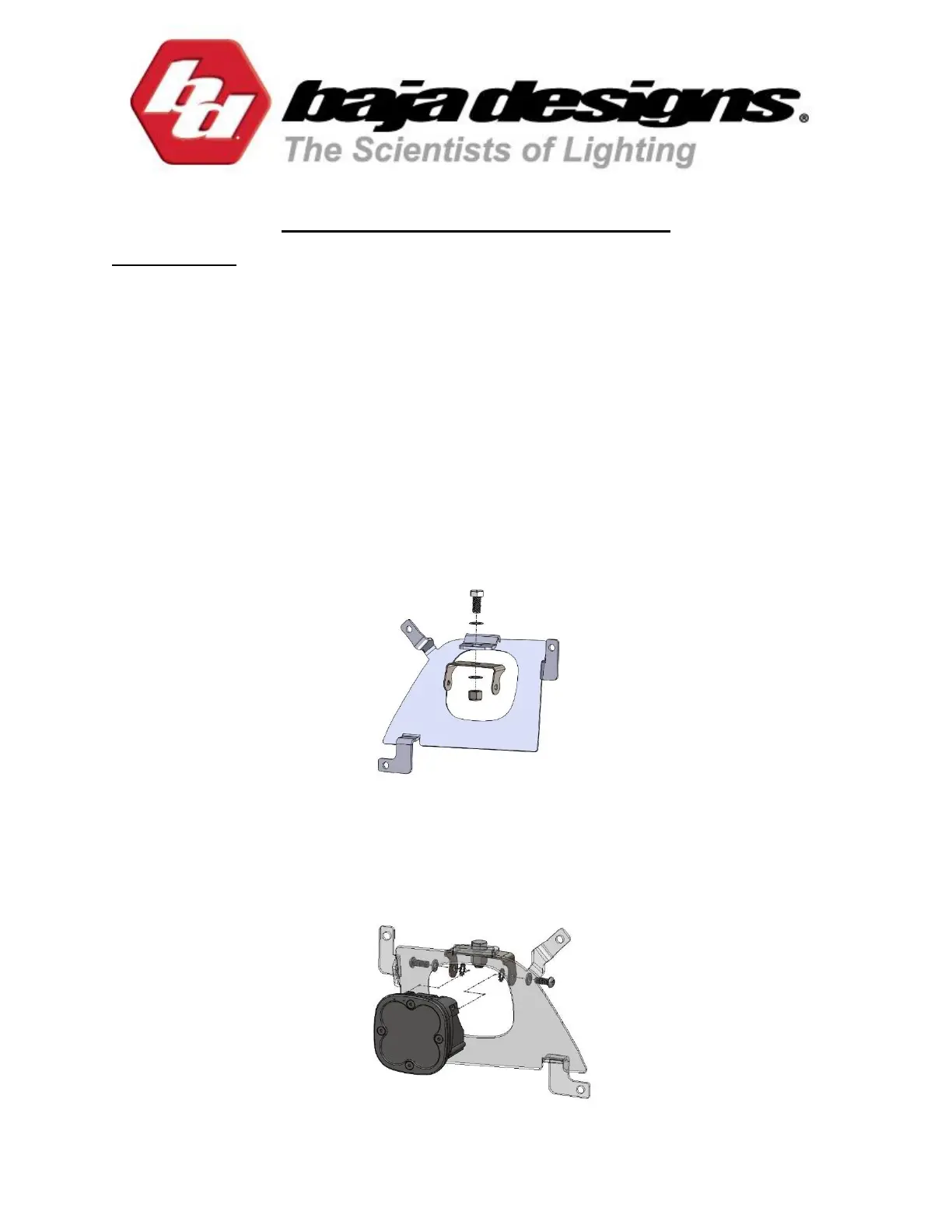
1. To begin, layout the entire contents of the kit on a flat surface and locate the squadron
parts bag. With the 9/16” socket and wrench, assemble the squadron bracket onto the
fog pocket bracket with the provided 3/8” bolt, washers, and nylon locking nut. Refer to
the driver side exploded sketch below.
2. This kit places each Squadron light upside down inside the fog pocket. Using the 2.5mm
Allen wrench, remove the four bezel bolts on the face of the light. Remove and spin the
bezel and lense 180 degrees, then reinstall. Assemble the light onto the bracket with the
rest of the hardware in the parts bag (see exploded view below). Tighten lightly for
adjustment later. Repeat steps 1 and 2 for the opposite side light and bracket assembly.


 To Next Page