en Cleaning and servicing
34
15.2 Changing the basic set-
tings
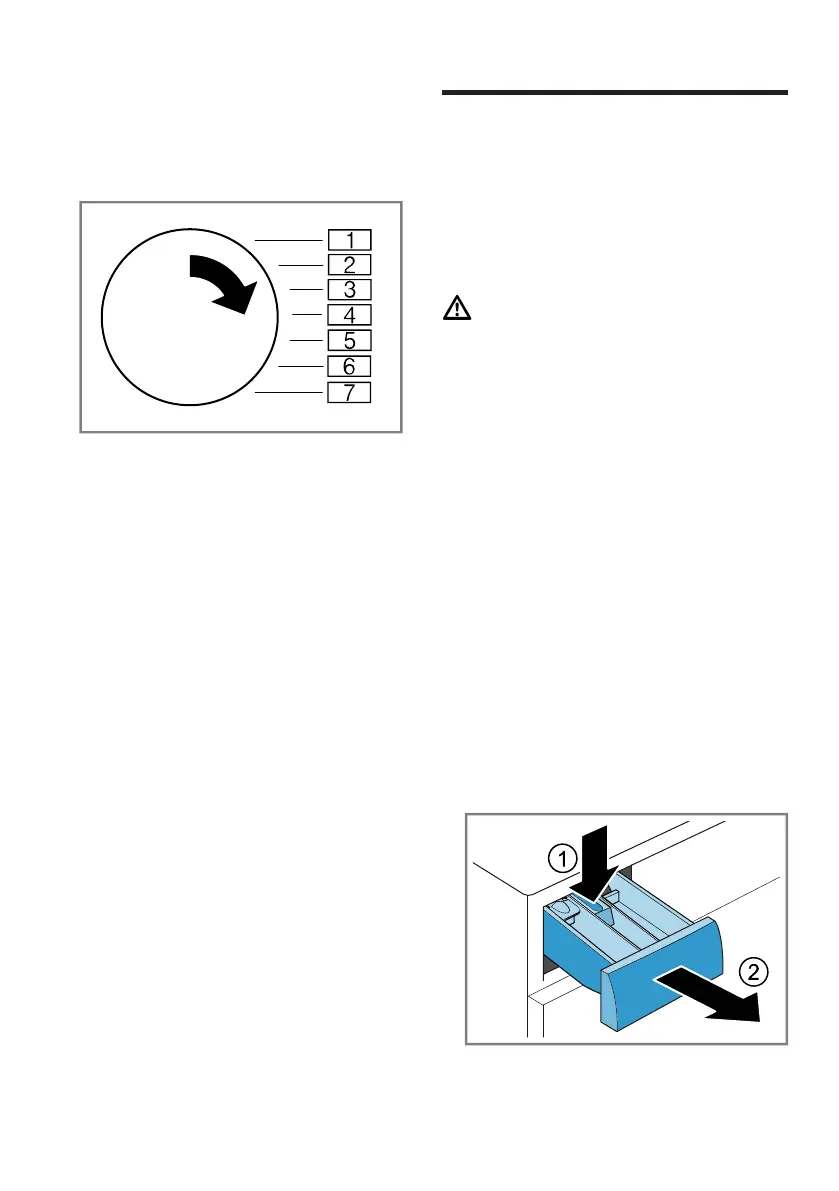
1. Set the programme selector to po-
sition 1.
2. Press Inicio/Pausa + cargaand, at
the same time, turn the pro-
gramme selector to position2.
a The display shows the current
value.
3. Set the programme selector to the
required position.
4. To change the value, press Progr.
diferida.
5. To save the changes, switch off
the appliance.
16 Cleaning and servi-
cing
To keep your appliance working effi-
ciently for a long time, it is important
to clean and maintain it carefully.
16.1 Cleaning the drum
CAUTION
Risk of injury!
Permanently washing at low temper-
atures and a lack of ventilation for
the appliance may damage the drum
and cause injury.
▶ Regularly run a programme for
cleaning the drum or wash at tem-
peratures of at least 60°C.
▶ Leave the appliance to dry after
every operation with the door
open, and leave the detergent
drawer to dry.
▶ Run the Limp. tambor programme
without laundry and using washing
powder.
16.2 Cleaning the detergent
drawer
1. Pull out the detergent drawer.
2. Press down on the insert and re-
move the detergent drawer.



 To Next Page