EasyManua.ls Logo

Balboa Water Group TP500 - User Manual

Balboa Water Group TP500
15 pages
Print Icon
To Next Page IconTo Next Page
Loading...
42355 rev A 06/05/20
1
Manufactured under one or more of these patents. U.S. Patents: 5332944, 5361215, 5550753, 5559720, 5,883,459, 6253227, 6282370, 6590188, 6976052,
6965815, 7030343, 7,417,834 b2, Canadian Patent: 2342614, Australian patent: 2373248 other patents both foreign and domestic applied for and pending. All
material copyright of Balboa Water Group.
TP500 and TP500S Control Panels
User Guide for Simplied Menu
System Model: All BP series systems that support Simplied Menus
Panel Model: TP500 and TP500S Series
Panel Software Version: All versions
Display Icons
A B C D E F G H I J K
N
M
L
A - Heat
B - Ready Mode
C - Rest Mode
D - bba™2 On
E - WiFi (Cloud Connection)
MicroSilk® is a registered trademark of Jason International.
F - Light
G - Cleanup Cycle
H - Jets 1
I - Jets 2
J - Blower
K - Auxiliary (Jets 3 or )
L - Temperature Range (High / Low)
M - Set (Programming)
N - Filter Cycle (1 or 2 or Both)
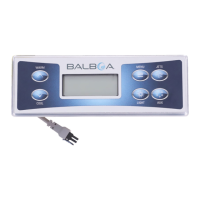
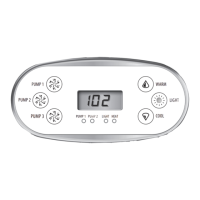
TP500S
TP500
Question and Answer IconNeed help?

Do you have a question about the Balboa Water Group TP500 and is the answer not in the manual?

Summary

Display Icons

Main Menus and Navigation

Control Panel Navigation

Explains how to navigate the control panel menus using buttons.

Power-up Screen Sequence

Describes the sequences displayed when the system powers up.

Spa Preparation and Filling

Priming Mode Operation

Details the priming mode, its duration, and function.

Priming the Pumps

Instructions for priming pumps to ensure proper water flow.

Exiting Priming Mode

How to manually or automatically exit the priming mode.

Spa Behavior and Functions

Pump Operation Modes

Explanation of pump speeds, circulation modes, and time-outs.

Filtration and Ozone System

Details filtration cycles and ozone generator operation.

Freeze Protection System

How the system protects against freezing conditions.

Clean-up Cycle Function

Explanation of the optional clean-up cycle after pump use.

Temperature Control

Adjusting Set Temperature

How to adjust the spa's set temperature using buttons.

Press-and-Hold Adjustment

Using press-and-hold for continuous temperature adjustment.

Spa Modes: Ready and Rest

Ready Mode vs. Rest Mode

Compares Ready Mode for constant heating vs. Rest Mode for timed heating.

Ready-in-Rest Mode Function

Behavior when 'Jets' is pressed while in Rest Mode.

Display Settings and Filtration

Flip (Invert Display) Setting

How to invert the display for better viewing.

Adjusting Filtration Cycles

Setting the duration for primary and secondary filter cycles.

Purge Cycles Explained

How pumps/blower purge plumbing at the start of filter cycles.

General System Messages

Priming Mode Status Display

Displays during the spa's priming sequence.

Temperature Status Messages

Messages related to unknown or high water temperatures.

Freeze Protection Alerts

Indicates when freeze protection is active.

System Warnings and Codes

Specific warnings like J29 related to system configuration.

Heater System Messages

Heater Flow Reduction Errors

Errors indicating reduced or failed water flow to the heater.

Heater Dry and Overheat Errors

Messages for dry heater conditions or overheating.

Flow-Related Troubleshooting

Guidance on checking water flow issues for heater problems.

Sensor and Communication Issues

Sensor Balance and Failure Alerts

Messages about sensor synchronization and failure.

Miscellaneous System Messages

Handles communication errors and test software status.

System Errors and Configuration

Memory and Clock Errors

Errors related to system memory and clock functions.

Configuration and GFCI Errors

Issues with spa startup configuration or GFCI testing.

System Alerts and Maintenance Reminders

Pump and Water Level Alerts

Alerts for stuck pumps or low water levels.

General Maintenance Reminders

System prompts for regular maintenance tasks like pH checks.

Scheduled Maintenance Reminders

Filter and GFCI Maintenance

Reminders to clean filters and test GFCI periodically.

Water and Cover Maintenance

Prompts for changing water and cleaning vinyl covers.

Wood and Filter Replacement

Reminders for cleaning wood and replacing filters.

Ongoing Maintenance Reminders

Cartridge and Ozone;UV Checks

Reminders to install new cartridges and check ozone/UV generators.

Service Technician Check-up

Prompt for a professional service check-up.

Safety and Installation Requirements

Basic Installation Guidelines

Electrical and connection requirements for installation.

CSA Compliance and Warnings

Safety standards, cautions, and warnings for spa operation.

Service and User Restrictions

GFCI testing, shock hazards, and user service limitations.

Balboa Water Group TP500 Specifications

General IconGeneral
ModelTP500
CategoryControl Panel
ManufacturerBalboa Water Group
CompatibilityBalboa spa systems
Operating Temperature32°F to 122°F (0°C to 50°C)

Related product manuals