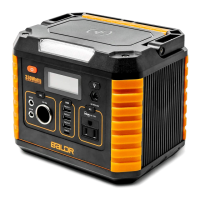
WIRELESS CHARGER
Press ON/OFF Button A before charging. Press ON/OFF Button to shut down the output(s)
When not in use.
COOLING FAN
BALDR 330 utilizes an internal cooling fan to ensure the product is operating within the
appropriate temperature range. BALDR 330, when it experiences a higher output load, will
automatically turn on the fan. During discharge, and possibly charging, the fan may operate
intermittently to keep internal temperature within operating range. The fan will likely start when
the AC circuit is activated to ensure proper operation.
FUNCTION BUTTONS
5
USB-C OUTPUT
The USB-C output port will NOT function until the appropriate
Button A & D
are both pressed
to activate.
The USB-C cable of different devices need different endorsements of corresponding protocols,
if the USB-C port didn't work, try to use the AC output port.
4
10
12
BALDR 330 POWER ON/OFF A
Button A is the master switch. Press Button A to activate the button B/C/D.
Press Button A to shut down the output(s) When not in use. 10 seconds after you turn off the
Button A, BALDR 330 will have a BEEP sound indication.
SOS MODE & LED LIGHT B
Function available no matter the Button A activate or not.
First, press Button B to turn on the LED light;
Second, DOUBLE-Press to turn on the SOS mode;
Third, press Button B back to LED light, one more time again, will turn off the light.
10 seconds after you turn off the Button B, BALDR 330 will have a BEEP sound indication.
DC OUTPUT POWER ON/OFF C
The DC output port will NOT function until the appropriate Button A & C are both pressed to
activate. Press Button C to shut down the output(s) When not in use.
USB OUTPUT POWER ON/OFF D
The USB output port will NOT function until the appropriate Button A & D are both pressed to
activate.
Press Button D to shut down the output(s) When not in use.
AC OUTPUT POWER ON/OFF E
The AC output port will NOT function until the appropriate Button A & E are both pressed to
activate.
Press Button E to shut down the output(s) When not in use.


 To Next Page
 Loading...