Need help?
Do you have a question about the Balt 27614 Beta and is the answer not in the manual?
Instruction to identify and separate all components and hardware before beginning assembly.
Screw locking and non-locking casters into the bottom front of the base using the caster wrench.
Insert the pole into the base and secure it using a long bolt and four small screws.
Slide the main platform onto the pole, ensuring the clamp lever is locked to secure it.
Attach the book stop to the main platform using three book stop screws.
Slide monitor mount onto the pole, tighten clamp, and attach cable ties to the pole.
Secure CPU mounts to the pole with screws and use CPU straps to secure the CPU.
The Balt Beta Cart, model #27614, is a versatile and adjustable mobile workstation designed to support various computing and display components. This assembly instruction manual details the setup and features of the cart, emphasizing its adaptability for different user needs and environments.
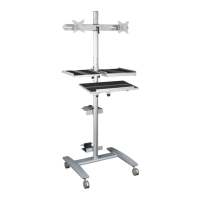
The Beta Cart serves as a mobile platform for a computer system, including a monitor, CPU, and keyboard/mouse, allowing for easy relocation and ergonomic adjustment. Its primary function is to provide a flexible and organized workspace that can be moved within an office, classroom, or medical facility. The cart's design focuses on accessibility and user comfort, enabling users to adjust the height and position of the main platform and monitor mount to suit their preferences, whether standing or sitting. The inclusion of CPU mounts and cable management features helps maintain a tidy and efficient workspace, preventing clutter and ensuring the safety of connected devices.
The cart's structure is built around a sturdy base (P1) and a central pole (P2), providing stability and support for all mounted components. The base is equipped with two 3" locking casters (A) and two 3" non-locking casters (B), allowing for smooth mobility and secure positioning when locked. The main platform (P3) is designed to hold a keyboard, mouse, or other peripherals, and its height can be adjusted along the pole (P2) using a clamp lever mechanism. The monitor mount (P4) is also adjustable along the pole, offering flexibility in screen positioning. The tension of the monitor mount can be fine-tuned using wrenches (H) to ensure the display remains securely in place at the desired angle. Two CPU mounts (P5) are provided, attaching to the pole via CPU mount clamps (P6) and secured with screws (J). These mounts are designed to hold a CPU using two CPU straps (I), ensuring the computer is safely secured during movement. Cable management is facilitated by three electrical clips (C) that snap onto the pole (P2), helping to organize and secure power and data cables. The cart also includes a book stop (L) that attaches to the main platform (P3) with book stop Phillips screws (K), preventing items from sliding off the platform.
The Beta Cart is designed for ease of use and adaptability. The mobile nature, facilitated by the casters, allows the workstation to be easily moved between different locations, promoting collaborative work or flexible individual setups. The adjustable height of both the main platform and the monitor mount is a key ergonomic feature, enabling users to customize the cart to their preferred working posture, whether standing or sitting. This adjustability helps reduce strain and improve comfort during prolonged use. The clamp lever mechanism for the main platform and monitor mount allows for quick and secure height adjustments. The monitor mount's tension adjustment feature ensures that monitors of varying weights can be securely positioned. The CPU mounts, with their integrated straps, provide a secure way to transport the computer, protecting it from accidental falls or damage during movement. The cable clips help maintain a clean and organized appearance, reducing the risk of tangled cables and improving safety. The book stop feature on the main platform adds practicality, preventing items like notebooks, documents, or small devices from sliding off the platform, especially during movement. The cart's assembly instructions are clear and step-by-step, making the setup process straightforward for users.
The manual emphasizes the importance of regular maintenance to ensure the longevity and safety of the Beta Cart. Users are instructed to check all screws periodically, specifically every six months, to ensure they remain tight. This proactive measure helps prevent loosening of components due to vibrations or regular use, which could compromise the cart's stability and safety. The use of an Allen wrench (E) and caster wrench (F) for assembly and adjustments suggests that basic tools are provided or required for maintenance tasks. In the event of missing, broken, damaged, or worn parts, users are advised to stop using the product immediately until repairs are made. The manual directs users to contact customer service for assistance with missing parts or assembly issues, highlighting the availability of support for maintenance and troubleshooting. The recommendation to use "factory authorized parts" for repairs underscores the importance of maintaining the cart's original specifications and safety standards. This focus on regular checks and proper repair procedures ensures that the Beta Cart remains a reliable and safe workstation over time.
 General
| Brand | Balt |
|---|---|
| Model | 27614 Beta |
| Category | Outdoor Cart |
| Language | English |

 To Next Page