EasyManua.ls Logo

Balt WOW Flexi-Desk - User Manual

Balt WOW Flexi-Desk
4 pages
Print Icon
To Next Page IconTo Next Page
Loading...
1
1234567890123456789012345678901212345678901234567890123
1234567890123456789012345678901212345678901234567890123

1234567890123456789012345678901212345678901234567890123

1234567890123456789012345678901212345678901234567890123
1234567890123456789012345678901212345678901234567890123
1234567890123456789012345678901212345678901234567890123
1234567890123456789012345678901212345678901234567890123
1234567890123456789012345678901212345678901234567890123
1234567890123456789012345678901212345678901234567890123
1234567890123456789012345678901212345678901234567890123
1234567890123456789012345678901212345678901234567890123
1234567890123456789012345678901212345678901234567890123
1234567890123456789012345678901212345678901234567890123
1234567890123456789012345678901212345678901234567890123
1234567890123456789012345678901212345678901234567890123
1234567890123456789012345678901212345678901234567890123
1234567890123456789012345678901212345678901234567890123
1234567890123456789012345678901212345678901234567890123
1234567890123456789012345678901212345678901234567890123
1234567890123456789012345678901212345678901234567890123
1234567890123456789012345678901212345678901234567890123
1234567890123456789012345678901212345678901234567890123
1234567890123456789012345678901212345678901234567890123
1234567890123456789012345678901212345678901234567890123
1234567890123456789012345678901212345678901234567890123
1234567890123456789012345678901212345678901234567890123
1234567890123456789012345678901212345678901234567890123
1234567890123456789012345678901212345678901234567890123
1234567890123456789012345678901212345678901234567890123
1234567890123456789012345678901212345678901234567890123
1234567890123456789012345678901212345678901234567890123
1234567890123456789012345678901212345678901234567890123
1234567890123456789012345678901212345678901234567890123
1234567890123456789012345678901212345678901234567890123
1234567890123456789012345678901212345678901234567890123
1234567890123456789012345678901212345678901234567890123
1234567890123456789012345678901212345678901234567890123
1234567890123456789012345678901212345678901234567890123
1234567890123456789012345678901212345678901234567890123
1234567890123456789012345678901212345678901234567890123
1234567890123456789012345678901212345678901234567890123
1234567890123456789012345678901212345678901234567890123
1234567890123456789012345678901212345678901234567890123
1234567890123456789012345678901212345678901234567890123
1234567890123456789012345678901212345678901234567890123
1234567890123456789012345678901212345678901234567890123
1234567890123456789012345678901212345678901234567890123
1234567890123456789012345678901212345678901234567890123
1234567890123456789012345678901212345678901234567890123
1234567890123456789012345678901212345678901234567890123
1234567890123456789012345678901212345678901234567890123
1234567890123456789012345678901212345678901234567890123
1234567890123456789012345678901212345678901234567890123
1234567890123456789012345678901212345678901234567890123
1234567890123456789012345678901212345678901234567890123
1234567890123456789012345678901212345678901234567890123
1234567890123456789012345678901212345678901234567890123
1234567890123456789012345678901212345678901234567890123
1234567890123456789012345678901212345678901234567890123
1234567890123456789012345678901212345678901234567890123
1234567890123456789012345678901212345678901234567890123
1234567890123456789012345678901212345678901234567890123
1234567890123456789012345678901212345678901234567890123
1234567890123456789012345678901212345678901234567890123
1234567890123456789012345678901212345678901234567890123
1234567890123456789012345678901212345678901234567890123
1234567890123456789012345678901212345678901234567890123
1234567890123456789012345678901212345678901234567890123
1234567890123456789012345678901212345678901234567890123
1234567890123456789012345678901212345678901234567890123
1234567890123456789012345678901212345678901234567890123
1234567890123456789012345678901212345678901234567890123
1234567890123456789012345678901212345678901234567890123
1234567890123456789012345678901212345678901234567890123
1234567890123456789012345678901212345678901234567890123
1234567890123456789012345678901212345678901234567890123
1234567890123456789012345678901212345678901234567890123
1234567890123456789012345678901212345678901234567890123
1234567890123456789012345678901212345678901234567890123
1234567890123456789012345678901212345678901234567890123
1234567890123456789012345678901212345678901234567890123
1234567890123456789012345678901212345678901234567890123
#90329
WOW Flexi-Desk
Assembly Instructions
Question and Answer IconNeed help?

Do you have a question about the Balt WOW Flexi-Desk and is the answer not in the manual?

Summary

Assembly Instructions

Parts List and Hardware

Lists all components and hardware required for assembly.

Initial Assembly Steps

Details steps for attaching casters and the main pole to the base.

Final Assembly Steps

Covers attaching the top panel, monitor mount, and cable ties.

Overview

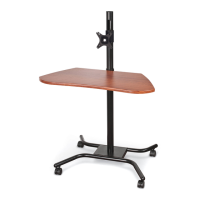
The Balt #90329 WOW Flexi-Desk, also referred to as the WOW Flexi-Stand, is a mobile and adjustable workstation designed to provide flexibility and ergonomic benefits for users. This device is primarily intended for holding a monitor and a work surface, allowing for easy repositioning and height adjustment to suit various tasks and user preferences.

Function Description:

The WOW Flexi-Desk serves as a versatile mobile workstation, enabling users to work comfortably in different environments. Its core function is to support a monitor and provide a stable work surface (Top Panel) that can be adjusted in height. The mobility, facilitated by casters, allows the desk to be easily moved between rooms or within a workspace, making it suitable for dynamic work settings, collaborative environments, or individual use where flexibility is key. The monitor mount allows for the attachment of a display, transforming the unit into a compact and portable computer station. The design emphasizes ergonomic adjustability, aiming to reduce strain and promote better posture by allowing users to customize the height of both the monitor and the work surface.

Important Technical Specifications:

The assembly instructions detail the components and hardware required for constructing the WOW Flexi-Desk. Key structural components include:

  • P1 Pole: The central vertical support of the desk, providing the main axis for height adjustment. One pole is included.
  • P2 Base: The foundational support structure with four arms, designed to provide stability and accommodate the casters. One base is included.
  • P3 Top Frame: The underlying support for the Top Panel. One top frame is included.
  • P4 Top Panel: The primary work surface of the desk. One top panel is included.
  • P5 Monitor Mount: A dedicated bracket for attaching a monitor, offering additional adjustability. One monitor mount is included.

The hardware list specifies the fasteners and tools provided for assembly:

  • A 2" Locking Caster: Two casters with locking mechanisms are included, typically for the front of the base to prevent unwanted movement.
  • B 2" Caster: Two standard casters are included, typically for the rear of the base, allowing for smooth mobility.
  • C Caster Wrench: A tool specifically for tightening the casters. One is included.
  • D M6x25mm Screws: Four screws used for attaching the Pole to the Base.
  • E M6x40mm Screws: Four screws used for attaching the Top Panel to the Top Frame.
  • F Allen Wrench: A tool for tightening the M6x25mm screws. One is included.
  • G Wrench: Two wrenches are included, likely for adjusting the tilt tension of the monitor mount.
  • H Cable Tie: Three cable ties are provided for wire management.

Usage Features:

The WOW Flexi-Desk is designed with several features to enhance its usability:

  • Mobility: Equipped with four 2-inch casters (two locking, two standard), the desk can be easily moved and repositioned. The locking casters provide stability when the desk needs to remain stationary.
  • Height Adjustability: Both the Top Panel Assembly (work surface) and the Monitor Mount can be independently adjusted in height along the Pole (P1). This is achieved using "Clamp Levers" which, when opened, allow the components to slide up or down the pole, and when closed, lock them in place. This feature is crucial for adapting the desk to different users, tasks (e.g., sitting or standing), and ergonomic requirements.
  • Monitor Mount: A dedicated monitor mount (P5) is included, allowing users to attach a display directly to the desk. The monitor mount also features tilt tension adjustment, which can be customized using the provided wrenches (G) after removing plastic caps. This enables users to set the optimal viewing angle for their monitor.
  • Wire Management: Three Cable Ties (H) are provided to help organize and secure cables along the Pole (P1), contributing to a tidy and safe workspace.
  • Easy Assembly: The instructions are presented in a clear, step-by-step manner with illustrations, making the assembly process straightforward for users.

Maintenance Features:

The manual emphasizes the importance of regular maintenance to ensure the safety and longevity of the WOW Flexi-Desk:

  • Screw Tightness Check: Users are instructed to check all screws for tightness at least every six months. This is a critical maintenance step to prevent loosening components and potential instability.
  • Immediate Action for Issues: In case of missing, broken, damaged, or worn parts, users are advised to immediately stop using the product. Repairs should only be made by a dealer using factory-authorized parts, ensuring the integrity and safety of the desk.
  • Customer Service Support: A dedicated Customer Service Department is available for assistance during assembly, operating Monday-Friday from 8 a.m. to 5 p.m. Central Standard Time, with a toll-free number provided.
  • Email Support for Missing/Damaged Parts: For convenience, an email address is provided for reporting missing or UPS damaged parts, available 24 hours a day, 7 days a week. This ensures prompt resolution of initial product issues.

Overall, the Balt #90329 WOW Flexi-Desk is a well-designed, adjustable, and mobile workstation that prioritizes user comfort and flexibility, supported by clear assembly instructions and robust maintenance guidelines.

Balt WOW Flexi-Desk Specifications

General IconGeneral
BrandBalt
ModelWOW Flexi-Desk
CategoryDesktop
LanguageEnglish