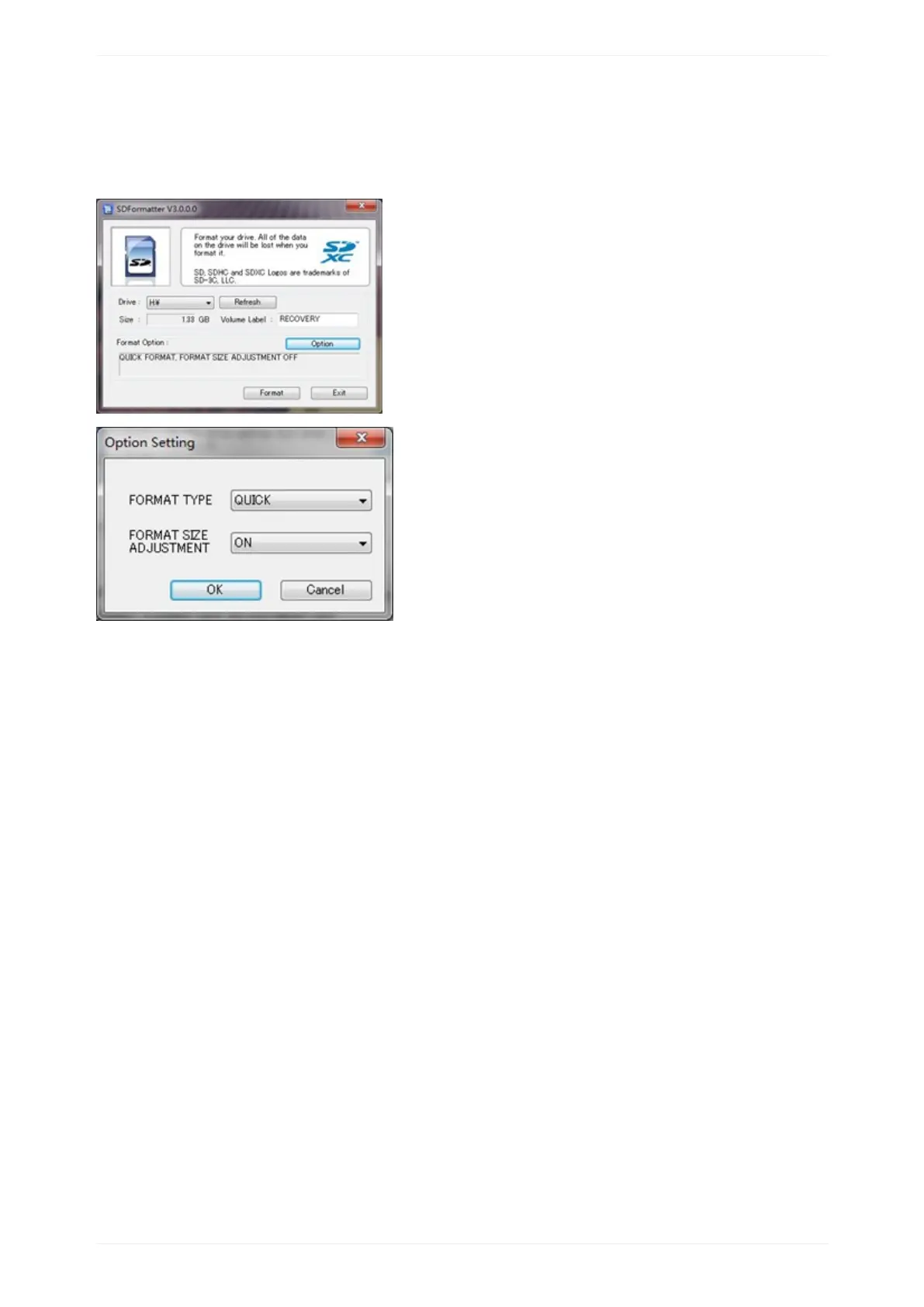
*Unzipthedownloadfileandrunthesetup.exetoinstallthetoolonyourmachine.
*Inthe"Options"menu,set"FORMATTYPE"optiontoQUICK,"FORMATSIZE
ADJUSTMENT"optionto"ON".
*CheckthattheSDcardyouinsertedmatchestheoneselectedbytheTool.
*Clickthe“Format”button.
FormatyourSDunderLinuxos:
*Runfdisk–lcommandtochecktheSDcardnode.
*Runsudofdisk/dev/sdxcommandtodeleteallpartitionofSDcard.
*Runmkfs–tvfat/dev/sdxcommandtoformattheentireSDcardasFAT.(xshouldbe
replacedaccordingtoyourSDcardnode)
3,DownloadtheOSimagefromDownloaddistrict(http://www.banana-pi.org)
4.UnzipthedownloadfiletogettheOSimage.
Windows:Rightclickonthefileandchoose“Extractall”.
Linux:Rununzip[downloadedfilename]command.
5.WritetheimagefiletotheSDcard.
Androidimage


 To Next Page