!
1TT!–TIMER!+!TERMOREG OLATO RE!-!Reference!Manual!!-!Pag.!1!di!7!
!
!
!
!!!!!!!!!!!!!!!!!!!!!!!!!!!!!!!!!!!!!!!!!!!!!!!!!!!!!!!!!!!!!!!!!!!!!!!!!!!!!!!!!!!!!!!!!!!!!!!!!!!!!!!!!!!!!!!!!!!!!!!!!!!!!!!!!!!!!!!!!!!!!!!!!!!!!!!!!!!!!!!!!!!!!!!!!!!!!!!!!!!!!!!!!!!!!!!!!!!!!!!!!!!!!!!!!!!!!!!!!!!!!!!!!!!
!!!!!!!!!!!!!!!!!!!!!!!!!!!!!!!!!!!!!!!!!!!!!!!!!!!!!!!!!!!!!!!!!!!!!!!!!!!!!!!!!!!!!!!!!!!!!!!!!!!!!!!!!!!!!!!!!!!!!!!!!!!!!
!!!!!!!!!!!!!!!!!!!!!!!!!!!!!!!!!!!!!!!!!!!!!!!!!!!!!!!!!!!!!!!!!!!!!!!!!!!!!!!!!!!!!!!!!!!!!!!!!!!!!!!!!!!!!!!!!!!!!!!!!!!!!!!www.bebmilano.it!
!!!!!!!!!!!!!!!!!!!!!!!!!!!!!!!!!!!!!!!!!
!
!!!!!!!!!!!!!!!!!!!!1TT!–!USER!MANUAL!
!!!!!!!!!!!!!!!!!!!!!!!!!!!!!!!!!!!!!!TIMER!!+!TEMPERATURE!CONTROLLER!!
!
!! When the device is turned-on its display shows the following text:
!
- SEL!!!!!upper!display!!!!!
- CAL!!!!lower!display!!
!
!!!!!!!!!!!!!After!a!few!seconds!the!upper!display!shows!the!!!value!of!the!measured!temperature;!
!!!!!!!!!!!!!and!the!lower!display!!the!value!of!a!time!set .!
!
!!!!!!!!!!!!!!Time!setting:!!
• Press!the!!!!S!!!!!button,!so!t h e !u p p e r !display!will!show!!timE!!;!the!low e r!disp lay!the !value !of!on e!tim e,!
• Use!the!following!buttons!!!!▲!!!
!
!!!to!set!the!requested!time!value.!!
In!order!to !memorize!it,!rese t!(!7!–!5)!or!press!ON/OFF.!
!
!
!!!!!!!!!!!!!!Temperature!setting!!(After!time!setting)!
!
• Press!the!!!!S!!!!button,!so!the!upper!!display!will!show!!!°C!!!and!the!lower!display!a!temperature!value;!
Use!the
!
!▲!!
!
!!buttons!to!set!the!required!temperature!value.!
!!!!!!!!!!!!!!!!!!!!!!
!!!!!!!!!!!!!!TO!ACCES!THE!TEMPERATURE!PARAMETERS!USING!THE!PASSWORD.!
• Press!for!!5!seconds!the!!!!S!!!!button,so!the!upper!!display!!will!show!!SET!and!the!lower!!!t1!.!
Pres!the!!!!▲!! button!!so!the!upper!display!will!show!SET,!the!low er! !!tim E .!!!
• Press!again!the!!!! ▲!!button!and!the!lower!display!will!show!dEv.!!
• Press!again!the!!!! ▲!!button!and!the!lower!display!will!show!!!PAS.!!
• Press!the!!!S!!!!!button!and!the!lower!display!!!will!show!!100;!!enter!the!pass word!!123.!!
• With!the!!!S!!!!!button!every!pulse!corresponds!to!a!!parameter!!(see!the!Instructions!Manual).!
!
TO!ACCESS!THE!TIMER!PARAMETERS!USING!THE!PASSWORD.!
Press!for!5!seconds!the!!!S!!!button!;!!the!uppe r!d is p la y!will!show!!SET,!the !lo wer!display!.!
t1
!the!upper!right!
!red!led!will!be!switch ed ! on!!(1)!!
Press!the!!▲!button!!and!the!!display!will!show!timE!!,!
Press!the!!!S!!button!to!access!the !follow in g!pa ram ete rs: !
!
!!!!!!!!!!!!!!!toP!!!!!!!absolute!max!limit!block!!
MobE!!relay!function!!!
InP!!!!!!!pulse!timed!relay!!
!!!!!!!!!!!!!!!!Rit!!!!!!!!delayed!relay!!!!
dir!!!!!!!!count!!!UP!!or!!dn!!
!
TS!!!!!!!Setting!of!the!times!!scale!
0!=!!!!!!!99,99!
1!=!!!!!!!999,9!
2!=!!!!!!!9999!sec.!
3!=!!!!!!!9999!min.!
4!=!!!!!!!59!min.!59!sec.!
!
Use!the!!!▲!!and!!!
!
!!buttons!!to!select!
!
At!the!end!of!every!change!the!display!will!show!!!9!9!confirming!the!successfully!com pleted!program m ing.!
!

 Need help?
 General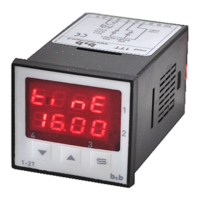

 To Next Page