4
What’s content
BandLuxe C5XX USB dongle modem
Features
●
●●
●
C50x series : support 3.5G, HSPA+ and LTE
standard ( LTE/HSPA+/HSPA/WCDMA/
EDGE/GPRS)
C52x series : support LTE/EVDO Rev A
●
●●
●
Support SMS Message
●
●●
●
USB Interface
●
●●
●
Support microSD/microSDHC storage
●
●●
●
Support systems: Windows 7, Windows Vista,
Windows XP,
●
●●
●
Does not interfere with other USB
peripherals
●
●●
●
Multi language interface (English, French,
German, Italian, Spanish, Traditional
Chinese, Russian, Portuguese, Finnish,
Polish, Thai, Dutch and Arabic)
●
●●
●
Plug & Play
Before You Install
Information
Before installing the C50X, we recommend obtaining the following
information from the SIM Card Mobile network operator:
Access Point Name (APN)
- For many carriers, the APN may simply be Internet.
Phone Number
- The Phone Number to dial to establish a network connection.
BandLuxe software helps input this number correctly.
Password (Optional)
- Some (but not many) carriers require a password.
Notice: BandLuxe C5XX is a radio device. Please
be aware to keep metal materials away from the
device.
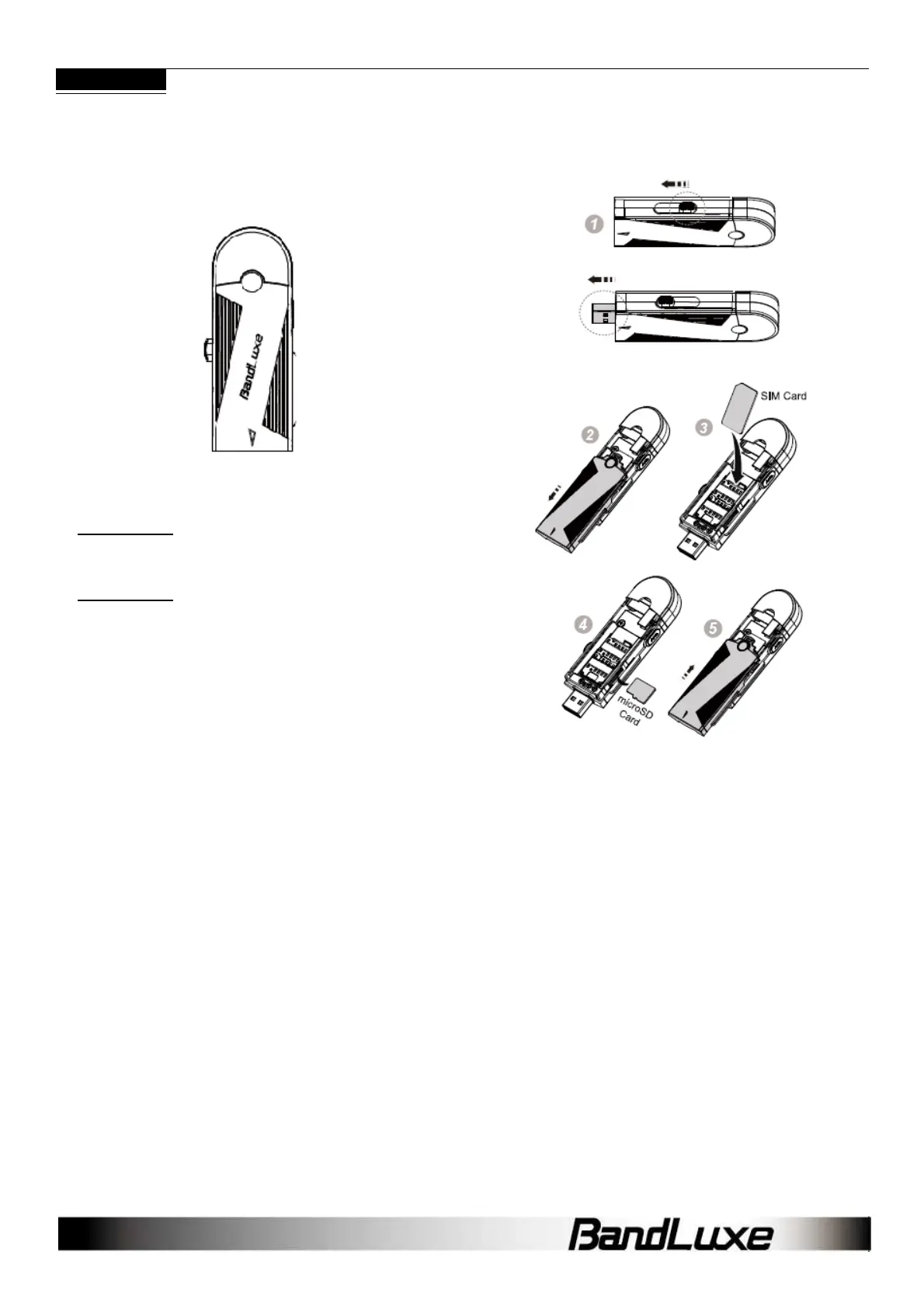
Insert the SIM Card & microSD Memory Card
1. USB connector can be extended by shifting the switch
(fig. 1)
2. Remove the front cover.(fig. 2)
3. Follow the arrow direction insert the SIM card(fig. 3)
4. micro SD card reader is equipped. Golden color contact of
microSD card should be faced up to insert. (fig. 4).
*micro SD card is an optional purchased accessory.
5. Replace the front cover
Hardware Installation
With the SIM card properly inserted, the C5XX may now be installed
into the computer via USB port.
1. Insert the C5XX into the computer.
2. The LED should light up when connection is established, though it
may be obscured.



 To Next Page