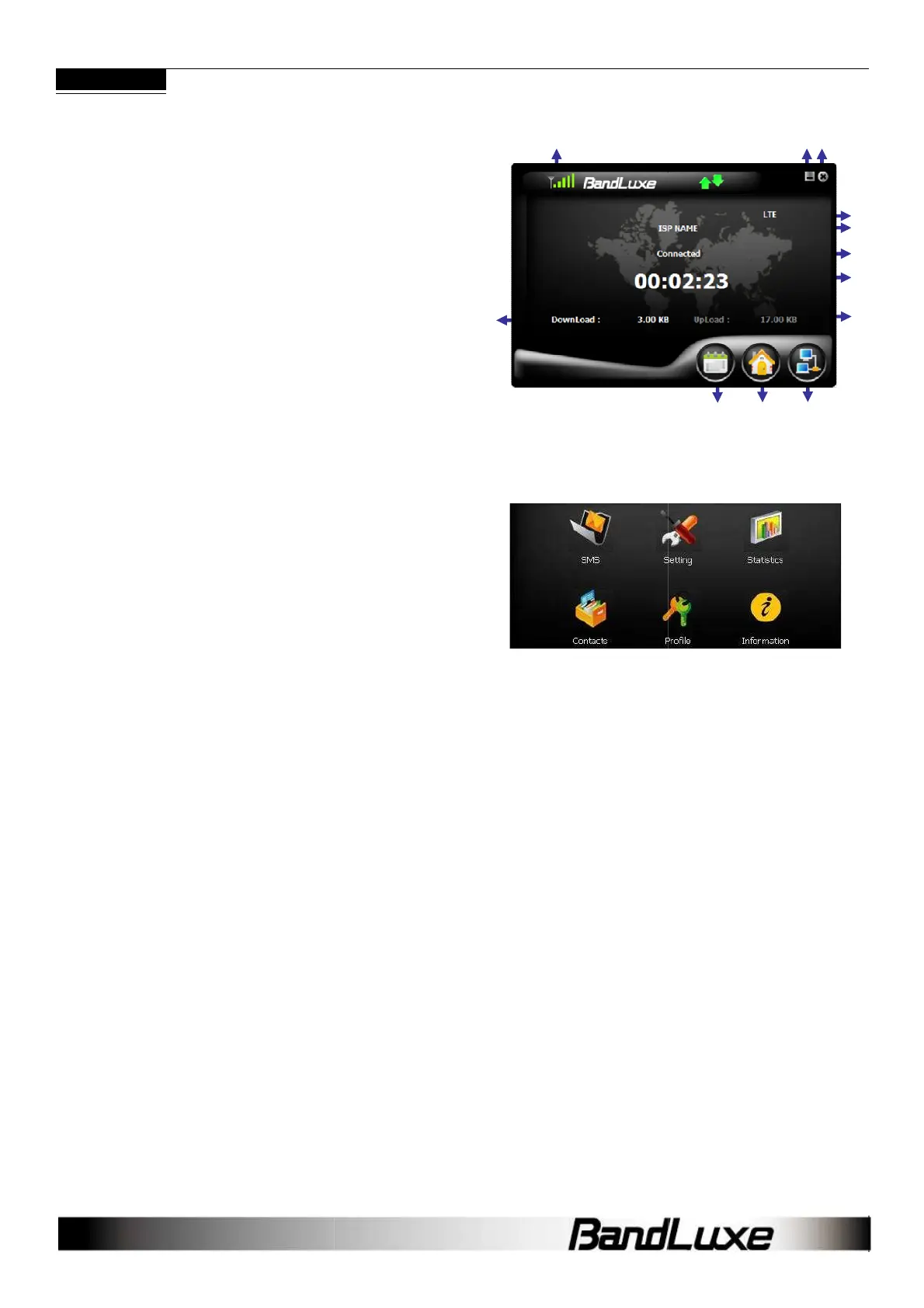
Home Screen
1. Signal Strength
2. Minimize
3. Radio Technology
4. Mobile Network Operator
5. Connection Status
6. Connection Time Elapse
7. Total Data Uploaded
8. Total Data Downloaded
9. Menu
10. Home Screen
11. Connect/Disconnect
12. Close
Note: The Home screen only indicates LTE
status. After installation, the C5XX
automatically initiates SMS
functions upon successful connection to the computer. Text mes
can be sent or received, even if the Home screen indicates no
connection.
Menu Screen
SMS: Text message folders such as Inbox, Draft,
Setting:
General, SMS, SIM, Radio and Network preferences.
Statistics: Upload/Download graphs, totals
Contacts:
SIM Card, Outlook and dongle contact lists
Profile: Connection profile setup/options.
Information: IMEI, software, firmware version
automatically initiates SMS
functions upon successful connection to the computer. Text mes
sages
can be sent or received, even if the Home screen indicates no
tc.
General, SMS, SIM, Radio and Network preferences.
SIM Card, Outlook and dongle contact lists
1
8
7
2
12
11
10
9
5
4
6
7
3



 To Next Page