Bugs 7 User Manual
Flight mode switch
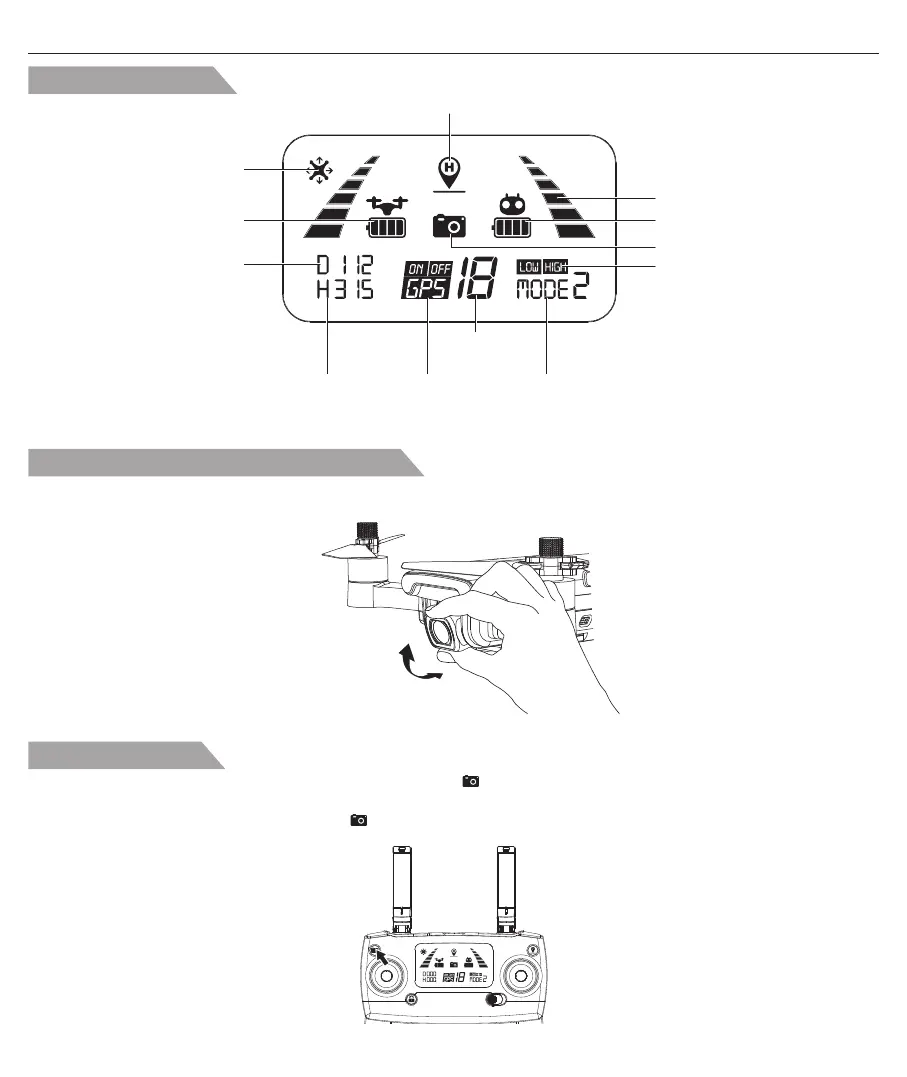
Short-press the button indicated as below, the camera icon “ ” on the LCD screen flashes once, the camera
takes one photo;
Long-press the same button, the video icon “ ” on the LCD screen flashes slowly, the camera is taking video.
Long-press again will exit shooting.
LCD Screen display
Remote controller battery level
GPS
mode
Satellite
amount
Altitude against
Home Point
Photo/Video
Return to Home
(RTH) icon
Aircraft battery level
Remote controller
throttle mode
Distance against Home Point
Headless mode
Signal strength
High/Low speed mode
Adjust the gimbal camera angle manually
90°
By rotating the drone’s camera manually, the shooting angle of gimbal camera will be adjusted. Please adjust the angle
according to the using situation.
-14-


 To Next Page