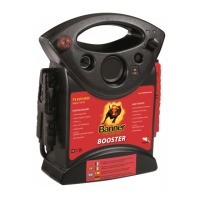
The Power Booster PB12 and PB12/24 are portable jump starters designed for safely and effectively boosting vehicle engines and powering various DC and USB devices. This manual provides essential safety and operating instructions for proper use and maintenance.
Function Description
The primary function of the Power Booster is to jump-start vehicle engines. It achieves this by providing a temporary power source to a vehicle's battery. Additionally, it serves as a portable power source for 12V DC accessories and USB devices, making it versatile for various applications. The internal battery of the booster should be charged immediately after purchase, after each use, and as often as possible to ensure optimal performance. It is recommended to keep the booster permanently connected to its automatic charger when not in use.
Important Technical Specifications
The Power Booster comes in two models: PB12 and PB12/24, with slight differences in their output voltage and weight.
Booster 12V:
- Internal Battery Type: 12V AGM lead-acid
- Output Voltage: 12V DC/6 cells
- Rated Capacity: 23 Ah
- DC Power Outlet (Max Continuous Load): 12V DC/15A
- Product Weight: 9.8 kg
- Charger Input: 230V AC 50Hz, 0.5A
- Charger Output: 12V-2A
Booster 12/24V:
- Internal Battery Type: 12V AGM lead-acid
- Output Voltage: 12V DC – 24V DC/6 cells
- Rated Capacity: 2 x 23 Ah
- DC Power Outlet (Max Continuous Load): 12V DC/15A
- Product Weight: 19.8 kg
- Charger Input: 230V AC 50Hz, 0.5A
- Charger Output: 12V-2A
Both models are equipped with an inline fuse to protect the internal battery from overload. The fuse specifications are:
- Booster 12V: Fast blow, DC automotive type, rated 32V, 300A (Bussman/Audio Ohm Srl)
- Booster 12/24V: Fast blow, DC automotive type, rated 32V, 500A (Bussman/Audio Ohm Srl)
Usage Features
The Power Booster is designed with several features to enhance its usability and safety:
- Heavy-duty battery clamps: For secure connection to vehicle batteries.
- Display button: Used to check the internal battery's charge status or voltage level.
- Digital display: Shows the battery's charge percentage (when not connected to a vehicle battery and the rotary switch is OFF) or voltage level (when the rotary switch is ON). When connected to a vehicle battery and the booster switch is OFF, it displays the vehicle's battery voltage.
- USB button: Activates the USB port.
- USB Port: Provides up to 2.1A at 5V DC for powering USB devices. It automatically shuts off after 60 minutes if no device is connected.
- Booster ON/OFF switch: A rotary switch with positions for 0 (OFF), 12V (for both models), and 24V (for the 12/24V model).
- 12V DC socket: For powering 12V DC accessories (max continuous load 15A).
- 12V DC charge port: For connecting the included charger to recharge the internal battery.
- 12V-2A charger: The dedicated charger for the booster's internal battery.
- Power LED (green): Indicates that the charger is connected to AC power.
- Charging status LED (yellow/orange): Pulses slowly during charging or maintenance mode, and flashes rapidly if a battery problem is detected.
- Bad Battery LED (red): Lights up if the charger detects a problem with the battery.
Jump Starting a Vehicle Engine:
To jump-start, first turn the vehicle's ignition OFF. Connect the positive (RED) clamp to the positive terminal of the vehicle battery and the negative (BLACK) clamp to the vehicle chassis or engine block away from the battery. If clamps are connected backward, an audio alarm will sound, and connections must be reversed before turning the booster ON. Turn the booster ON, crank the engine for no more than 8 seconds, then wait at least 3 minutes before reattempting if necessary. Once the engine starts, turn the booster OFF immediately and disconnect the clamps in reverse order (chassis first, then battery terminal).
Powering 12V DC Devices:
Ensure the 12V DC device is OFF before plugging it into the booster's 12V DC socket. If the device draws more than 15A or short-circuits, the booster's circuit breaker will trip, automatically resetting after a minute or two. Prolonged use of a 12V device can excessively drain the booster's battery, so recharge immediately after use.
Powering USB Devices:
Ensure battery clamps are securely clipped to their holders. Press the USB button, plug the device into the USB port, and turn the device on. Reverse these steps when finished. Prolonged USB device operation can also drain the booster's battery, requiring immediate recharging.
Maintenance Features
Regular maintenance ensures the longevity and safe operation of the Power Booster:
- Cleaning: User cleaning and maintenance should not be performed by unsupervised children. Always unplug the charger from the booster before any maintenance. Use a dry cloth to wipe off battery corrosion, dirt, or oil from the clamps, cords, and case. Do not use liquid cleaners.
- Component Check: Ensure all booster components are in place and in good working condition.
- Professional Service: All other servicing, including replacement of a damaged output cable or power cord, should be performed by qualified service personnel. Do not disassemble the booster or charger yourself.
- Fuse Replacement: The booster is equipped with an inline fuse to protect against overload. If the fuse blows, it must be replaced with a new one of the same type and rating (300A for PB12, 500A for PB12/24V). Allow the fuse to cool completely (approx. 5 minutes) before replacement. Ensure the booster is OFF and unplugged from the external charger.
- Storage: Store the booster upright in a cool, dry indoor place. Always ensure the booster is fully charged before storing. It is highly recommended to leave the booster on charge when not in use. Do not store the booster in any area where acid leakage from the internal battery could cause damage.

 Need help?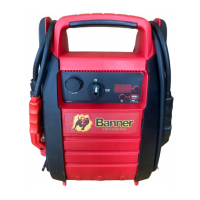

 To Next Page
 General