EasyManua.ls Logo

Banzai WAVE CRUISER - Battery Installation and Replacement

Default Icon
10 pages
Print Icon
To Next Page IconTo Next Page
To Previous Page IconTo Previous Page
Loading...
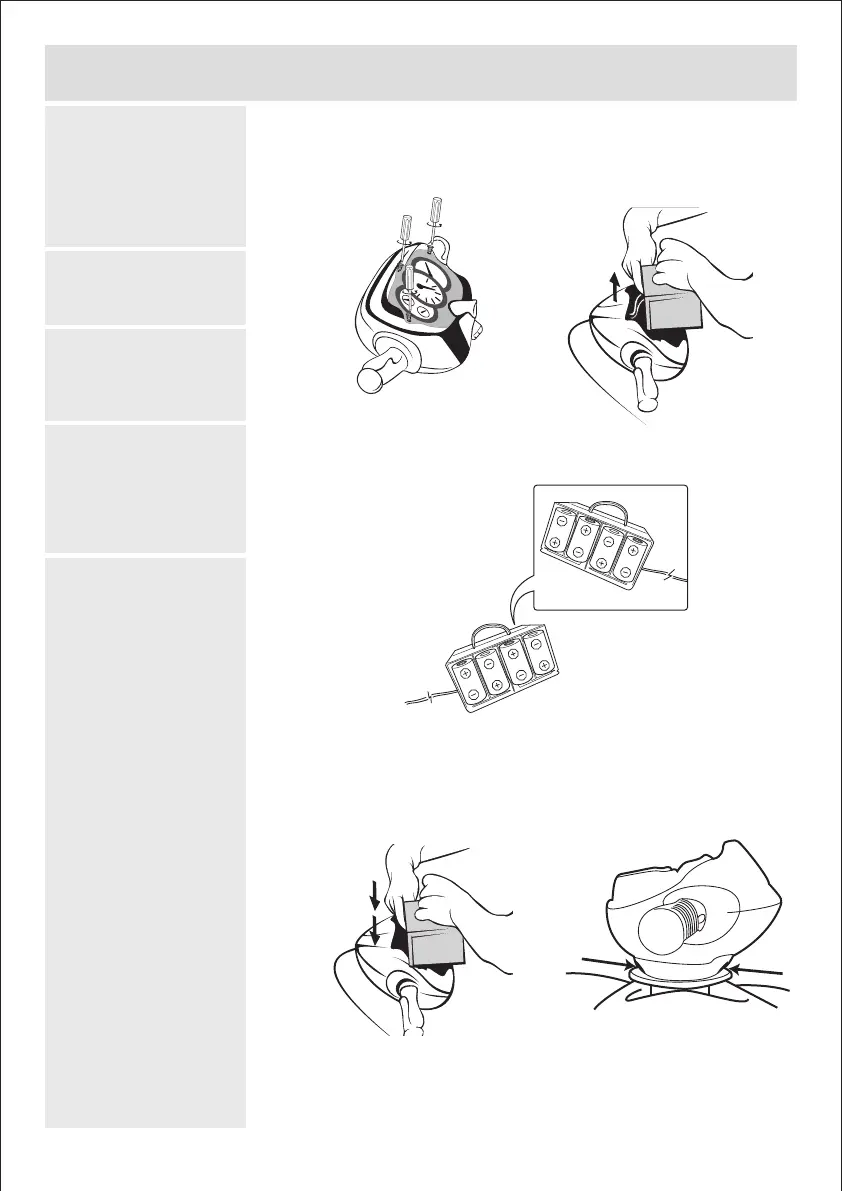
Installing / Replacing Batteries
(Batteries not included)
1. Unscrew the top cover
on the controller unit
with a screwdriver as
shown.
2. Take out the battery
box.
3. Install 8 x 1.5V “D”
(LR20) size batteries
accordingly.
4. Place the battery box
back inside the
controller unit and
screw on the top cover
with a screwdriver.
5. To replace batteries,
make sure to remove
the Motorized WAVE
CRUISER™
from the swimming
pool, unlock the
controller unit from the
Motorized WAVE
CRUISER™ and repeat
procedures 1 to 4.
NOTE: Never install or
replace the batteries
while toy is still wet or
in the pool.
1. 2.
4. 5.
3.
Another side
4 BANZAI 15733 20121130