
 Need help?
Do you have a question about the Baofeng BF-F8TD and is the answer not in the manual?
Details OS requirements for programming software.
Information about the programming cable and driver installation.
Steps to download and install the programming software.
Instructions for connecting the radio to the computer via cable.
Guide to identifying the correct COM port using Device Manager.
Set up software port and confirm with Device Manager.
Read data and modify channel parameters like frequency and CTCSS.
Guide to adjusting advanced settings like VOX, Squelch, and display.
Final steps to write changes to the radio and verify settings.
Procedure to download configuration from the radio using CHIRP software.
Steps to choose the correct driver port and radio model in CHIRP.
Guide to modifying channel memories and general settings in CHIRP.
Final steps to upload modified settings back to the radio using CHIRP.
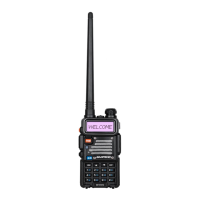
The BaoFeng BF-F8TD is a versatile dual-band amateur radio designed for enthusiasts and professionals who require reliable communication across VHF and UHF frequencies. This programming guide facilitates a quick start for users to configure their radio, leveraging its enhanced capabilities.
The BF-F8TD serves as a robust communication device, offering 128 channels for diverse operational needs. Its primary function is to enable two-way radio communication, supporting both VHF (136-174MHz) and UHF (400-520MHz) bands. The radio's core functionality revolves around transmitting and receiving signals, with programmable parameters that allow for tailored usage in various environments. Users can assign alphanumeric names to channels, making identification and management straightforward. The device also supports adding or removing channels from a scanning list, enhancing its utility for monitoring multiple frequencies.
The programming process, detailed in this guide, is crucial for unlocking the full potential of the BF-F8TD. It allows users to customize channel frequencies, CTCSS/DCS codes, power levels, and bandwidth settings. The radio's ability to be programmed via computer software, either the manufacturer's proprietary software or CHIRP, simplifies complex configurations and offers a user-friendly interface for managing extensive channel lists and operational parameters.
The BF-F8TD is designed with several features to enhance its usability and adaptability.
Channel Management: With 128 available channels, users have ample space to store frequently used frequencies. Each channel can be configured with specific RX and TX frequencies, CTCSS/DCS codes, and power settings. The ability to assign alphanumeric names (up to 10 digits) to channels significantly improves organization and ease of use, allowing operators to quickly identify channels without memorizing frequencies. Channels can also be added to or removed from a scan list, enabling selective monitoring.
Frequency Modes: The radio supports both Channel Mode and Frequency (VFO) Mode. In Channel Mode, the radio operates on pre-programmed channels. In VFO Mode, users can manually input frequencies, making it flexible for on-the-fly adjustments or exploring new frequencies. The "STEP" setting in VFO Mode allows users to define the increment for frequency changes, facilitating precise tuning.
CTCSS/DCS (Squelch Codes): The BF-F8TD incorporates CTCSS (Continuous Tone-Coded Squelch System) and DCS (Digital-Coded Squelch) capabilities. These features help to filter out unwanted transmissions, ensuring that users only hear signals with the matching tone or code. This is particularly useful in busy radio environments, reducing interference and improving communication clarity. The guide refers to specific DCS and CTCSS tables in the manual for detailed code selection.
Power Settings: Users can select between High and Low transmit power settings (8W for High, 1W for Low). This feature allows operators to conserve battery life when communicating over short distances or to increase power for longer-range transmissions, optimizing performance based on situational needs.
Bandwidth Selection: The radio supports both Wideband (25kHz bandwidth) and Narrowband (12.5 kHz bandwidth). This flexibility is important for compliance with different regulatory standards and for optimizing signal quality in various communication scenarios.
PTT-ID (Push-To-Talk ID): The PTT-ID feature allows the radio to send a unique identification code during transmission. Users can configure whether the code is sent at the beginning (BOT), end (EOT), or both (BOTH) of a transmission. This can be useful for identifying operators in a group or for logging purposes. The guide also mentions a "PTT Delay" setting (0-30ms) for fine-tuning the timing of the signal code transmission.
Squelch Level: The squelch function mutes the speaker in the absence of a strong signal, preventing static noise. The BF-F8TD offers 10 squelch levels (0-9), with higher levels requiring a stronger signal to unmute the speaker. This allows users to adjust sensitivity based on ambient noise and signal strength.
VOX Function (Voice Operated Transmit): When enabled, VOX allows for hands-free transmission, as the radio will transmit automatically when it detects voice. The gain level can be adjusted (0-10) to ensure appropriate sensitivity, facilitating smooth transmission without needing to press the PTT button.
Busy Channel Lockout (BCL): This feature prevents transmission on an occupied channel. If BCL is enabled and the channel is in use, pressing the PTT key will result in a beep tone, and the radio will not transmit, thus preventing interference with ongoing communications. Users can choose to enable or disable this feature.
FM Radio: The BF-F8TD includes an FM radio function, which can be activated or deactivated via programming. This provides an additional utility for entertainment or monitoring FM broadcasts.
Roger Beep: This feature sends an end-of-transmission tone, signaling to other stations that the transmission has concluded. It can be enabled or disabled according to user preference.
Dual Watch Mode (TDR): The radio supports Dual Watch mode, allowing users to monitor two channels simultaneously. This is a valuable asset for operators who need to keep track of multiple communication streams. The "TX Under TDR Start" setting determines whether priority is returned to the selected display once the signal on the other display disappears.
Display Settings: Users can customize the display mode for Channel A/B, choosing to show the Channel Number (CH), Channel Number and Name (CH + Name), or Channel Number and Frequency (CH + Freq). This personalization enhances the user experience by providing relevant information at a glance. The "ABR" (Auto Backlight) setting controls the time-out for the LCD backlight (OFF/0-5 seconds).
Work Mode: The radio can operate in "Frequency" or "Channel" work modes, allowing users to switch between VFO and memory channels as needed.
Keypad Lock (KB_LOCK/AutoLock): The keypad can be locked to prevent accidental key presses. The "AutoLock" feature automatically locks the keypad if it's not used for 8 seconds, enhancing security and preventing unintended changes to settings.
While the manual primarily focuses on programming, certain aspects touch upon maintenance-related considerations:
Battery Conservation: The "TOT (Time Out Timer)" feature limits transmission time (15-600 seconds), which helps prevent excessively long transmissions and conserves battery life. In the event of a stuck PTT switch, it also prevents battery depletion and interference. The "Save Mode" setting (OFF/1:1/1:2/1:3/1:4) allows users to select the ratio of sleep cycles to awake cycles. A higher ratio means longer battery life, though it might cause a word or two to be missed when a monitored frequency becomes active.
Programming Cable and Driver: The inclusion of an FTDI programming cable, which typically does not require a separate driver installation (plug and play), simplifies the initial setup for programming. However, the guide provides instructions for updating the FTDI driver if the computer does not automatically install it, ensuring connectivity for programming. This proactive approach to driver management helps maintain the radio's programmability.
Software Updates: The guide encourages users to use the "Latest Version" of the CHIRP software, implying that regular software updates are available and beneficial for optimal performance and compatibility. Keeping the programming software updated ensures access to the latest features and bug fixes, contributing to the long-term usability of the radio.
Troubleshooting Connectivity: The guide includes a dedicated section for troubleshooting "Failed to Connect to the transceiver (Radio)" errors. This section provides practical checks such as ensuring the radio is turned on, the cable is fully inserted (with a "double click" indication), and maintaining pressure on the cable for proper contact. It even suggests "dampening the pins of the cable" as a "cheat" to ensure a solid connection. These tips are crucial for maintaining the ability to program the radio effectively.
Support Resources: The provision of contact information for support (walkietalkiesoftware.com) and Facebook pages (TIDRADIO) for additional help indicates a commitment to user assistance. This ensures that users can resolve issues related to the radio's usage or programming, contributing to its overall maintainability and user satisfaction.
 General
| Channel Capacity | 128 |
|---|---|
| Display | LCD |
| Operating Voltage | 7.4V |
| Frequency Stability | ±2.5 ppm |
| Operating Temperature | -20°C to +60°C |
| Waterproof | No |
| Frequency Range | 136-174 MHz / 400-520 MHz |
| Antenna Impedance | 50 ohms |
| Channel Spacing | 12.5 / 25 kHz |
| Dimensions | 110 x 58 x 32 mm |

 To Next Page










