EasyManua.ls Logo

Baofeng PLUS Series - User Manual

Baofeng PLUS Series
7 pages
Print Icon
To Next Page IconTo Next Page
Loading...
User Manual
Model: BF-888S PLUS
ATTENTION! You’re BF-888S PLUS SERIES is a multi-task Two Way Radio. Combining the latest technology in radio communication
along with a sturdy mechanical frame, BF-888S PLUS is the ideal and effective solution for the professionals who need to stay in touch
with the working team (in construction sites, buildings, shows, trade fairs or hotels) or for leisure users that just want to keep up with
friends and family.
Before using this product, read the RF Energy Exposure and Product Safety Guide that ship with the radio which contains instructions for safe
usage and RF energy awareness and control for compliance with applicable standards and regulation.
WARNING: MODIFICATION OF THIS DEVICE TO RECEIVE CELLULAR RADIOTELEPHONE SERVICE SIGNALS IS PROHIBIITED UNDER
FCC RULES AND FEDERRAL LAW.
FCC Part 15.21 Warning Statement
THE GRANTEE IS NOT RESPONSIBLE FOR ANY CHANGES OR MODIFICATIONS NOT EXPRESSLY APPROVED BY THE PARTY RESPONSIBLE
FOR COMPLIANCE. SUCH MODIFICATIONS COULD VOID THE USER’S AUTHORITY TO OPERATE THE EQUIPMENT.
Chapter1. Getting Started
1.1 Regulations and Safety Warnings
FCC Licensing Information
This device complies with Part 90 and 15 of the federal Communications Commission (FCC) Rules.
Operation is subject to the condition that that this device does not cause harmful interference. The radio operates on radio frequencies that are
regulated by the Federal Communications Commission (FCC). To transmit on these frequencies, you are required to have a license issued by the
FCC. To obtain forms, call the FCC forms hotline at: 1-800-418-3676 or go to http://www.fcc.gov For questions concerning commercial licensing,
contact the FCC at 1-888- CALL-FCC (1-888-225-5322).
Before filling out you application, you must decide which frequency you can operate on.
NOTICE: Use of this radio outside the country where it was intended to be distributed is subject to government regulations and may be prohibited.
FCC Regulatory Conformance
FCC Statement
Our radio generators RF electromagnetic energy during transmit mode.This radio is designed for and classified asOccupational Use Only,meaning
it must be used only during the course of employment by individuals aware of the hazards,and the ways To Minimize Such hazards.
This radio is NOT intended for use by theGeneral Population in an uncontrolled environment. This radio has been tested and complies with the
FCC RF exposure limits forOccupational Use Only.
Inaddition, our radio complies with the following Standards and Guidelines with regard to RF energy and electromagnetic energy levels and
evaluation of such levels for exposure to humans:
---IEEE Std. 1528:2013 and KDB447498, Evaluating Compliance with FCC Guidelines for Human Exposure to Radio Frequency Electromagnetic
Fields.
---American National Standards Institute (C95.1-1992), IEEE Standard for Safety Levels with Respect to Human Exposure to Radio Frequency
Electromagnetic Fields, 3 kHz to 300 GHz.
---American National Standards Institute (C95.3-1992), IEEE Recommended Practice for the Measurement of Potentially Hazardous
Electromagnetic Fields-RF and Microwave.
The information listed above provides the user with the information needed to make him or her aware of RF exposure, and what to do to as-sure
that this radio operates with the FCC RF exposure limits of this radio.
Electromagnetic Interference/Compatibility
During transmissions, The radio generates RF energy that can possibly cause interference with other devices or systems. To avoid such interference,
turn off the radio in areas where signs are posted to do so.
DO NOT operate the transmitter in areas that are sensitive to electromagnetic radiation such as hospitals, aircraft,and blasting sites.
Occupational/Controlled Use
The radio transmitter is used in situations in which persons are exposed as consequence of their employment provided those persons are fully
aware of the potential for exposure and can exercise control over their exposure.
This equipment has been tested and found to comply with the limits for a Class B digital device, pursuant to Part 15 of FCC Rules. These limits are
designed to provide reasonable protection against harmful interference in a residential installation. This equipment generates and can radiate
radio frequency energy. If not installed and used in accordance with the instructions, it may cause harmful interference to radio communications.
However, there is no guarantee that interference will not occur in a particular installation. Verification of harmful interference by this equipment to
radio or television reception can be determined by turning it off and then on. The user is encouraged to try to correct the interference by one or
more of the following measures:
- Reorient or relocate the receiving antenna.
- Increase the separation between the equipment and receiver.
- Connect the equipment into an outlet on a circuit different from that to which the receiver is connected.
- Consult the dealer or an experienced radio/TV technician for help.
Changes or modifications not expressly approved by the party responsible for compliance could void the user's authority to operate the
equipment.
This device complies with Part 15 of the FCC Rules. Operation is subject to the condition that this device does not cause harmful interference.
Licensing Information
Use our radio in USA is subject to the rules & regulations of FCC. Changes or modifications not expressly approved by our may void the user
authority granted by the FCC to operate this radio and should not be made. To comply with FCC requirements, transmitter adjustments should be
made only by or under the supervision of a person certified as technically qualified to perform transmitter maintenance and repairs in the private
land mobile and fixed services as certified by an organization representative of the user of those services. Replacement of any transmitter


Questions and Answers

Summary

Regulations and Safety Warnings

FCC Licensing Information

Information regarding the FCC license requirements for operating the radio on regulated frequencies.

FCC Statement

Details on the radio's classification as 'Occupational Use Only' and compliance with FCC RF exposure limits.

FCC Regulatory Conformance

Statement on the radio's compliance with IEEE standards for RF energy and electromagnetic fields.

Electromagnetic Interference;Compatibility

Guidance on avoiding interference caused by the radio's RF energy during transmission.

Occupational;Controlled Use

Explanation of how the radio transmitter is used in situations where users are aware of and can control exposure.

RF Exposure Standards and Guidelines

RF Exposure Compliance and Control Guidelines

Instructions for controlling exposure and ensuring compliance with environmental RF exposure limits.

Precautions for Portable Terminals

Operating Prohibitions

Safety instructions to prevent property loss, bodily injury, or death when operating the product.

Important Tips

Key recommendations for optimal product usage and care.

Precautions for Batteries

Charging Prohibitions

Safety guidelines for battery charging, avoiding hazardous environments and improper practices.

Maintenance Instructions

Tips for maintaining battery health and prolonging its lifespan.

Package Contents and Main Characteristics

Package Contents

List of items included in the BF-888S PLUS package for different models.

Main Characteristics

Overview of the radio's key features and specifications.

Installation of Accessories

Install the Li-ion Battery

Step-by-step guide to attaching and removing the battery pack from the radio.

Install the Belt Clip

Instructions on how to attach and remove the belt clip from the radio unit.

External Speaker;Microphone Jack

Information on using external audio accessories with the radio's accessory jack.

Using a Headset

Details on connecting and using a headset for private communication.

Charging the Battery

Charging the Radio

Instructions on how to charge the radio using the supplied charging cradle and Micro USB port.

Using the Charging Cradle

Procedure for charging the radio unit by placing it in the charging cradle.

Radio Overview and Operation

Main controls and parts of the radio

Identification of the main components and controls of the BF-888S PLUS radio.

Power on;off and volume adjustment

How to turn the radio on/off and adjust the volume using the control knob.

Transmission

Steps for communicating, including using the PTT key and ensuring correct channel settings.

Monitor

Using the Monitor function to open the squelch and listen to weak signals.

Scan

Information on how the Scan function works and its activation via programming software.

Squelch

Explanation of the Squelch function and its levels for noise reduction.

CTCSS;DCS tones

Details on CTCSS and DCS tones for selective communication with specific users.

Advanced Features and Operations

Prompt voice switch settings

How to enable or disable voice prompts for radio operations.

Emergency alert function

Procedure for activating and deactivating the emergency alarm function.

VOX

Using the VOX feature for hands-free transmission and adjusting sensitivity levels.

Quick operation radio

Performing quick operations using button combinations without programming software.

Troubleshooting and Technical Specifications

Troubleshooting Guide

Common phenomena, their analysis, and solutions for radio operational issues.

Technical Specifications

Detailed technical specifications for the BF-888S PLUS radio.

Appendix C. - CTCSS Table

Appendix D. - DCS Table

Overview

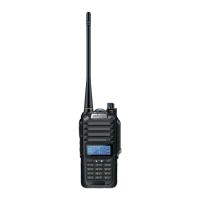
The BF-888S PLUS SERIES is a versatile two-way radio designed for both professional and leisure use, offering reliable communication in various environments. It combines advanced radio communication technology with a robust mechanical design, making it suitable for demanding work settings like construction sites, buildings, shows, trade fairs, or hotels, as well as for staying connected with friends and family during leisure activities.

Before operating the device, users are advised to consult the included RF Energy Exposure and Product Safety Guide, which provides essential information on safe usage and compliance with RF energy awareness and control regulations. It's crucial to note that modifying this device to receive cellular radiotelephone service signals is strictly prohibited under FCC rules and federal law. Any changes or modifications not expressly approved by the party responsible for compliance could void the user's authority to operate the equipment. The grantee is not responsible for such unauthorized changes.

The BF-888S PLUS complies with Part 90 and 15 of the Federal Communications Commission (FCC) Rules. Operation is contingent on the device not causing harmful interference. To transmit on regulated radio frequencies, users must obtain a license from the FCC. Information on obtaining forms and commercial licensing is available through the FCC hotline or website. Users should determine their operating frequency before applying for a license. It's important to be aware that using this radio outside the country for which it was intended may be subject to government regulations and could be prohibited.

This radio generates RF electromagnetic energy during transmit mode and is classified for "Occupational Use Only." This means it is intended for use by individuals who are aware of the associated hazards and how to minimize them, typically in a work environment. It is not designed for "General Population" use in uncontrolled environments. The device has been tested and complies with FCC RF exposure limits for "Occupational Use Only."

The radio adheres to various standards and guidelines concerning RF energy and electromagnetic energy levels, including IEEE Std. 1528:2013, KDB447498, American National Standards Institute (C95.1-1992), and IEEE Recommended Practice for the Measurement of Potentially Hazardous Electromagnetic Fields-RF and Microwave. This information is provided to ensure users are aware of RF exposure and can operate the radio within FCC RF exposure limits.

During transmissions, the radio emits RF energy that may cause interference with other devices or systems. To prevent such interference, users should turn off the radio in areas where signs prohibit its use. It should not be operated in areas sensitive to electromagnetic radiation, such as hospitals, aircraft, or blasting sites. The device is intended for occupational/controlled use, where users are fully aware of potential exposure and can control it.

The equipment has been tested and found to comply with Class B digital device limits under Part 15 of FCC Rules, designed to provide reasonable protection against harmful interference in residential installations. If the equipment causes harmful interference to radio or television reception, users are encouraged to try corrective measures such as reorienting the antenna, increasing separation between equipment and receiver, connecting to a different circuit outlet, or consulting a dealer or experienced technician. Unauthorized changes or modifications could void the user's authority to operate the equipment.

Usage Features:

The BF-888S PLUS offers 16 channels with a channel spacing of 12.5 KHz. It includes vocal tuning, a channel monitor, and a 2-pin Kenwood accessory jack for external devices. The radio supports 50 CTCSS tones and 210 DCS codes, allowing for selective communication. Its frequency range is 400.00 to 470.00MHz, with a maximum output power of 2W. Other features include channel scan, battery save mode, squelch control, and a Time Out Timer (TOT). The device is powered by a Li-Ion 1500mAh battery pack.

To power on/off and adjust volume, rotate the Power/Volume knob clockwise to turn the radio on and adjust the volume level. To turn it off, rotate the control counter-clockwise until a mechanical "click" is heard.

For transmission, all radios in a group must be set to the same channel. Briefly pressing the Monitor button enables the Monitor feature to ensure the frequency is clear before pressing the PTT key to transmit. Releasing the PTT key allows reception. Only one user can transmit at a time, so it's important not to transmit while receiving and to use transmission sparingly to conserve battery life. If communication is difficult, it may be due to CTCSS tones or DCS codes.

The Monitor feature allows users to open the Squelch and listen to weak signals that would otherwise be suppressed. Holding down the Monitor button enables this function.

The Scan function can be activated via optional programming software. To enable scanning, all 16 channels must be programmed. If the radio is turned on channel 16, scanning starts automatically. When a signal is detected, scanning stops on the busy channel. Pressing the PTT key will transmit on the latest busy channel. Channel 16 is the priority channel, so if no signal is picked up when PTT is pressed, the radio will transmit on channel 16.

The Squelch function reduces noise on free channels and allows reception of weak signals. The BF-888S PLUS has 10 Squelch levels, programmable via software (0 means Squelch is off, 1-9 offer increasing noise reduction). The default Squelch level is 4.

CTCSS and DCS tones act as access codes, allowing the radio to communicate only with users on the same channel with the same code. Each channel can be set with up to 50 CTCSS tones and 210 DCS codes. This prevents reception of undesired signals from other stations on the same frequency but with different CTCSS/DCS tones.

The prompt voice switch settings are controlled by the encoder on the 10th channel. Pressing and holding the PTT and Monitor buttons simultaneously turns the radio on and toggles the prompt voice function on or off. When enabled, voice prompts guide operation; when off, only a "beep" prompt is heard.

An emergency alert function can be pre-programmed into the Alarm function via CPS programming software. To activate, turn on the radio and short press the Monitor button. Pressing it again releases the emergency alarm status.

The VOX (Voice Operated eXchange) feature enables hands-free conversations without needing to press PTT. Speaking into the microphone automatically activates transmission. VOX sensitivity can be adjusted in 5 levels (1-5) via programming software, with level 2 being the default and having the lowest sensitivity. The VOX feature can be enabled/disabled and sensitivity levels selected through the CPS programming path: Edit > VOX > Vox Gain.

Without CPS programming software, quick operations can be performed using PTT + Monitor combinations:

  • On channels 1-5, pressing and holding PTT + Monitor turns the radio on and toggles the VOX function on or off. VOX sensitivity levels (1-5) can be set, with level 1 being the highest sensitivity and level 5 the lowest. Voice prompts indicate VOX ON or VOX OFF.
  • On the 10th channel, pressing and holding PTT + Monitor turns the radio on and toggles the prompt voice function on or off.
  • On the 15th channel, pressing and holding PTT + Monitor turns the radio on and switches the prompt language between Chinese and English.

Maintenance Features:

The BF-888S PLUS radios can be charged directly using the supplied charging cradle or via the Micro USB port. For fastest charging, the radio should be turned off. Only accessories specifically designated for this product should be used to avoid personal injury or property damage.

To charge via the Micro USB Port:

  1. Connect the included AC adapter with a Micro USB connector cable to the radio's Micro USB port.
  2. Connect the other end to an outlet providing USB charging power (not a USB hub).
  3. Charge the batteries for 6 hours until the battery indicator stops flashing.

To charge using the Charging Cradle:

  1. Connect the included AC adapter with a USB connector cable to the charging cradle's Micro USB port.
  2. Connect the other end to a standard AC wall outlet.
  3. Place the charging cradle on a desk or tabletop and place the radio in the cradle with the keypad facing forward.
  4. Charge the batteries for 6 hours.

Notes on charging:

  • Use only supplied batteries, charger, and AC adapter or approved accessories.
  • Charge time may vary based on remaining battery life.
  • Batteries must be installed for the unit to operate, even if connected to external power.
  • If battery power is low, the radio cannot operate even with external power; batteries must charge first.
  • Attempting to transmit with low power will cause the radio to automatically turn off.

To install the Li-ion Battery:

  1. Turn off the radio.
  2. Orient the back of the radio and the battery latch toward you.
  3. Fit the battery to the back of the radio (covering the product nameplate).
  4. Squeeze and push the battery pack toward the top until it locks with the latch.

To remove the battery:

  1. Turn off the radio.
  2. Orient the back of the radio and the battery latch toward you.
  3. Press down on the battery latch to the end and pull the battery towards you until it detaches.

To install the Belt Clip: Slide the clip down into the slot on the back of the radio until the Belt Clip-latch clicks.

To remove the Belt Clip: Press the Lock-tab down and gently pull the belt clip up toward the top of the radio.

For external speaker/microphone or headset use: Each radio can be used with an optional external speaker/microphone or headset for hands-free operation.

  1. Open the rubber cap on the side of the radio.
  2. Insert the plug(s) into the SPK/MIC jacks.
  3. Place the ear bud into your ear and adjust the Microphone to the desired position. Important: The radio is not submersible or waterproof when using a headset jack. When the headset is removed, ensure the jack cover is fully pressed into place to restore waterproof capability.

Precautions for Batteries:

  • Do not charge or replace batteries in locations with fuels, chemicals, explosive atmospheres, or other flammable/explosive materials.
  • Do not charge wet batteries; dry them with a soft, clean cloth first.
  • Do not charge deformed, leaking, or overheated batteries.
  • Do not charge with unauthorized chargers.
  • Do not charge in areas with strong radiation.
  • Avoid overcharging, as it can shorten battery life.

Battery Maintenance Instructions:

  • Regularly wipe accumulated dust from the charging connector with a clean, dry cloth to ensure normal charging.
  • It is recommended to charge the battery between 5°C and 40°C. Charging outside this range may reduce battery life or cause leakage.

Transportation Instructions:

  • Damaged batteries must not be transported.
  • To prevent short circuits, separate batteries from metal parts or from each other if multiple batteries are transported in one package.
  • The radio must be switched off and secured against accidental activation if the battery is attached.
  • The contents of the shipment must be declared in shipping documents and indicated by a Battery Shipping Label on the packaging. Consult your hauler for local regulations.

In case of troubleshooting, common issues include the radio not turning on (check battery installation, power, and contacts), weak/intermittent voice during reception (check battery voltage, volume, antenna, speaker), inability to communicate with group members (verify frequency/signaling type, proximity), hearing unknown voices/noise (check frequency, squelch level, signaling), or excessive noise/hiss (move to an open area, restart radio). If the radio continuously transmits, check the VOX function and headset. If keys are unresponsive, restart the radio. For persistent issues or other queries, users should contact their dealer for technical support.

Baofeng PLUS Series Specifications

General IconGeneral
Frequency RangeVHF: 136-174 MHz, UHF: 400-520 MHz
Number of Channels128
Battery Capacity1800 mAh
Modulation TypeFM
Operating Temperature-20°C to +60°C
WaterproofNo
Operating Voltage7.4V
Channel Spacing12.5/25 kHz
Dimensions110 x 58 x 32 mm
Output Power5W / 1W (High/Low)

Related product manuals