EasyManua.ls Logo

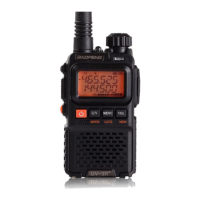
Baofeng UV-17R Series - User Manual

Baofeng UV-17R Series
41 pages
Print Icon
To Next Page IconTo Next Page
Loading...
UV-17R SERIES

Questions and Answers

  • M
    molly39Jul 29, 2025
    Why does my Baofeng Two-Way Radio keep transmitting?
    • D
      David WongJul 29, 2025
      If your Baofeng Two-Way Radio is transmitting continuously, it might be due to the VOX function being enabled or the headset not being properly connected. Try turning off the VOX function and ensure the headphones are correctly installed.
  • T
    Thomas JonesAug 4, 2025
    How to fix weak voice on Baofeng UV-17R Two-Way Radio?
    • R
      Rodney WareAug 4, 2025
      If you're experiencing weak or intermittent voice during receiving on your Baofeng Two-Way Radio, several factors could be the cause. The battery voltage might be low, so try recharging or replacing the battery. Also, the volume level could be set too low, so increase it. Ensure the antenna is securely attached by turning off the radio, removing, and reattaching it. Finally, check if the speaker is blocked and clean its surface if necessary.
  • C
    Cheryl JohnsonAug 10, 2025
    What to do if Baofeng UV-17R Two-Way Radio has too much noise?
    • D
      Darius BrennanAug 10, 2025
      If you are unable to hear anyone because of too much noise and hiss on your Baofeng Two-Way Radio, it could be due to several reasons. You may be too far away from other members, so try moving closer. Your location might be unfavorable, such as being blocked by buildings or underground, so move to an open area and restart the radio. External disturbances like electromagnetic interference can also cause this, so stay away from equipment that may be causing interference.
  • H
    Heather OwensAug 16, 2025
    Why does my Baofeng UV-17R Two-Way Radio pick up other conversations?
    • S
      Sonya PooleAug 17, 2025
      If you're hearing unknown voices or noise on your Baofeng Two-Way Radio, it may be due to interference from other radios using the same frequency. Try changing the frequency or adjusting the squelch level. If the radio is in analog mode and has no signaling set, request your dealer to set signaling for the current channel to avoid interference.
  • D
    Darren KaiserAug 22, 2025
    What to do if Baofeng Two-Way Radio cannot communicate with group?
    • J
      James BurtonAug 23, 2025
      If you cannot communicate with other group members on your Baofeng Two-Way Radio, the frequency or signaling type may be inconsistent with that of other members. Verify that your TX/RX frequency and signaling type are correct. Also, you may be too far away from other members, so try moving closer.

Summary

Chapter 1. Getting Started

1.1 Regulations and Safety Warnings

Explains FCC conformance and RF exposure guidelines for safe operation.

1.2 Content of the packaging

Lists all items included in the radio package for user verification.

1.3 Main features

Details the primary functionalities and capabilities of the radio.

Chapter 2. Charging the Battery

2.1 Charging the Battery Pack

Provides instructions and precautions for charging the Li-ion battery pack.

2.2 Charger Supplied

Specifies the use of the company-provided charger for safety and performance.

2.4 How to Charge

Details the step-by-step process for charging the radio's battery.

2.5 LED Indicator

Explains the meaning of different LED status indications during charging.

2.6 How to Store the Battery

Provides guidelines for storing the battery to maintain its condition.

Chapter 3. Installation of Accessories

3.1 Installing; Removing the Antenna

Instructions for attaching and detaching the radio's antenna.

3.2 Installing the belt clip

Guidance on how to attach and remove the belt clip accessory.

3.3 Installing the battery pack

Steps for correctly attaching and removing the battery pack from the radio.

3.4 Additional Speaker;Microphone (Optional)

Instructions for connecting an optional external speaker/microphone.

Chapter 4. Radio Overview

4.1 Buttons and controls of the radio

Identifies and describes all the physical buttons and controls on the radio.

4.2 LCD Display

Explains the icons and indicators shown on the radio's Liquid Crystal Display.

4.3 Status Indications

Describes the meaning of the LED indicator and its associated radio status.

4.4 Main keypad controls

Details the functions of the main keypad buttons and their operations.

Chapter 5. Basic Operations

5.1 Power on the radio

Instructions for turning the radio unit on and off.

5.2 Adjusting the volume

Guidance on how to increase or decrease the radio's audio volume.

5.3 Main Band;Sub Band Select

How to switch between the primary and secondary display bands for operation.

5.4 VFO;Channel Switch

Procedure for switching between Frequency (VFO) and Channel (MR) modes.

5.5 Frequency (VFO) mode

Explains how to navigate and input frequencies in VFO mode.

5.6 Channel (MR) Mode and Channel Selection

How to select and navigate channels in Memory (MR) mode.

5.7 Making a call

Steps for initiating a transmission and receiving calls in different modes.

5.8 Using the Flashlight

How to activate and use the built-in LED flashlight feature.

5.9 Emergency Alert

Instructions for activating the emergency alert siren and flashlight.

5.10 FM Radio (FM)

How to listen to broadcast FM radio stations on the device.

5.11 Monitor

Enables monitoring of weak signals by opening the squelch.

5.12 Keypad lock

How to enable and disable the keypad lock to prevent accidental key presses.

5.13 Frequency reversal

Reverses transmit and receive frequencies for repeater access.

5.14 TX Repeaters tone

How to send the 1750Hz tone burst for repeater communication.

5.15 One touch frequency Search

Procedure for quickly searching for active frequencies and their settings.

5.16 Weather Radio;Scan Weather Channel

How to use the NOAA weather radio and scanning functions.

Chapter 6. Advanced Features

6.1 Working the menu system

Explains how to navigate and use the radio's menu system via arrow keys or shortcuts.

6.2 Scanning

Details the built-in scanner for VHF/UHF bands and its scanning modes.

6.3 Manual Programming (Channels Memory)

How to store and retrieve frequencies and settings into memory channels.

6.4 Repeaters Programming

Instructions for programming the radio to communicate via repeaters.

6.5 VOX

Enables hands-free transmission by voice activation.

6.6 Dual Watch

Allows monitoring of two channels simultaneously.

6.7 Stopwatch timer

How to activate and use the built-in stopwatch function.

6.8 DTMF

Information on DTMF signaling for automation and remote control.

6.9 Customization

How to adjust visual and audible features like backlight, beeps, and prompts.

6.10 Reset - MENU 42

Procedures for resetting the radio to VFO or ALL default settings.

Appendix A. - Troubleshooting guide

Appendix B. - Shortcut Menu operations

Appendix C. - Technical Specifications

Baofeng UV-17R Series Specifications

General IconGeneral
Frequency Stability±2.5ppm
CTCSS/DCSYes
FM RadioYes
DisplayLCD
KeypadYes
VoxYes
ScanningYes
LED FlashlightYes
Frequency Range136-174 MHz, 400-520 MHz
Output Power5W/1W
Operating ModeSimplex
Antenna Impedance50Ω
Operating Temperature-20°C to +60°C
WaterproofNo

Related product manuals