6 21618-A-01-09
DE
GB
F
NL
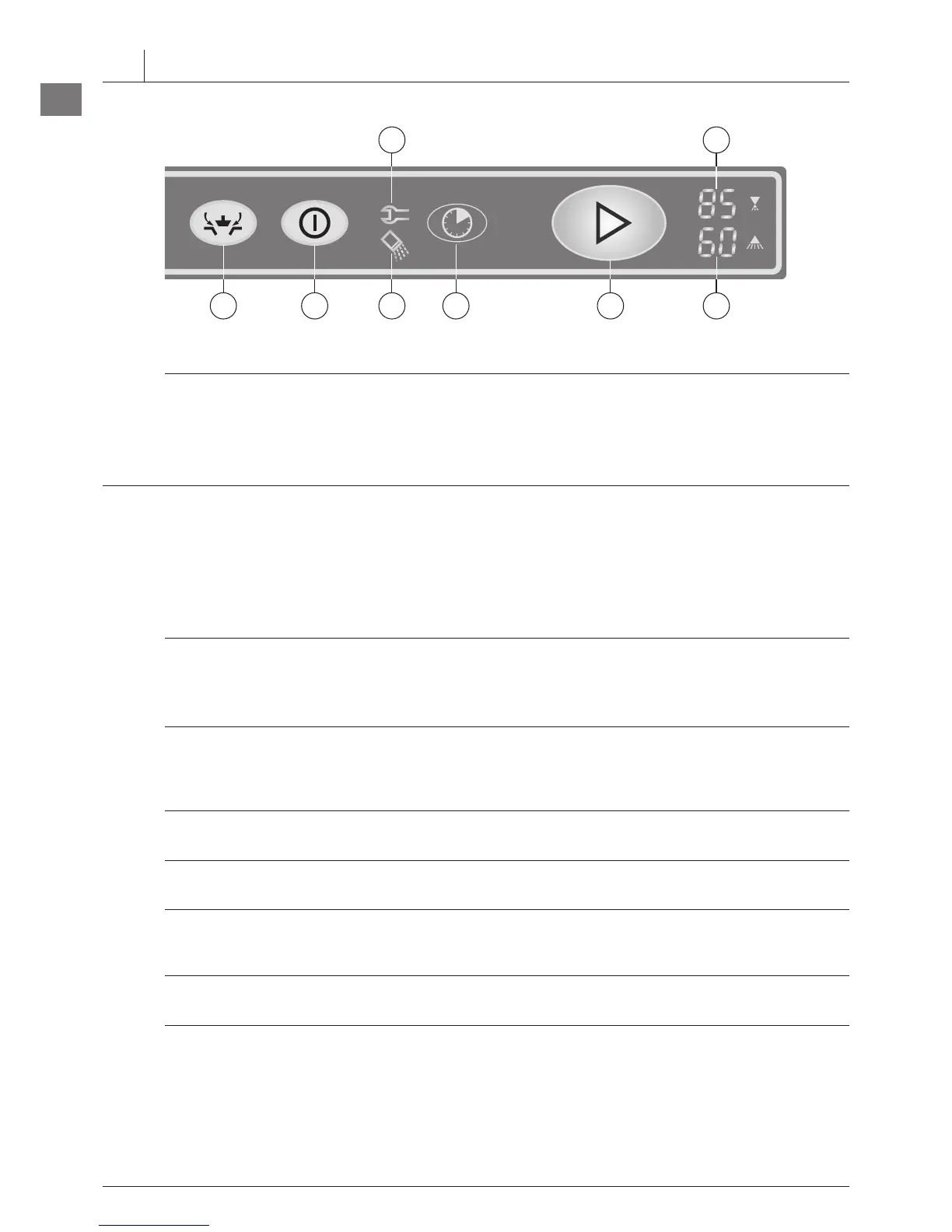
➀
Machine ON / OFF
Pushing this button switches the machine on.
In case of operating error or faults, it is possible to switch-off the machine
immediately without the drain cycle, by pushing this button again.
After switch off, the machine is not voltage free!
➁
Start button
By pushing this button the wash cycle will be started.
Furthermore the button illuminates to indicate the mode of the machine:
GREEN
GREEN
(flashing)
(permanent)
= Machine fills and starts heating
Wash cycle is running
Machine draining / switch-off
= Machine is ready for operation
➂
Drain button
By pushing and holding (2 seconds) this button, the drain and self cleaning
cycle starts. At the end of the cycle, the machine switches off automatically.
After switch off, the machine is not voltage free!
➃
Program button
By pushing this button, it is possible to select between two preset
programs.
The program no. (e.g. P02) will be shown in the Display
➅
.
➄
Display e.g. temperature indication Wash (°C) (see chapter 6).
➅
Display e.g. temperature indication Rinse (°C) (see chapter 6).
➆
Salt required
Indicating the need for regeneration salt to be added.
(Only with built-in softener.)
➇
Service indicator
Indicating, that the machine has a fault (see chapter 12).
3 CONTROLS


 To Next Page