Baracuda
®
Saltmaster
TM
Saltwater Chlorinator | Installation and Operating Instructions
11
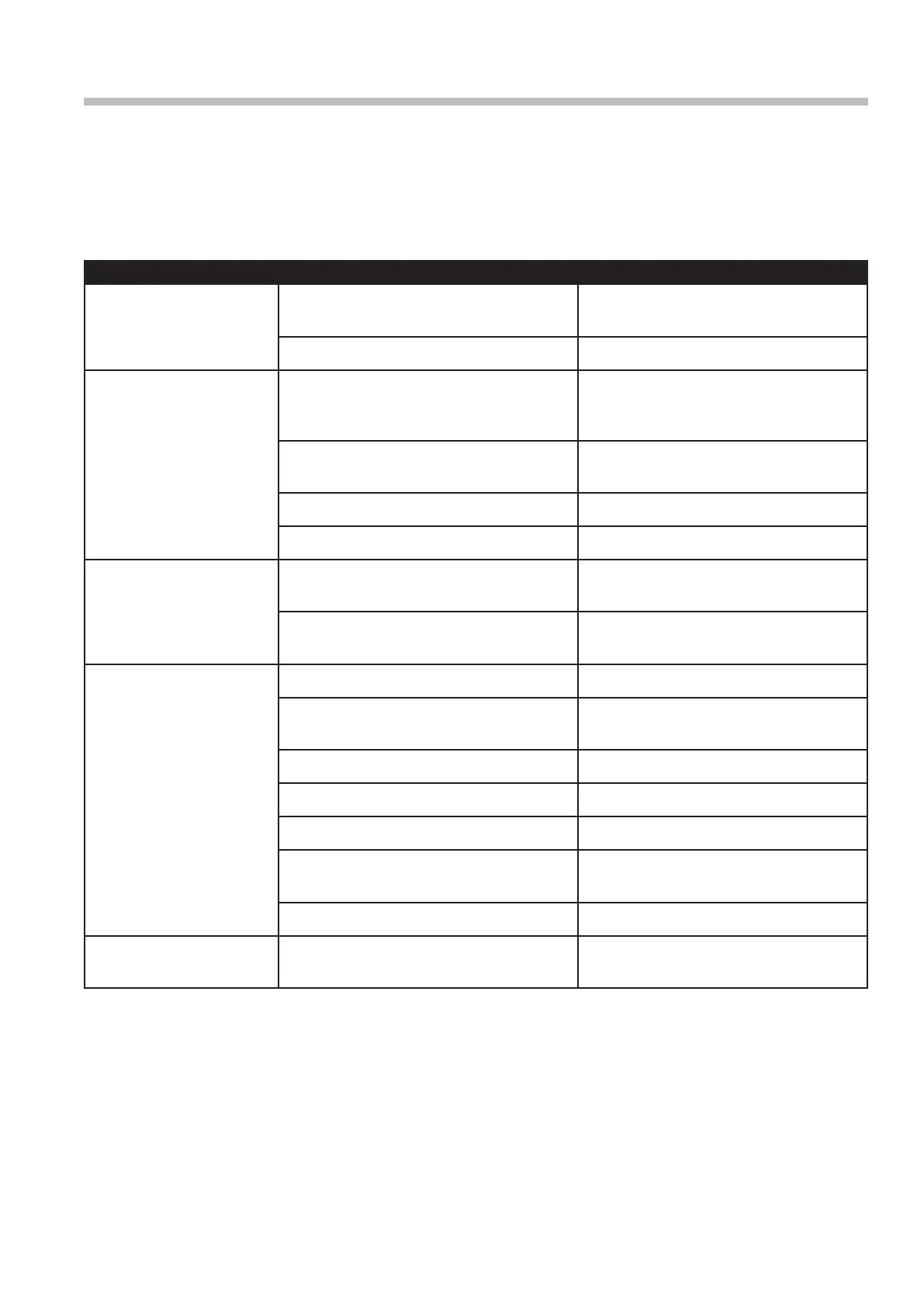
Section 16. Troubleshooting
Your Saltmaster Chlorinator has diagnostic and
safety features to make it easy to maintain your
system. The table below summarises potential
faults and their causes.
Fault Indication Potential Cause Remedy
NO F (No flow) Pump turned off/disconnected or
valves closed
Ensure valves/pump on.
Blue wire disconnected from cell Connect blue sense wire to cell.
LO S (Low salt) Salt level in pool has dropped too low Take sample of water to pool shop
and check salt level – add salt as
recommended.
Pool water temperature is low Add salt and turn chlorinator output
down until the water is warmer.
Cell has calcified Clean cell.
Cell has failed Call for service.
Display blank No power to controller Plug in controller and ensure mains
power available.
Fuse blown Have a service technician replace
fuse (3 amp slow blow).
Low/No chlorine in pool Cables not connected to cell Connect cables.
Timer period too short Increase timer period – particularly
insummer.
Chlorine output level too low Increase chlorine output.
Filter needs backwashing Backwash filter.
pH too high Balance pH level to 7.4 – 7.6
Pool stabiliser (cyanuric acid) too low Increase stabiliser between 30 and
60 ppm.
Salt level too low Increase salt to above 6,000 ppm.
Clock loses time when
mains power removed
Battery life expired Call a technician.
For spare parts and further advice, please
consult the website, go to
www.baracuda.com.au


 To Next Page