page 6
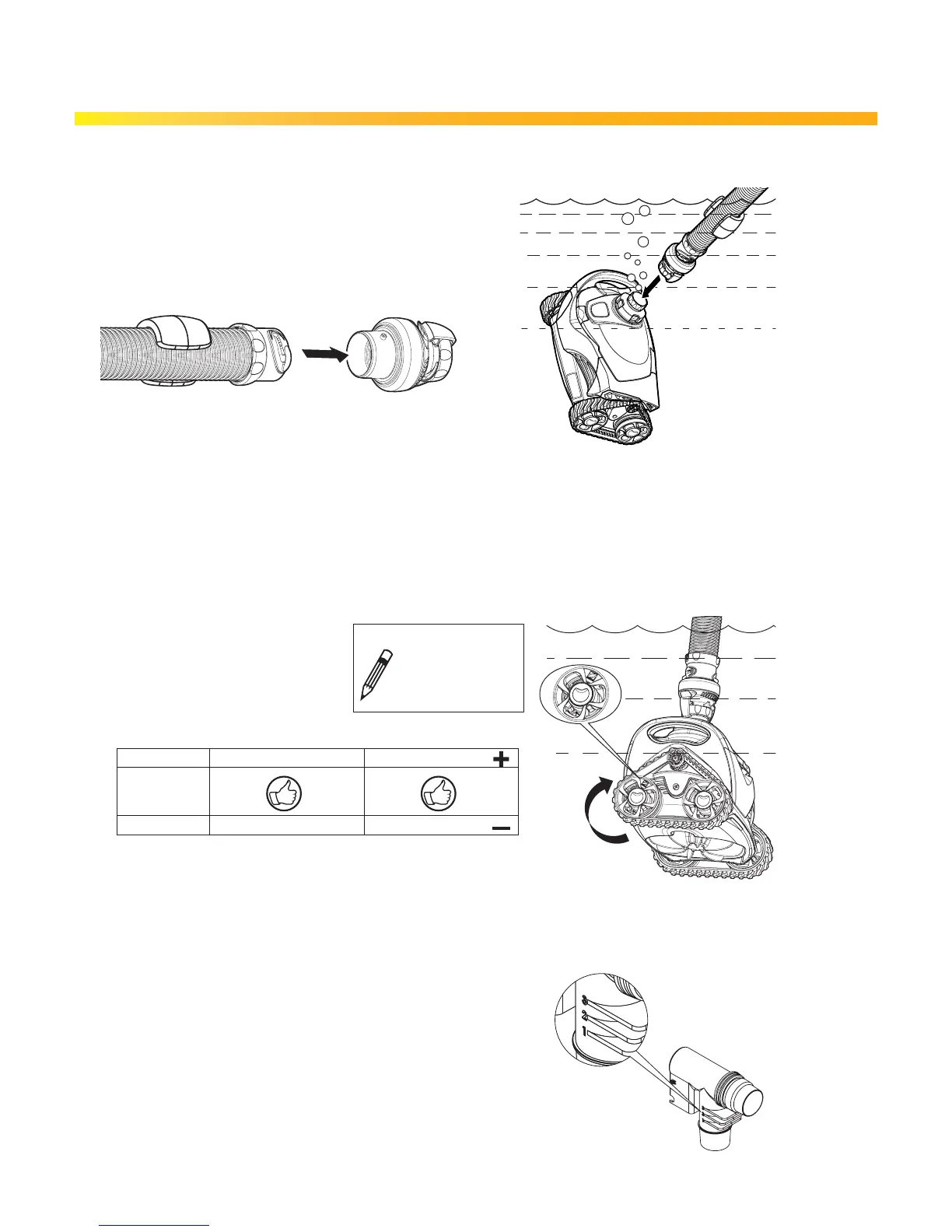
4. Connecting Cleaner Head to Flow Regulator Valve
4.1 Remove orange sticker off leader hose.
4.2 Attach the flow regulator valve to the leader hose
and connect the cleaner head to the
flow regulator valve.
5. Re-Connecting to Skimmer Box
5.1 Temporarily disconnect hose from skimmer, turn on pool filter pump.
5.2 Flood the hose with water, turn off pool filter pump, reconnect hose to skimmer box, then turn pool
filter pump back on.
6. Check Cleaner Flow
6.1 Watch the orange wheel marker,
use a stopwatch to time ten (10)
wheel rotations.
7. Adjust Flow if Necessary, using the
AD Flow Valve
7.1 The AD Flow Valve has three settings:
(1) Low, (2) Medium, and (3) High.
The valve comes with a factory setting of (2).
+ Adjust the AD Flow Valve to setting (3) to increase flow.
– Adjust the AD Flow Valve to setting (1) decrease flow.
Installation
IF Time is ... Result ... Adjust Flow ...
26-50 Poor Performance Increase Flow
20-25
10-19 Possible Damage Decrease Flow
10 rotations
_ _ _ _ _ _ _ seconds


 To Next Page