14 – Speaker
15 – Battery case.
Reverse
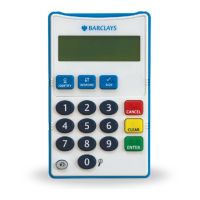
8 – Number keys – The number keys are a rounded shape and the number five key has two tactile
dots to aid in orientation
9 – Cancel – Press this key to cancel and return to the main menu. The key has a raised tactile
X shape
10 – Clear – Press this key to delete one number at a time if you make an error. The key has a raised
tactile I shape
11 – Enter – You will be prompted to press this key after you have entered your card PIN in the
card reader, or after you have entered other requested information. The key has a raised tactile
0 shape
12 – Repeat – The key repeats the last played audio announcement. It announces the eight digit
unique code one character at a time followed by a beep at the end
13 – The 0 Key – Larger View/Repeat Code. When the audio function is switched off, you
can press the 0 key to increase the size of the unique eight digit code. When the audio
function is switched on, you can press the 0 key to hear the code repeated back to you.


 To Next Page