40-10
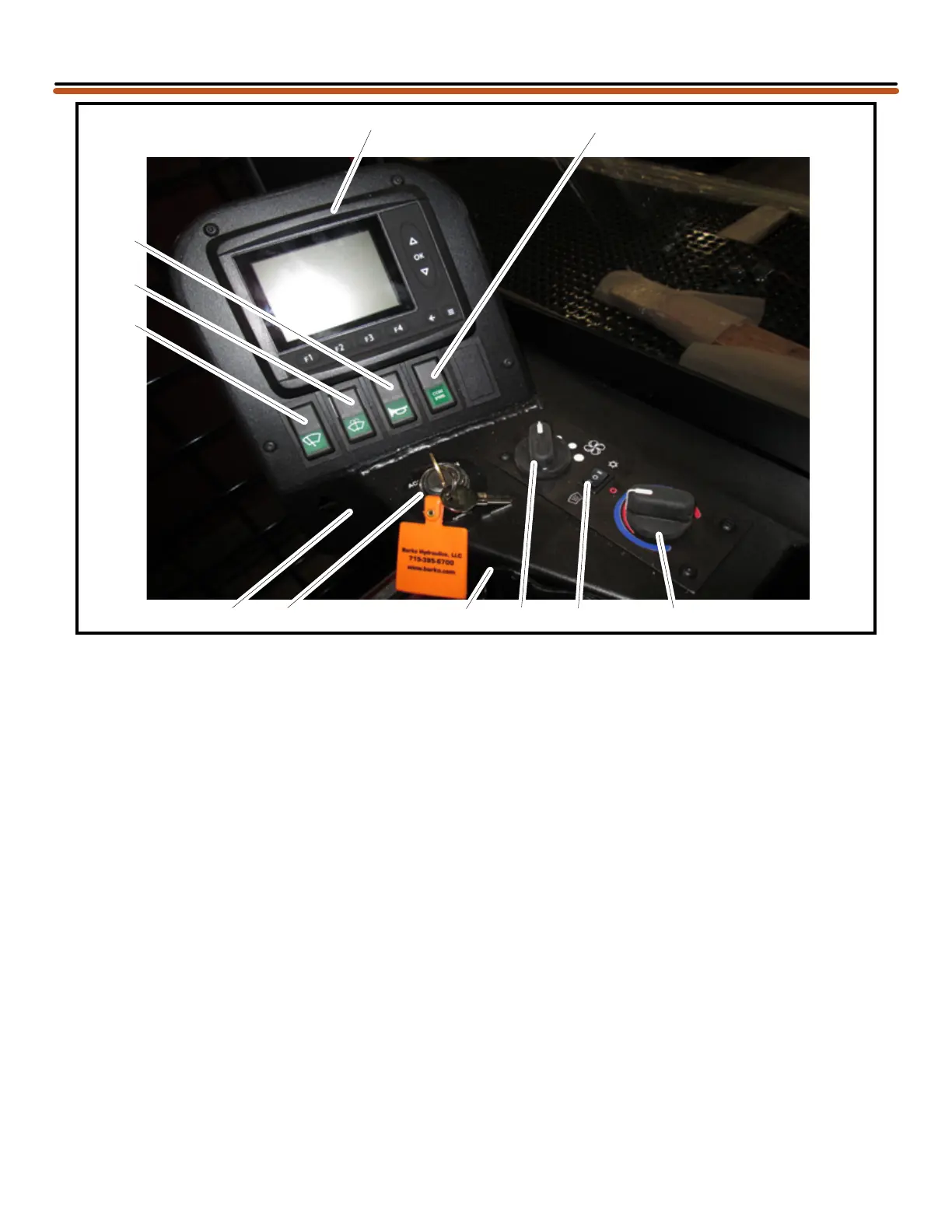
1 MD3 Control Panel
Panel displays Fuel Level, Engine Water
Temperature, Engine Oil Pressure, and Hour
Meter. This display will also display machine
warnings. The throttle is adjusted at this panel.
See separate instruction for controls DEF level.
2 Control Power Switch
Activates control power to machine. Push top to
turn on power. Push bottom to turn off power.
This switch can be used when you want to
deactivate machine controls but do not want to
lift seat armrest/servo lever.
3 Horn Switch
Push to activate horn.
4 Windshield Wiper Switch
Operates windshield wipers. Push switch
to activate wiper. Three positions: Off, Low
Speed, and High Speed.
5 Washer Switch
Operates windshield washer. Push switch to
activate washer.
6 Ignition Key Switch
Turn switch to one of four positions: Accessory,
Off, On or Start.
Start position is used to start engine. Once
engine starts, let key move to On position for
running.
7 USB Port
The USB Port is used to plug a computer into
the MD3 Control Panel.
8 Fan Speed Switch
Ventilation fan speeds are: Off / Low / Medium /
High speed.
9 Air Conditioning Mode Switch
Three modes are: Defrost / Heat / Air
Conditioning.
10 Temperature Control Dial
Variably controls cab heater output, from off
(blue) to 100% on (red).
11 Cummins 9 pin Diagnosis Connector (under
dash)
INSTRUMENTAL PANELS
2
1
3
5
4
11 6
7
8
9 10
08/20/2018
Updated
OPERATOR’S



 To Next Page