Barn Owl: Camera Settings
Trigger Settings:
Your camera’s Motion Trigger settings determine how and when photos are taken.
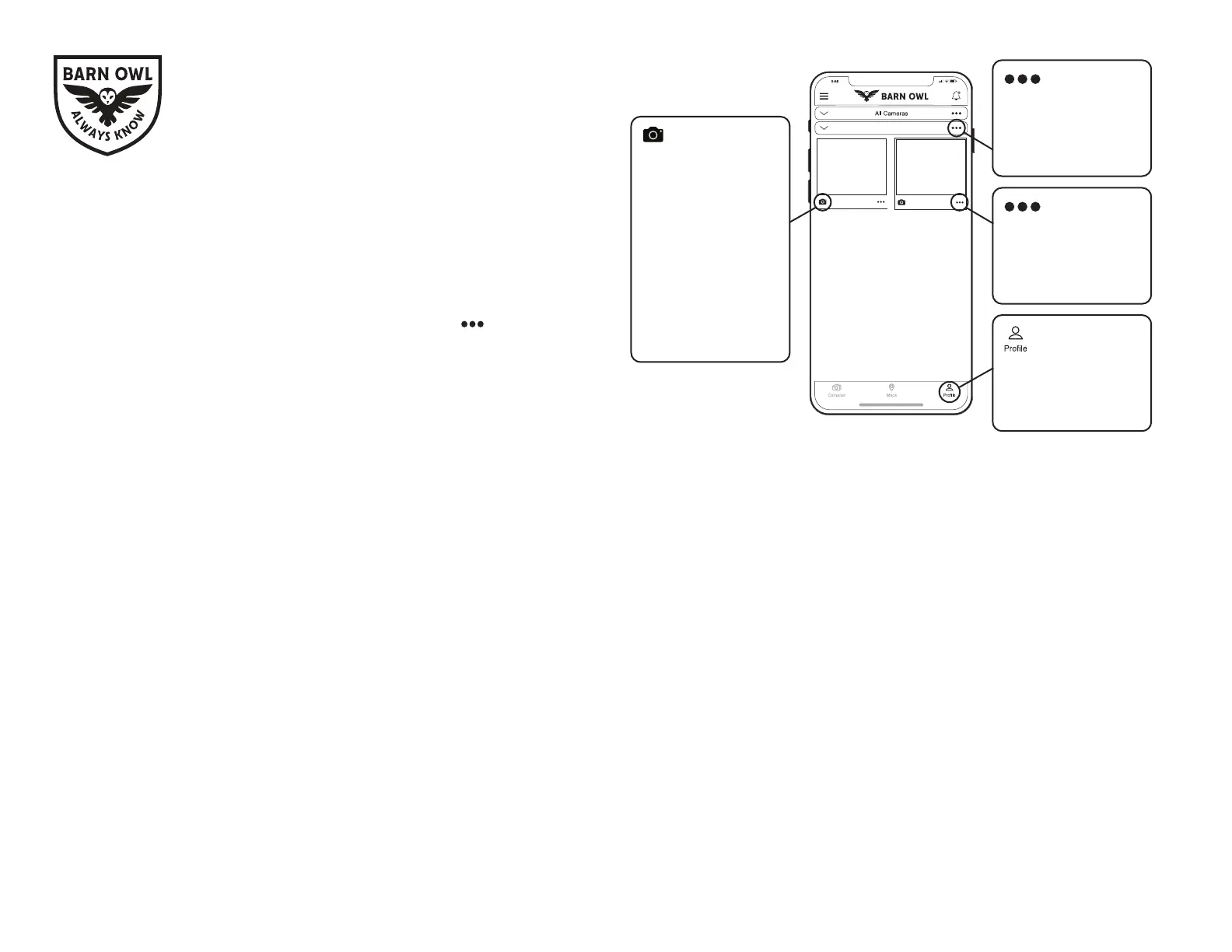
You can access your camera’s Triggers from the camera’s settings screen. Navigate
to your camera’s triggers by selecting the camera options icon from the camera
image tile and then selecting “camera settings.”
Types of Triggers:
• Motion Trigger:
When “ON”, camera automatically triggers on motion.
• Trigger Delay:
Time delay between motion-triggers.
Displayed as: HH:MM:SS
• Periodic Trigger:
Time delay between automatically-recurring triggers, regardless of motion.
Displayed as: HH:MM
• Trigger Window:
Time window where the camera will operate, according to the camera’s clock.
Displayed as: HH:MM-HH:MM
Example:
You want 3 scheduled images per day at 8am, 12pm, and 4pm.
Example Settings:
1. Set Your Periodic Trigger to: 04:00.
- The camera will trigger every 4 hours.
2. Turn Trigger Window to ON and set for: 08:00-16:00.
- The camera will trigger between 8am and 4pm.
Pro Tip:
Increase your image quality with the “Photo Size” option in the app.
Note: Higher quality images use more data.
Pro-Tip:
To avoid false motion triggers, make sure to minimize the amount of unnecessary
moving objects, like tree branches, directly in front of the camera lens.
Help Guide:
Visit: BarnOwl.tech/Faq for a full list of common questions.
Visit: BarnOwl.tech/instructions for detailed instructions.
Contact: Support@BarnOwl.tech if you have signal issues.
Returns
We offer a 45-day money back return policy. The 45 days begins when you receive
delivery. We also offer a 2-year warranty for any inconsistent camera behavior that
wecan’txoverthephone.
Warranty
The Limited Hardware Warranty covers defects in material and workmanship under
normal use during the Warranty Period of 2 years from date of purchase.
Barn Owl Care
For a small monthly fee per camera, Barn Owl will provide a lifetime warranty for
theft and accidental damage. For more information on Barn Owl Care, please see the
BillingtabunderyourUserProleorcontactusdirectly.
Contact Info
Sales: (720) 594-5533
shop@barnowl.tech
Support: (720) 594-3649
support@barnowl.tech
Camera Group A
Image 1 Image 2
Click the camera icon
below an image to
trigger your camera
on-demand.
Note:
The camera should
respond within 30
seconds if it’s in the
ON position and the
SMS Setting is set
to “Instant.”
Access camera
options by selecting
the three dots below
an image.
Access group
options by selecting
the three dots in the
camera group label.
Select“Prole”to
access billing and
account details.
USER GUIDE
Barn Owl HQ



 To Previous Page
 Loading...