EasyManua.ls Logo

Bartlett RTC 1000 - User Manual

Bartlett RTC 1000
2 pages
Print Icon
To Next Page IconTo Next Page
Loading...
BARTLETT
Instrument Company
Learn How To Delay Start Your Kiln
Using the delay start can be a useful tool
when firing your kiln. This can allow you to
start a firing early in the morning so it will be
finished early in the evening. Just in time for
you to be there when it finishes and leave the
studio on time.
While the delay start is a great tool, we
always recommend you be there toward the
end of the firing when the kiln is at it's hottest
temperatures. Using a controller doesn't
guarantee the kiln won't over fire if an issue
arises. That is why it's always best to be there
for the firing of your kiln.
Using the delay start of the V6CF:
Enter the desired program
Press "Delay" and the display will
alternately flash "dELA" and 00.00
Type in the desired delay time (#'s to the
left of the decimal are hours, to the right
are minutes)
Press "Enter".
Press "Start" and the delay time will
display and begin counting down to zero.
Home Controller Overview V6CF RTC1000 3Key
Question and Answer IconNeed help?

Do you have a question about the Bartlett RTC 1000 and is the answer not in the manual?

Bartlett RTC 1000 Specifications

General IconGeneral
CategoryController
Storage Temperature-40°C to 85°C
Power Consumption5W
Communication InterfaceRS-485
ProtocolModbus RTU

Summary

Learn How To Delay Start Your Kiln

Delay Start for V6 CF Controller

Instructions and explanation for using the delay start function on the V6CF controller, including program entry and setting delay time.

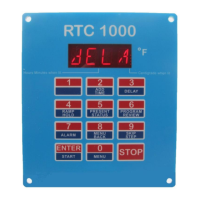
Delay Start for RTC1000 Controller

RTC1000 Delay Start Procedure

Step-by-step guide for initiating the delay start function on the RTC1000 controller, including program selection and time input.

Kiln Firing Safety Warning

Crucial safety advice emphasizing the need for supervision during critical firing stages, even with automatic controllers.

Related product manuals