- 35 -
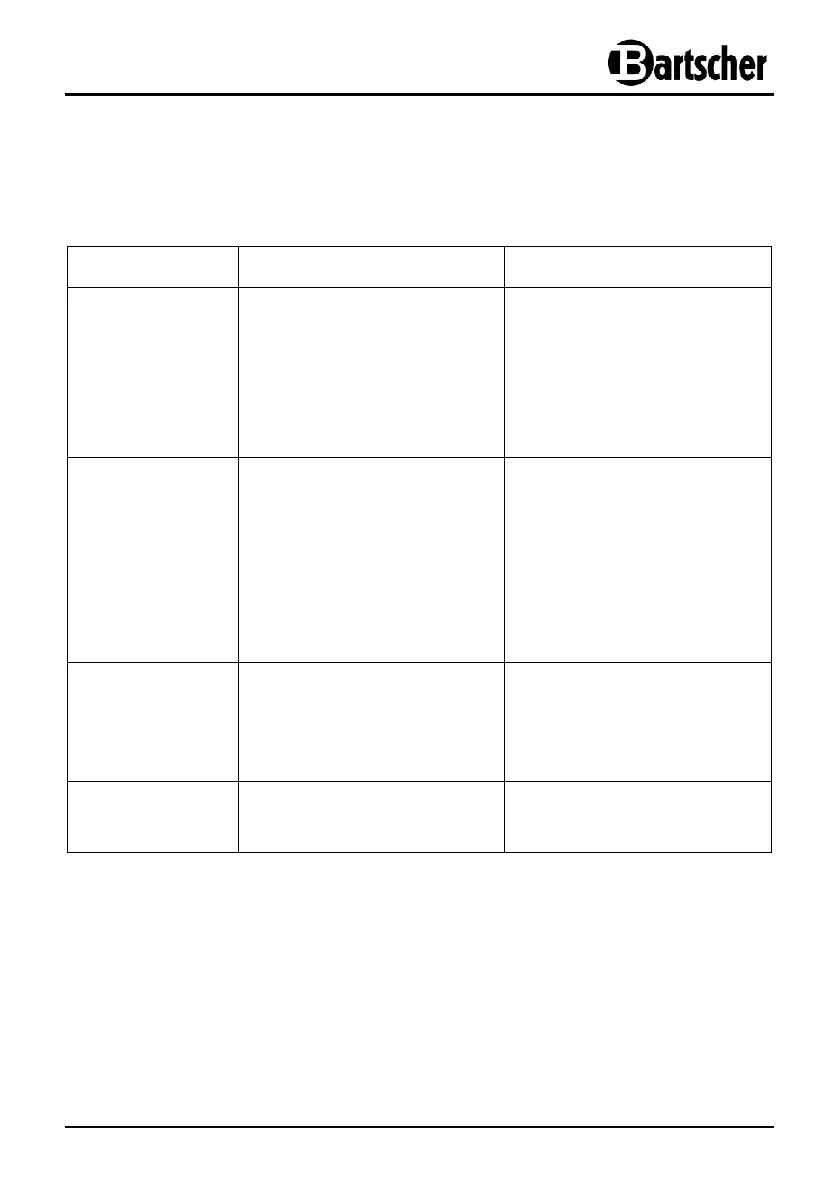
7. Possible Malfunctions
In case of malfunction, disconnect the device from its power source. Before contacting
the service or sales agent, verify - based on the table below - whether it is possible to
eliminate disruption in operation.
Problem
Cause
Solution
No cooling
• The plug is not placed in the
socket.
• Failure of the power supply
fuse.
• No power supply.
• Failure of the temperature
control.
• Plug into the socket
correctly.
• Verify the power supply.
• Verify the power supply.
• Contact the seller.
Not sufficient
cooling capacity
• Direct sun exposure or there
are sources of heat in the
close proximity to the unit.
• Wrong air circulation in
the unit.
• The glass cover not
completely shut or stays
open for too long.
• Move the unit further from
the sources of heat.
• Make sure there is enough
room between the unit and
the walls or other objects.
• Completely shut the glass
cover and shorten the time
when it stays open.
Loud sounds
when operating
• The unit is not placed on the
even surface.
• The unit is too close to the
walls or other objects.
• Place the unit on the even
surface.
• Make sure there is enough
room between the unit and
the walls or other objects.
Cooling does not
turn off
automatically
• The glass cover stayed open
for too long.
• Shorten the time when the
glass cover stays open.
If you cannot remove the malfunctions:
- do not open the body,
- notify the customer service point or contact the sales
agent, while providing the following information:
type of malfunction;
article and serial number (rating plate
at the rear of the device).


 To Next Page