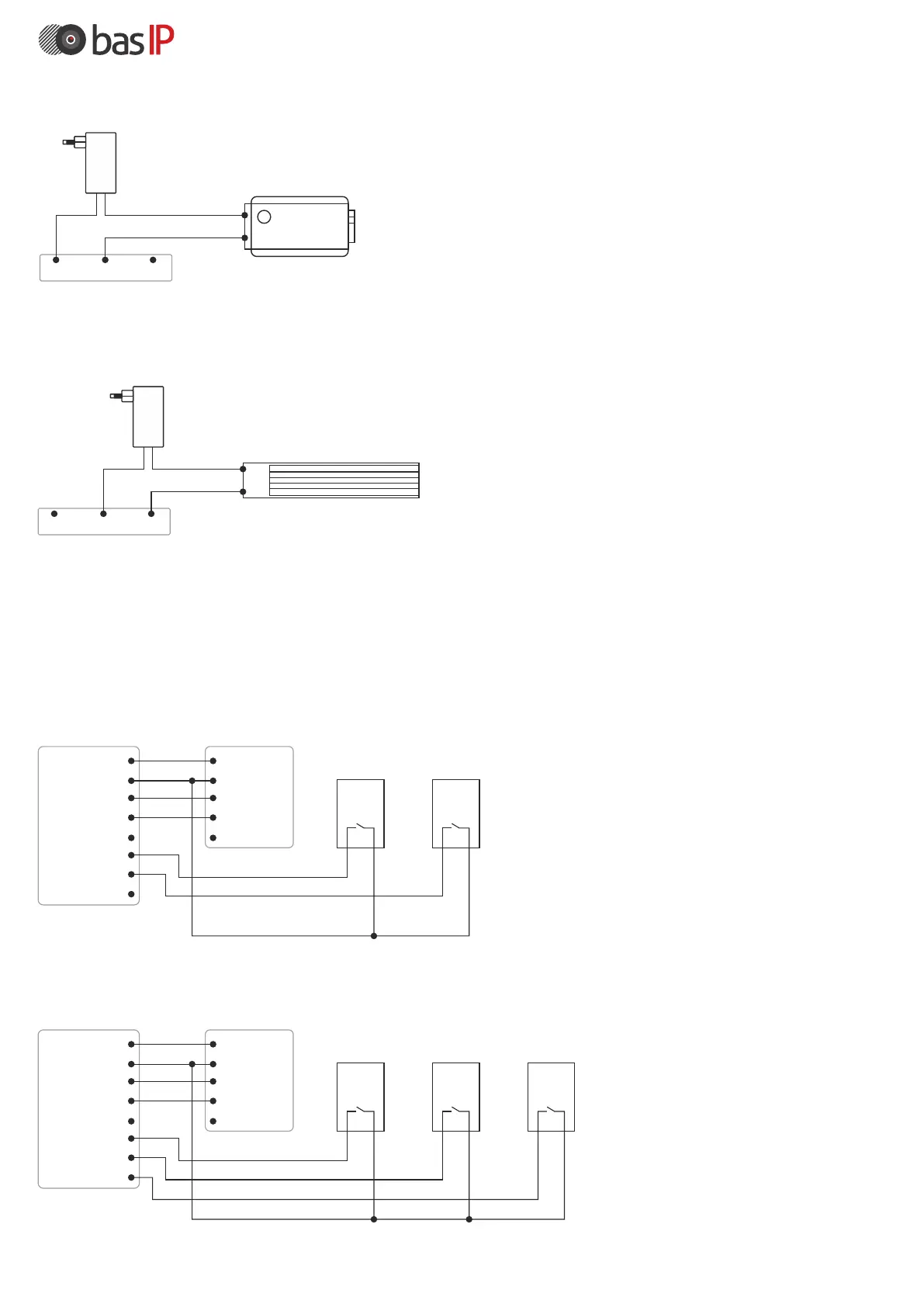
The option of connecting the electromagnetic lock.
With such a connection in the power circuit of the lock, you must use the contacts: COM (switchable contact)
and N.C. (normally closed contact).
+12V
DC
+
-
N.O. COM N.C.
Electromagnetic Lock
Power
supply
Fire alarm input and exit buttons (for 8 pin module)
Two exit buttons can be connected to this module, which will control the first
and second relays, respectively. Also, the module is equipped with a fire
alarm input.
The option of connecting the exit buttons.
The exit button for controlling the first relay is connected to the «Exit 1» and «GND» contacts, and the exit button
to control the second relay is connected to the «Exit 2» and «GND» contacts.
+12V DC
Ground
485+
485-
Lock
Exit 1
Exit2
Fire input
+12V DC
Ground
485+
485-
Lock
SH-42 module
Outdoor panel
Exit Button 1Exit Button 2
+12V DC
Ground
485+
485-
Lock
Exit 1
Exit2
Fire input
+12V DC
Ground
485+
485-
Lock
SH-42 module
Outdoor panel
Exit Button 1Exit Button 2Fire alarm
The option of connecting the exit and fire alarm buttons.
To connect the output control button of the first relay, use contacts «Exit 1» and «GND», and to connect
the control output button with the second relay, contacts «Exit 2» and «GND». The «Fire input» and «GND»
contacts are used to connect the fire alarm output contacts.
The option of connecting the electromechanical lock.
With such a connection in the power circuit of the lock, you must use the contacts: COM (switchable contact)
and N.O. (normally open contact).
+12V
DC
+
-
N.O. COM N.C.
Electromechanical lock
Power
supply



 To Next Page