• If your dose is more than 80 units, you will need to give more than 1 injection.
- Talk to your healthcare provider
about how to give your dose.
- Use a new Needle for each injection and repeat the priming step.
Step 9:
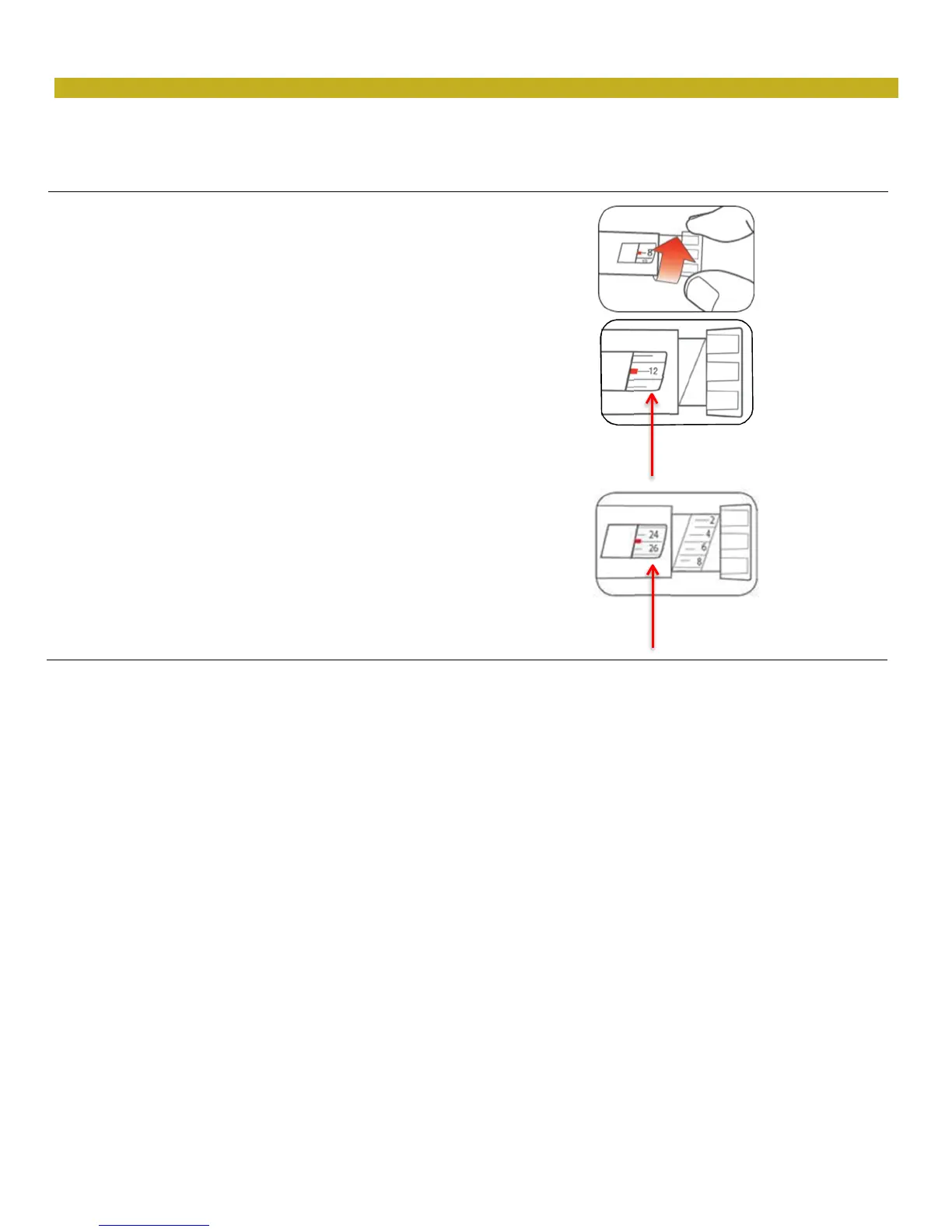
• Turn the Dose Knob to select the number of units
you need to inject. The Dose Indicator should line
up with your dose.
- The Pen dials 1 unit at a time.
- The Dose Knob clicks as you turn it.
- Do not dial your dose by counting the clicks
because you may dial the wrong dose.
- The dose can be corrected by turning the
Dose Knob in either direction until the correct
dose lines up with the Dose Indicator.
- The even numbers are printed on the dial.
- The odd numbers, after the number 1, are
shown as full lines.
• Always check the number in the Dose
Window to make sure you have dialed the
correct dose.
(Example: 12 units shown
in the Dose Window)
(Example: 25 units shown
in the Dose Window)
• The Pen will not let you dial more than the number of units left in the Pen.
• If you need to inject more than the number of units left in the Pen, you may either:
- inject the amount left in your Pen and then use a new Pen to give the rest of your dose, or
- get a new Pen and inject the full dose.
• It is normal to see a small amount of insulin left in the Pen that you can not inject.


 To Next Page