Installation Manual
EVE GLASS MOUNT KIT
© 2019
basalte v2.0
basalte bvba | hundelgemsesteenweg 1A | 9820 merelbeke | belgium
t +32 (0)9 385 78 38 | www.basalte.be | info@basalte.be
3
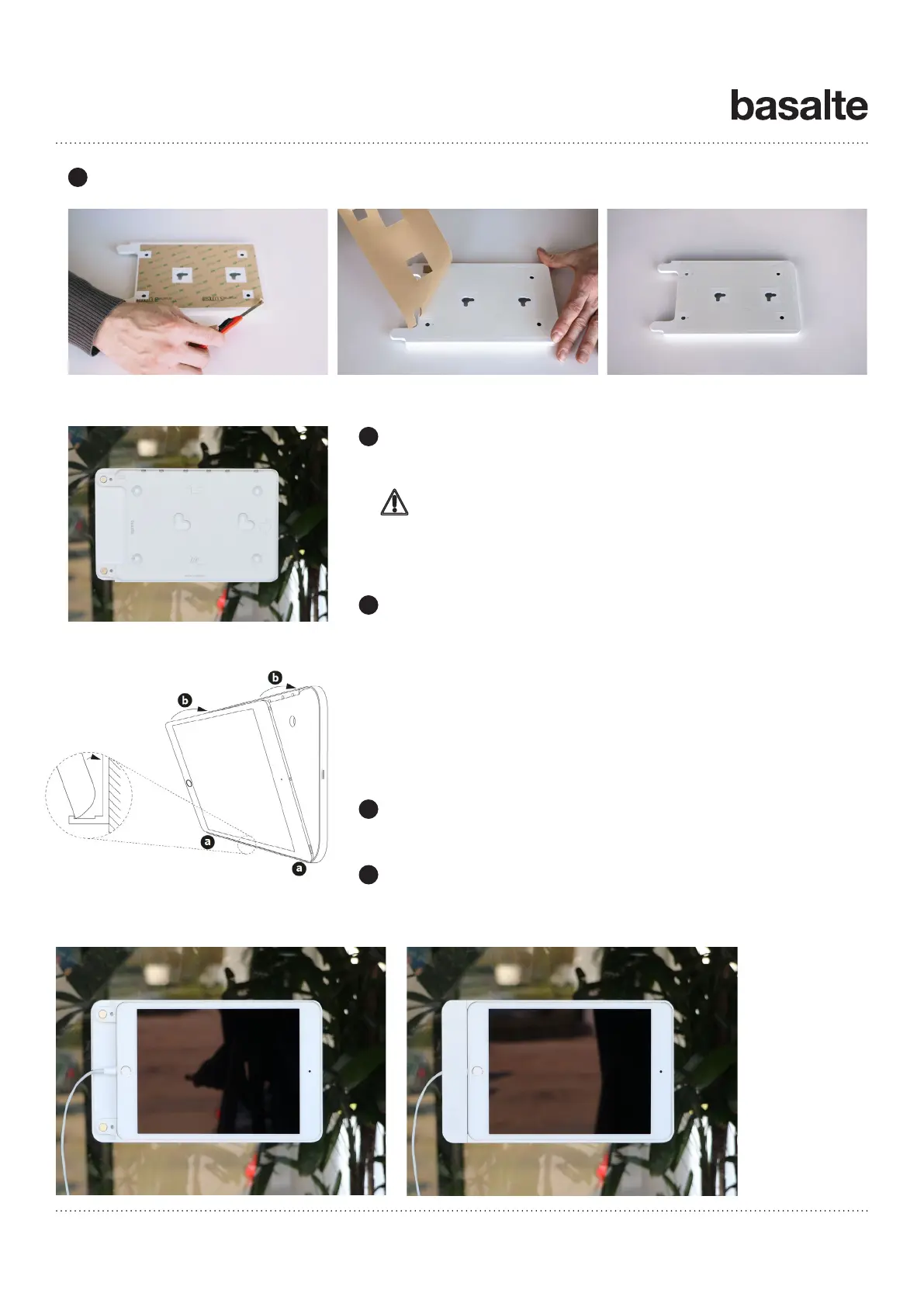
Lay the Eve frame on a steady, flat surface with the front facing the surface to remove the protective paper liner
from the adhesive tape.
Carefully mount the Eve frame against the installed film on the glass
surface. Make sure that the edges of the film and mount match.
Landscape mounting:
Place the right side of the iPad in the lower side of the frame as shown
on drawing (a) (opposite side of the magnets). Then gently push the
iPad in the frame so that it is being held by the magnets (b).
Connect the native charging cable to the iPad.
Portrait mounting:
Place the right side of the iPad in the right side of the frame as shown
on drawing 6 (a) (opposite side of the magnets). Then gently push the
iPad in the frame so that it is being held by the magnets (b).
Run the cable through the opening in the cover and click the cover on
the frame.
Security cover
Use the attached locking tool to secure your iPad against unwanted
removal.
Wait at least 48h before mounting the iPad in the frame allowing
the glue to dry.
4
5
6
7


 To Previous Page