EasyManua.ls Logo

Basalte EVE Plus - User Manual

Basalte EVE Plus
2 pages
Print Icon
To Next Page IconTo Next Page
Loading...
Identification of the parts
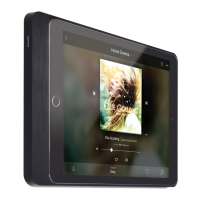
Eve Plus
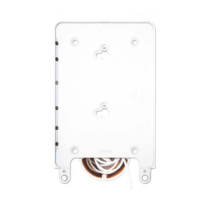
A Eve Plus sleeve
Eve Plus Mini - 0124-xx
Eve Plus Air - 0123-xx
Eve Plus - 0125-xx
B iPad (not included)
C Cover
D Softy grip
E Plus connector
F Screws
G USB-C connector
Mounting the iPad
1. Unmount the screws on the back of the sleeve and slide
o the cover.
2. Place the Eve Plus sleeve on a flat surface with the soft
grip facing downwards.
Gently slide in the iPad. Never apply too much force and
keep the iPad aligned with the sleeve.
Make sure the iPad stays flush with the frame.
3. Gently slide de USB-C connector in de iPad.
4. Gently reattach the cover by sliding it into position
5. Lock using the screws.
Make sure to follow the steps above in the right order as a
wrong installation can damage the frame.
2
3
Installation manual
Eve Plus
© 2022
basalte v1.0
1
Removing the iPad
1. Remove the screws holding the cover and slide o the
cover from the frame.
2. Place the Eve Plus sleeve on a flat surface, with the soft
grips facing downwards.
3. Gently slide out the iPad keeping it aligned with the
sleeve. Never apply too much force or pull the iPad up
or down while sliding. Make sure the iPad stays flush with
the sleeve until removed.
Docking the Eve Plus
Eve Plus lets you dock your iPad on a wall or table, while
keeping it charged. Thanks to the Plus connector the iPad
can be docked horizontally (landscape) and vertically
(portrait).
Eve Plus is compatible with the Eve Plus wall base (0130-xx)
and table base (0150-xx).
Important remark
Eve Plus sleeves with USB-C connectors are not compatible
with Eve Plus wall base USB (0130-02) and Gigabit POE
adapter (0610-20).
Dimensions
Eve Plus Mini (0124-xx): 213,80 mm/8,79” x 138,80 mm/5,47”
Eve Plus Mini is compatible with:
iPad Mini (6th generation)
Eve Plus Air (0123-xx): 266 mm/10,47” x 182.5 mm/7,19”
Eve Plus Air 11” is compatible with:
iPad Pro 11” (1st, 2nd, 3rd generation)
iPad Air 10.9” (4th, 5th generation)
Eve Plus (0125-xx): 267 mm/10.51” x 183,5 mm/7.27”
Eve Plus is compatible with: iPad 10.9” (10th generation)
Made in Belgium
Basalte is a registered trademark of Basalte bv.
EVE Plus is a registered trademark of Basalte bv.
EVE Plus is a registered design of Basalte bv.
iPad is a registered trademark of Apple Inc.
basalte bv
fraterstraat 37b I 9820 merelbeke I belgium
tel +32 9 385 78 38 I info@basalte.be I www.basalte.be
eve
plus
for Eve Plus, Eve Plus Mini & Eve Plus Air
Eve Plus does not support always-on display
configuration.

Other manuals for Basalte EVE Plus

Question and Answer IconNeed help?

Do you have a question about the Basalte EVE Plus and is the answer not in the manual?

Summary

Identification of Parts

Eve Plus Sleeve Components

Lists the components of the Eve Plus sleeve including the cover, softy grip, plus connector, screws, and USB-C connector.

Included iPad

Notes that the iPad itself is not included with the Eve Plus sleeve.

Mounting the iPad

Preparation and iPad Insertion

Instructions for unmounting the cover, placing the sleeve, and gently sliding the iPad into the sleeve.

Finalizing Installation

Steps for connecting the USB-C connector, reattaching the cover, and locking it with screws.

Removing the iPad

Procedure for iPad Removal

Detailed steps to remove the cover and gently slide the iPad out of the sleeve, emphasizing alignment.

Always-On Display Limitation

Important note that the Eve Plus does not support the always-on display configuration.

Docking and Compatibility

Docking Functionality

Explains how the Eve Plus allows docking iPads on walls or tables while keeping them charged, supporting vertical and horizontal orientation.

Compatibility Details

Lists compatible Eve Plus bases and notes USB-C connector incompatibility with specific wall bases.

Product Dimensions and iPad Compatibility

Eve Plus Mini Dimensions

Provides dimensions for Eve Plus Mini and lists compatible iPad Mini (6th gen).

Eve Plus Air Dimensions

Gives dimensions for Eve Plus Air and lists compatible iPad Pro 11" and iPad Air 10.9".

Eve Plus Dimensions

States dimensions for Eve Plus and its compatible iPad 10.9" (10th gen).

Overview

The Basalte Eve Plus is a sophisticated docking system designed for various iPad models, allowing them to be securely mounted and charged on walls or tables. This system comprises several components, including the Eve Plus sleeve, a cover, a softy grip, a Plus connector, screws, and a USB-C connector. The Eve Plus system is available in different variants to accommodate specific iPad models:

Eve Plus Mini (0124-xx)

  • Dimensions: 213.80 mm (8.79") x 138.80 mm (5.47")
  • Compatibility: iPad Mini (6th generation)

Eve Plus Air (0123-xx)

  • Dimensions: 266 mm (10.47") x 182.5 mm (7.19")
  • Compatibility: iPad Pro 11" (1st, 2nd, 3rd generation), iPad Air 10.9" (4th, 5th generation)

Eve Plus (0125-xx)

  • Dimensions: 267 mm (10.51") x 183.5 mm (7.27")
  • Compatibility: iPad 10.9" (10th generation)

Function Description

The primary function of the Eve Plus is to provide a secure and aesthetically pleasing way to integrate an iPad into a smart home or office environment. It allows the iPad to be docked either horizontally (landscape) or vertically (portrait) while ensuring it remains charged through the Plus connector. The system is compatible with Basalte's Eve Plus wall base (0130-xx) and table base (0150-xx), offering versatile mounting options.

Installation and Usage

Mounting the iPad:

  1. Preparation: Begin by unmounting the screws on the back of the Eve Plus sleeve and sliding off the cover.
  2. Placement: Place the Eve Plus sleeve on a flat surface with the softy grip facing downwards.
  3. iPad Insertion: Gently slide the iPad into the sleeve. It is crucial to avoid applying excessive force and to ensure the iPad remains aligned with the sleeve throughout the process. The iPad should sit flush with the frame once fully inserted.
  4. Connector Engagement: Gently slide the USB-C connector into the iPad's port.
  5. Securing the Cover: Gently reattach the cover by sliding it back into its original position.
  6. Final Lock: Lock the cover in place using the screws.

Important Installation Note: It is essential to follow these steps in the correct order, as an incorrect installation procedure can potentially damage the frame of the device.

Removing the iPad:

  1. Unscrewing the Cover: Remove the screws that hold the cover in place and slide the cover off the frame.
  2. Positioning the Sleeve: Place the Eve Plus sleeve on a flat surface with the softy grips facing downwards.
  3. iPad Removal: Gently slide the iPad out of the sleeve, maintaining alignment with the sleeve. Avoid applying excessive force or pulling the iPad up or down during removal. Ensure the iPad remains flush with the sleeve until it is completely removed.

Important Technical Specifications and Features

  • Docking Versatility: Supports both horizontal (landscape) and vertical (portrait) docking orientations.
  • Charging Capability: Keeps the iPad charged while docked via the Plus connector.
  • Compatibility with Basalte Bases: Designed to work seamlessly with Eve Plus wall bases (0130-xx) and table bases (0150-xx).
  • Material and Design: The system emphasizes a sleek design, ensuring the iPad sits flush within the frame. The softy grip helps secure the iPad and protects it from scratches.

Important Remarks and Limitations

  • USB-C Connector Compatibility: Eve Plus sleeves equipped with USB-C connectors are not compatible with Eve Plus wall base USB (0130-02) and Gigabit POE adapter (0610-20). This is a critical point for users to consider when selecting accessories.
  • Always-on Display: The Eve Plus system does not support always-on display configuration for the iPad. Users should be aware of this limitation if their workflow relies on this feature.

Maintenance Features

The design of the Eve Plus focuses on ease of installation and removal, which inherently contributes to its maintainability. The use of screws for securing the cover allows for straightforward access to the iPad for cleaning or replacement. The robust construction is designed to protect the iPad while docked.

Manufacturing and Branding

  • Made in Belgium: The Basalte Eve Plus is manufactured in Belgium, indicating a commitment to quality and craftsmanship.
  • Trademarks:
    • Basalte is a registered trademark of Basalte bv.
    • EVE Plus is a registered trademark of Basalte bv.
    • EVE Plus is a registered design of Basalte bv.
    • iPad is a registered trademark of Apple Inc.

Contact Information

Basalte bv Fraterstraat 37b | 9820 Merelbeke | Belgium Tel: +32 9 385 78 38 Email: info@basalte.be Website: www.basalte.be

Basalte EVE Plus Specifications

General IconGeneral
BrandBasalte
ModelEVE Plus
CategoryDocking Station
LanguageEnglish

Related product manuals