EasyManua.ls Logo

Bauer 19503E-B - User Manual

Bauer 19503E-B
8 pages
Print Icon
To Next Page IconTo Next Page
Loading...
Visit our website at: http://www.harborfreight.com
Email our technical support at: productsupport@harborfreight.com
Owners Manual & Safety Instructions
Save This Manual Keep this manual for the safety warnings and precautions, assembly,
operating, inspection, maintenance and cleaning procedures. Write the product’s serial number in the
back of the manual near the assembly diagram (or month and year of purchase if product has no number).
Keep this manual and the receipt in a safe and dry place for future reference. 20d
When unpacking, make sure that the product is intact
and undamaged. If any parts are missing or broken,
please call 1-888-866-5797 as soon as possible.
Copyright
©
2019 by Harbor Freight Tools
®
. All rights reserved.
No portion of this manual or any artwork contained herein may be reproduced in
any shape or form without the express written consent of Harbor Freight Tools.
Diagrams within this manual may not be drawn proportionally. Due to continuing
improvements, actual product may differ slightly from the product described herein.
Tools required for assembly an d se rv ic e may n ot b e in cl uded.
Read this material before using this product.
Failure to do so can result in serious injury.
SAVE THIS MANUAL.
Question and Answer IconNeed help?

Do you have a question about the Bauer 19503E-B and is the answer not in the manual?

Summary

Rules for Safe Operation

Avoid Solid-State Speed Controls

Do not use this blower with any solid-state speed control device to reduce risk of fire or shock.

Polarized Plug Safety

Ensure the polarized plug fits correctly into the outlet to reduce electric shock risk.

Unattended Operation Warning

Never leave the blower running unattended during operation.

Handle Damaged Cords or Plugs

Do not operate with damaged cord/plug; seek authorized repair.

Cord Placement Safety

Avoid running cords under carpeting or coverings to prevent tripping.

Keep Hands Clear of Guards

Keep fingers and objects away from blade guards to prevent injury.

Disconnect Before Moving

Always disconnect the blower before moving it to another location.

Disconnect Before Cleaning Grills

Disconnect power before removing grills for cleaning to prevent shock.

Stable Surface Operation

Operate blower on a stable surface to prevent overturning.

Avoid Window Use During Rain

Do not use blower in windows; rain poses an electrical hazard.

Complete Assembly Before Use

Ensure the blower is fully assembled before turning it on.

Maintain Blower Labels

Keep blower labels and nameplates readable for safety information.

Dry Area Operation Only

Operate blower exclusively in dry areas, avoiding bathrooms or wet locations.

Keep Out of Reach of Children

This blower is not a toy; keep out of reach of children to prevent injury.

Pacemaker User Precautions

Pacemaker users should consult a physician before using the blower due to EMF.

Operator Responsibility for Safety

Operator must use common sense and caution, as manual cannot cover all scenarios.

Specifications

Electrical Rating Details

Details the blower's electrical rating (Voltage, Frequency, Amperage).

Auxiliary Outlet Capacity

Information about the two auxiliary 115 VAC outlets and their load limits.

Blower Functions Overview

Handle for Portability

Description of the handle for carrying and maneuvering the blower.

Power and Speed Control

Controls the power on/off and speed settings for the blower.

Air Intake Locations

Indicates the locations where air is drawn into the blower.

Air Outlet Description

The point from which the blower expels air.

Kickstand for Stability

Provides stability and angling options for the blower.

Auxiliary Power Outlets

Two outlets on the base for powering other devices.

Circuit Breaker Reset

Button to reset the internal circuit breaker if it trips.

Operating the Blower

Initial Power Setting

Ensure the power/speed switch is set to OFF before starting.

Power Cord Connection

Connect the power cord to a GFCI-protected grounded outlet.

Blower Positioning Options

Place the blower on a level base and position it horizontally, tilted, or vertically.

Ensure Airflow Clearance

Leave adequate space for unimpeded airflow and prevent debris intake.

Selecting Speed Setting

Rotate the Power/Speed Knob to choose the desired speed.

Overload Protection Reset

Procedure to reset the circuit breaker if the blower stops unexpectedly.

Using Auxiliary Outlets

Details on connecting devices to auxiliary outlets and their current limits.

Post-Operation Procedures

Turn off, unplug, clean, and store the blower indoors after use.

User Servicing Instructions

General Inspection Before Use

Inspect for loose hardware, moving parts, cracked parts, wiring, or other conditions.

Cleaning Air Inlets and Housing

Clean regularly with a damp cloth; do not open housing for cleaning.

Damaged Supply Cord Replacement

Damaged supply cords must be replaced only by a qualified service technician.

Troubleshooting Overload Trip

Check for dryness, obstructions, and cooling before resetting the circuit breaker.

Parts List and Diagram

Limited 90 Day Warranty

Summary

Rules for Safe Operation

Avoid Solid-State Speed Controls

Do not use this blower with any solid-state speed control device to reduce risk of fire or shock.

Polarized Plug Safety

Ensure the polarized plug fits correctly into the outlet to reduce electric shock risk.

Unattended Operation Warning

Never leave the blower running unattended during operation.

Handle Damaged Cords or Plugs

Do not operate with damaged cord/plug; seek authorized repair.

Cord Placement Safety

Avoid running cords under carpeting or coverings to prevent tripping.

Keep Hands Clear of Guards

Keep fingers and objects away from blade guards to prevent injury.

Disconnect Before Moving

Always disconnect the blower before moving it to another location.

Disconnect Before Cleaning Grills

Disconnect power before removing grills for cleaning to prevent shock.

Stable Surface Operation

Operate blower on a stable surface to prevent overturning.

Avoid Window Use During Rain

Do not use blower in windows; rain poses an electrical hazard.

Complete Assembly Before Use

Ensure the blower is fully assembled before turning it on.

Maintain Blower Labels

Keep blower labels and nameplates readable for safety information.

Dry Area Operation Only

Operate blower exclusively in dry areas, avoiding bathrooms or wet locations.

Keep Out of Reach of Children

This blower is not a toy; keep out of reach of children to prevent injury.

Pacemaker User Precautions

Pacemaker users should consult a physician before using the blower due to EMF.

Operator Responsibility for Safety

Operator must use common sense and caution, as manual cannot cover all scenarios.

Specifications

Electrical Rating Details

Details the blower's electrical rating (Voltage, Frequency, Amperage).

Auxiliary Outlet Capacity

Information about the two auxiliary 115 VAC outlets and their load limits.

Blower Functions Overview

Handle for Portability

Description of the handle for carrying and maneuvering the blower.

Power and Speed Control

Controls the power on/off and speed settings for the blower.

Air Intake Locations

Indicates the locations where air is drawn into the blower.

Air Outlet Description

The point from which the blower expels air.

Kickstand for Stability

Provides stability and angling options for the blower.

Auxiliary Power Outlets

Two outlets on the base for powering other devices.

Circuit Breaker Reset

Button to reset the internal circuit breaker if it trips.

Operating the Blower

Initial Power Setting

Ensure the power/speed switch is set to OFF before starting.

Power Cord Connection

Connect the power cord to a GFCI-protected grounded outlet.

Blower Positioning Options

Place the blower on a level base and position it horizontally, tilted, or vertically.

Ensure Airflow Clearance

Leave adequate space for unimpeded airflow and prevent debris intake.

Selecting Speed Setting

Rotate the Power/Speed Knob to choose the desired speed.

Overload Protection Reset

Procedure to reset the circuit breaker if the blower stops unexpectedly.

Using Auxiliary Outlets

Details on connecting devices to auxiliary outlets and their current limits.

Post-Operation Procedures

Turn off, unplug, clean, and store the blower indoors after use.

User Servicing Instructions

General Inspection Before Use

Inspect for loose hardware, moving parts, cracked parts, wiring, or other conditions.

Cleaning Air Inlets and Housing

Clean regularly with a damp cloth; do not open housing for cleaning.

Damaged Supply Cord Replacement

Damaged supply cords must be replaced only by a qualified service technician.

Troubleshooting Overload Trip

Check for dryness, obstructions, and cooling before resetting the circuit breaker.

Parts List and Diagram

Limited 90 Day Warranty

Overview

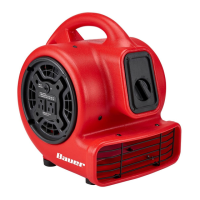
This document is an owner's manual and safety instructions for the Bauer 3-Speed Floor Blower, model 19503E-B. It provides essential information for safe operation, technical specifications, usage, and maintenance.

Function Description:

The Bauer 3-Speed Floor Blower is designed to provide powerful airflow for various applications, likely including drying floors, circulating air, or assisting with ventilation. It features a multi-speed control and auxiliary power outlets for added versatility. The blower is intended for household use only.

Important Technical Specifications:

  • Model: 19503E-B
  • Electrical Rating: 115VAC / 60Hz / 2.4A
  • Auxiliary Outlets: Two 115 VAC / 60Hz outlets
    • Combined Current Draw (Unit OFF): 12A Max
    • Combined Current Draw (Unit ON): 9.5A Max
  • Speed Settings: 3 speeds (controlled by a Power/Speed Knob)
  • Safety Features: Polarized plug, Overload Protection (Circuit Breaker Reset Button), Circuit Breaker (12A)

Usage Features:

The blower offers flexible positioning and multiple power options:

  • Power/Speed Knob: Controls the blower's speed settings and turns the unit ON/OFF.
  • Auxiliary Outlets: Two 115 VAC outlets are integrated into the unit, allowing other powered devices to be plugged in. Users must adhere to specified maximum combined current draws (12A when the unit is OFF, 9.5A when the unit is ON) to prevent overloading.
  • Positioning: The blower can be operated in three positions:
    • Horizontal: Placed flat on a surface.
    • Tilted: The integrated Kickstand can be pulled down to lift the front end of the blower, tilting it upwards. The Kickstand should be returned to its resting position when not in use.
    • Vertical: Positioned upright.
  • Airflow: Air flows in from both sides of the blower (Air Inlets) and exits through the Air Outlet. Adequate space must be maintained around the blower for unimpeded airflow, and care must be taken to prevent dirt or debris from being drawn in.
  • Overload Protection: If the blower suddenly stops operating, it indicates that the Overload Protection may have tripped. Before resetting the Circuit Breaker, users must ensure the blower is dry, air inlets/outlets are unobstructed, and the unit has cooled completely.
  • Safety Precautions:
    • Always operate on a stable surface to prevent overturning.
    • Do not use with solid-state speed control devices.
    • Do not leave running unattended.
    • Do not operate with a damaged cord or plug.
    • Avoid running the cord under carpeting, throw rugs, or furniture.
    • Never insert fingers, pencils, or other objects through the blade guards.
    • Disconnect the blower when moving or before cleaning.
    • Use only in dry areas; avoid bathrooms, laundry areas, or near sinks.
    • Not a toy; keep out of reach of children.
    • Individuals with pacemakers should consult their physician before use due to potential electromagnetic interference.

Maintenance Features:

The manual outlines basic user servicing instructions to ensure the blower's longevity and safe operation:

  • Pre-Use Inspection: Before each use, inspect the blower for loose hardware, misalignment or binding of moving parts, cracked or broken parts, damaged electrical wiring, and any other condition that might affect safe operation.
  • Cleaning: The outside housing should be cleaned regularly with a damp cloth to prevent dust accumulation in the air inlets/outlet. The housing should not be opened for cleaning or any other reason.
  • Cord Replacement: If the supply cord is damaged, it must be replaced only by a qualified service technician.
  • Overload Reset: In case of overload, ensure the blower is dry, air inlets/outlets are clear, and the unit has cooled before pressing the Circuit Breaker Reset Button.
  • Storage: After use, turn off, unplug, clean, and store the blower indoors out of children's reach.
  • Professional Repair: Procedures not specifically explained in the manual must be performed only by a qualified technician. The manufacturer explicitly states that all repairs and parts replacements should be undertaken by certified and licensed technicians.

The manual includes a parts list and an exploded diagram to assist with identification, though individual replacement parts may not be available for purchase. A 90-day limited warranty covers defects in materials and workmanship, but excludes damage from misuse, abuse, negligence, accidents, improper installation, normal wear and tear, or lack of maintenance.
Bauer 19503E-B Specifications

General IconGeneral
BrandBauer
Model19503E-B
CategoryBlower
LanguageEnglish

Related product manuals