Daily UseDaily Use
Using the Control Panel
FRZ. TEMP REF. TEMP
MODE
REF. TEMP
3 SEC.
A
C
B
D
6
7
1
2
3
4
5
A
o o
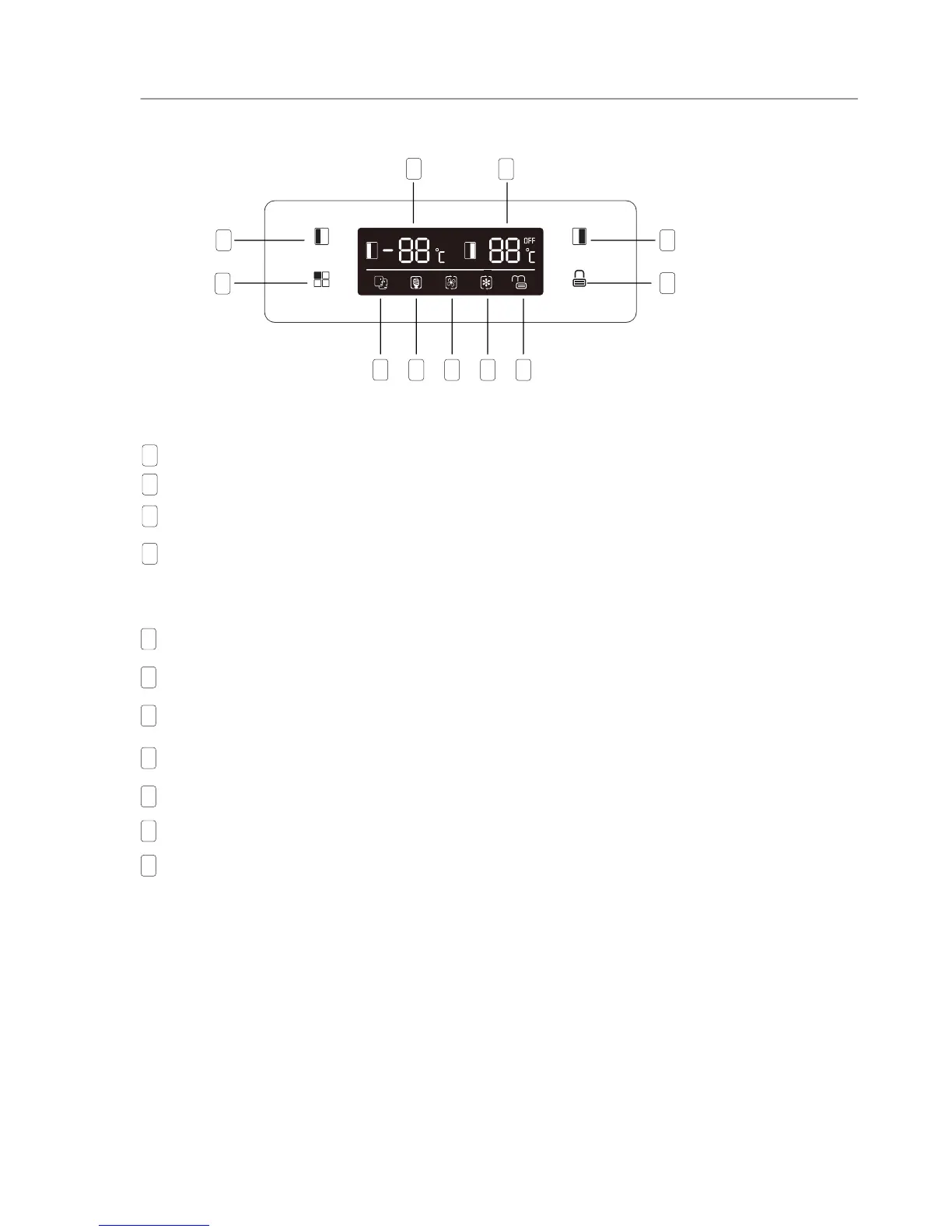
Press to adjust temperature of freezer compartment (left side) from -14 C to -22 C.
Buttons
B
o o
Press to adjust temperature of fridge compartment (right side) from 2 C to 8 C.
C
Press to select running mode from SMART, ECO, SUPER COOLING, SUPER FREEZING and USER’S
SETTING (no symbol in display).
D
Press 3 SEC. button and hold for 3 seconds to lock other three bottons.
Press it and hold for 1 second to unlock other three bottons.
Display
SMART mode, the refrigerator sets the temperature of two compartments automatically according to
internal temperature and ambient temperature.
1
ECO mode, the refrigerator runs in lowest energy consumption setting.
2
SUPER COOLING cools the fridge compartment to the lowest temperature for approx. 2 hours. Then
the temperature set before super mode is automatically restored.
3
SUPER FREEZING cools the freezer compartment to the lowest temperature for approx. 6 hours. Then
the temperature set before super mode is automatically restored.
4
LOCK, the symbol will light on if buttons are locked.
5
Display the setting temperature of freezer compartment.
6
Display the setting temperature of fridge compartment.
7
9


 To Next Page