Baur Test Equipment Ltd, C1 Connaught Business Centre, 49 Imperial Way, Croydon, CR0 4RR, UK.
0208 661 0957 sales@baurtest.com www.baurtest.com User Manual Version Number UM-TDR811210126
2. Set-Up
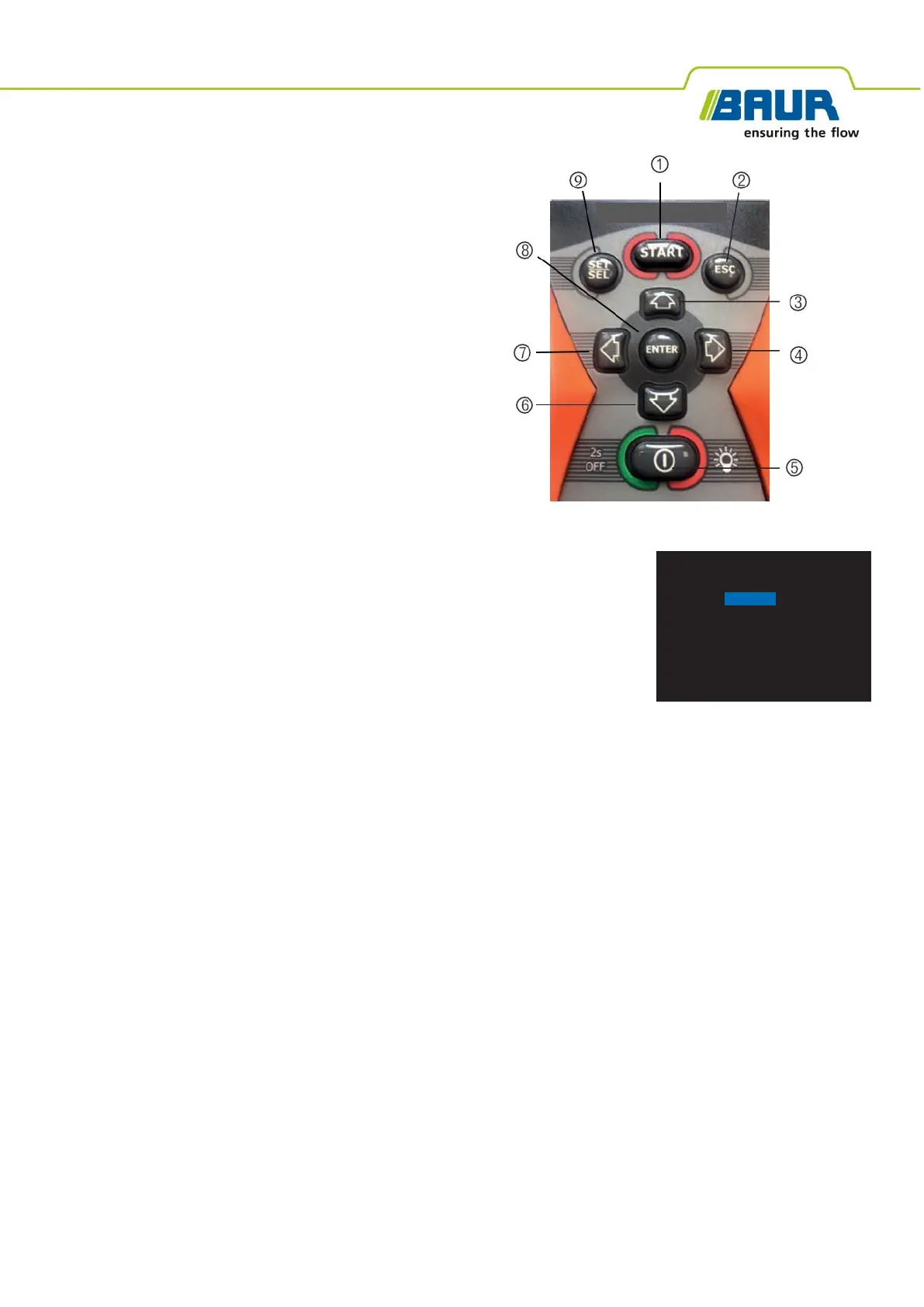
2.1. Keypad.
2.2. On and Off functions
After inserting new batteries (section 4.9), press and release the On-Off switch (5).
The start-up display will be shown momentarily and will be followed by the battery
selection display.
This display will only be shown when the batteries are removed or re- placed. Follow
the on-screen instructions to select battery type.
To turn off press and hold the On-Off switch (5) until the display closes.
At the next switched-on a new screen will appear giving choices of Measurement,
Settings, and Help. The normal choice for operation is “1. Measurement”.
2.3. Key Pad Backlight
Upon switching on the TDR 811 the key pad back-light will be turned on automatically for 20 seconds. Press any key to
restart the illumination. The illumination may be turned On or Off by momentarily pressing the On-Off switch (5). The
function will return to automatic when the TDR 811 is switched off and restarted.
3. Settings Menu
After switch-on, select “Settings” using the UP or Down arrow (3) or (6), press “Enter”
(8) to reveal the settings choices.
Press “ESC” to return to the start screen to progress to Measurement operation.
Select (1) “VoP Unit”:
Press the Left (7) or Right (4) key to choose % or m/us.
Select (2) “Length Unit”
: Press the Left (7) or Right (4) key to choose feet or metres. The choice of feet or metres will
change the VOP Unit to m/ms, or ft/ms.
Select (3) “Brightness”
: Press the Left (7) or Right (4) key to choose between High, Medium and Low. The lowest
setting should be used suitable for the ambient light conditions to preserve battery life.
Select (4) “Auto-Shutdown”:
Press the Left (7) or Right (4) key to choose between 1,3,5,10 and 15 minutes or disabled.
Select (5) “Language”:
Press the Left (7) or Right (4) key to choose between languages.


 To Next Page
 Loading...