8
GYRO CHANNEL / ACTIVATING THE GYRO
For the rst ight, and to facilitate in-ight tuning, it should be possible to adjust the gyro channel,
and therefore the gyro sensitivity in ight, in order to nd the optimum setting quickly, or to reduce
it immediately if needed, e.g. when sensitivity is too high.
Check the function of the gyro channel by adjusting the modes/banks via the transmitter and
comparing the LED‘s colour reaction.
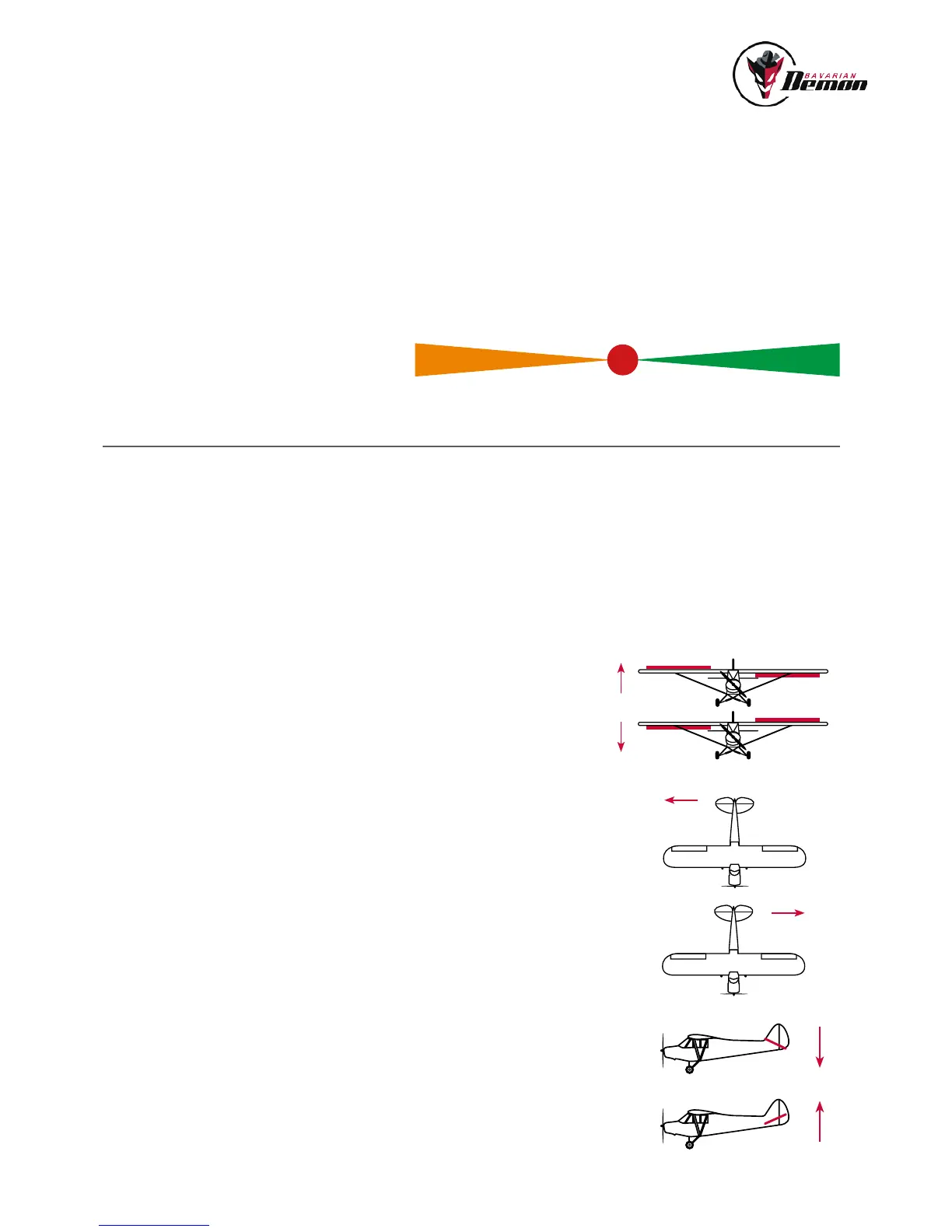
It is possible to determine whether bank 1 or 2 is activated from the polarity of the gyro channel
signal. Negative signal activates bank 1 (normal mode: LED = yellow orange), positive signal
activates bank 2 (Hold mode: LED = green).
A missing or neutral gyro channel signal (LED = red) switches off all gyro functions (manual ight).
MODE
SELECTED BANK
Functions assigned as default (can be changed via software) :
GYRO DIRECTIONAL TEST
This is absolutely required before the initial ight, and following any change to the installation
orientation, or in the RC system (servo direction, channel assignment etc.). For the direction test,
rst ensure that all gyros have been activated (on the gyro channel and/or conguration by PC).
Sole exception is if individual axes have deliberately not been taught so as not to enable
the corresponding gyros, these will not give any gyro reaction.
Now tilt the model in each axis and check that during the movement the corresponding surfaces
move in the opposite direction, i.e. work against the tilt. Check both directions for each axis and
also check that only the concerned surfaces move.
If the surfaces deect incorrectly, either the setup process has been unsuccessful or the installa-
tion orientation of the device is incorrect (or the transmitter was incorrectly programmed prior to
setup).
TEST / SET-UP FLIGHT
Only take off after a successful gyro directional test!
Setting the sensitivity
Start with a low sensitivity gain setting in the gyro channel, maximum 20% and initially only in
normal mode (LED = yellow-orange). To achieve as powerfull a stabilization as possible, increase
sensitivity carefully as far as possible, without any disruptive vibrating movements (oscillations)
occurring.
AUX (GYRO) CHANNEL
-100
Bank 1
+100
Bank 2
0
AUS
Normal/ Dampening mode Gyro OFF
APPLICATION
Normal ight
Aerobatics
Take-off
Landing
Unstabilized
aerobatics
(tailspin etc.),
manual ight
Hover / Torque / Harrier
Deactivate for take-off
and landing, or switch
to normal mode
Hold mode


 To Next Page