Operating your air
source heat pump
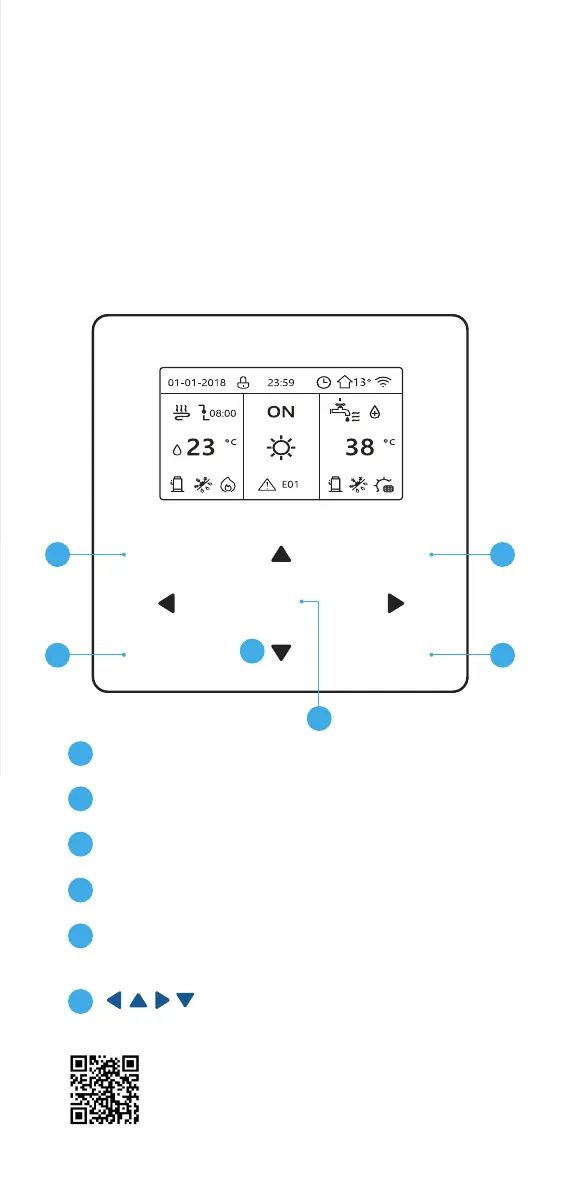
MENU: Enter the menu structure from the
home page
BACK: Come back to the up level
ON / OFF: Turn on or o operation mode in the
menu structure
UNLOCK: Long press for unlocking / locking
the controller
OK: Go to the next step when programming a
schedule in the menu structure / confirm a selection
/ enter a submenu in the menu structure
Navigate the cursor on the display /
navigate in the menu structure / adjust the settings
1
2
3
4
5
6
For more information on living with your
ASHP, visit baxi.co.uk/living-with-your-ASHP
Your installer will show you how your air source heat pump
controller works and demonstrate its features. A more detailed
user guide comes with your ASHP, which we suggest you keep
in a safe place in case you need to refer to it in the future.
COMFORT CONTROL
MENU
OK
ON / OFF
BACK UNLOCK
(LONG PRESS)
6
5
1
2
3
4


 To Next Page