39
COLOR SENSOR
TROUBLESHOOTING
Color Sensor Troubleshooting
The color sensor on the ball tube sends signals to the Color Control Boards mounted in the back of the game.
The game must see balls passing by the sensors to determine the ball color.
At power on, the game will sort balls by:
- Ball separator solenoid engages for 20 seconds, then disengages.
- Both blowers engage
- All balls drops
- Tube solenoid releases balls
- Yellow ball is blown up to the top, waiting area.
If a red ball is in top middle spot, either the ball stack solenoid misfired, or the color sensors need cleaning.
Use canned air to clean sensors - this will fix most color sensor issues.
A5CB6501
Color Control
Board
A5CB6501
Color Control
Board
A5CB6500
Color Sensor
AACE6549
AACE6549
White LED’s on
front of board are
ON when color
sensor is ready to
read balls
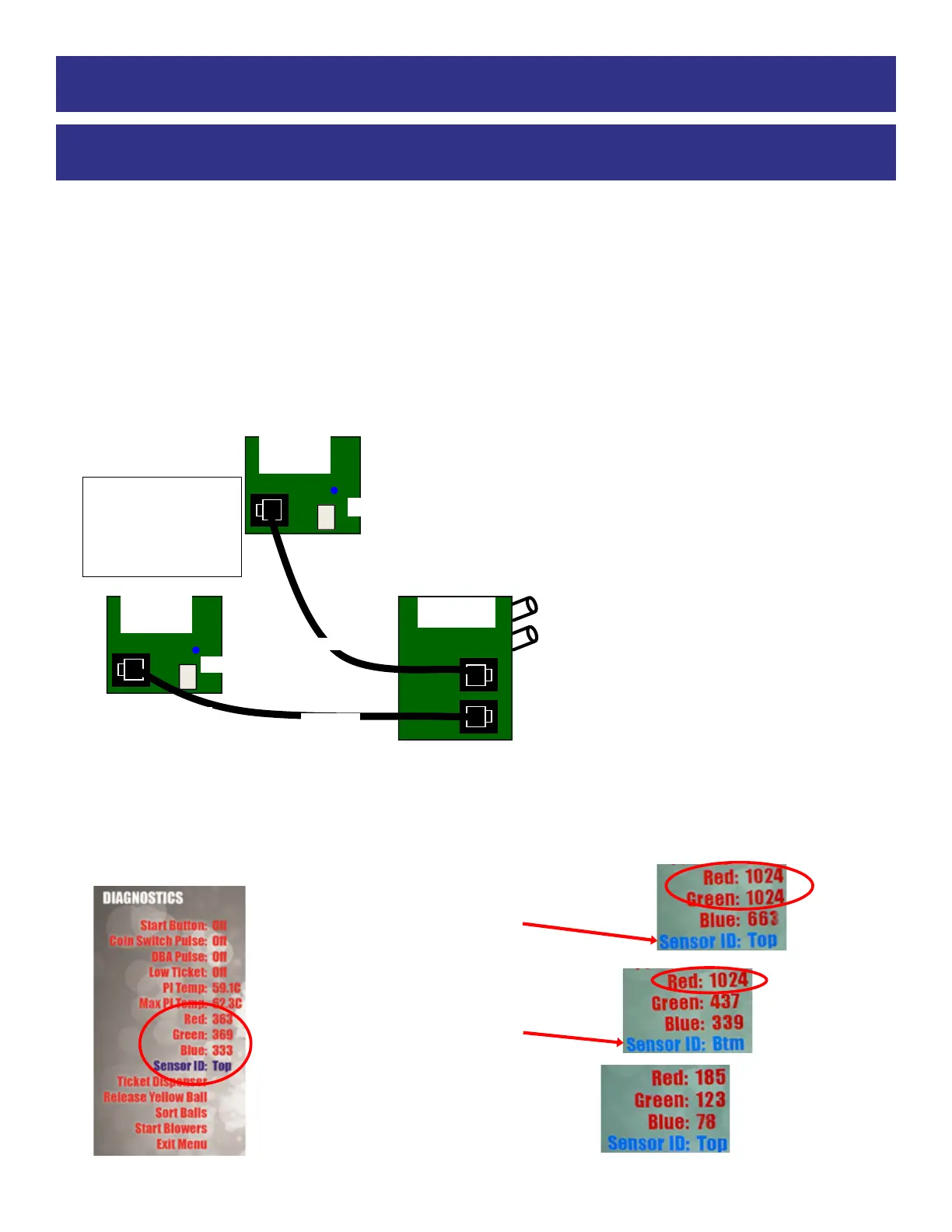
Top Sensor is left column in the diagnostic screen
Top Sensor Control
Both Dip #1 & #2 OFF
Bottom Sensor Control
Dip #1 ON & #2 OFF
Blue LED always ON
Blue LED always ON
Color Control Boards
Red LED on board will flash
when a ball has finished
passing by the color sensor.
A green flash means it is
communicating
Bottom Sensor is right column in the diagnostic screen
Diagnostic Menu
There is information in the Diagnostic Menu which may be helpful.
After the tube is filled:
The top sensor sees the last ball in the tube. Referred to in Diagnostics —> Sensor ID as “Top”
The bottom sensor sees the 2nd to the last ball in the tube. Referred to as —> Sensor ID as “Btm”
If the yellow ball is in the top position:
Both Red & Green should read over 1000.
Note: Sensor ID is Top
If a red ball is in the bottom position:
Red should read over 1000
Note: Sensor ID is Btm
If the tube is empty:
All values will read low, as shown:



 To Next Page