3
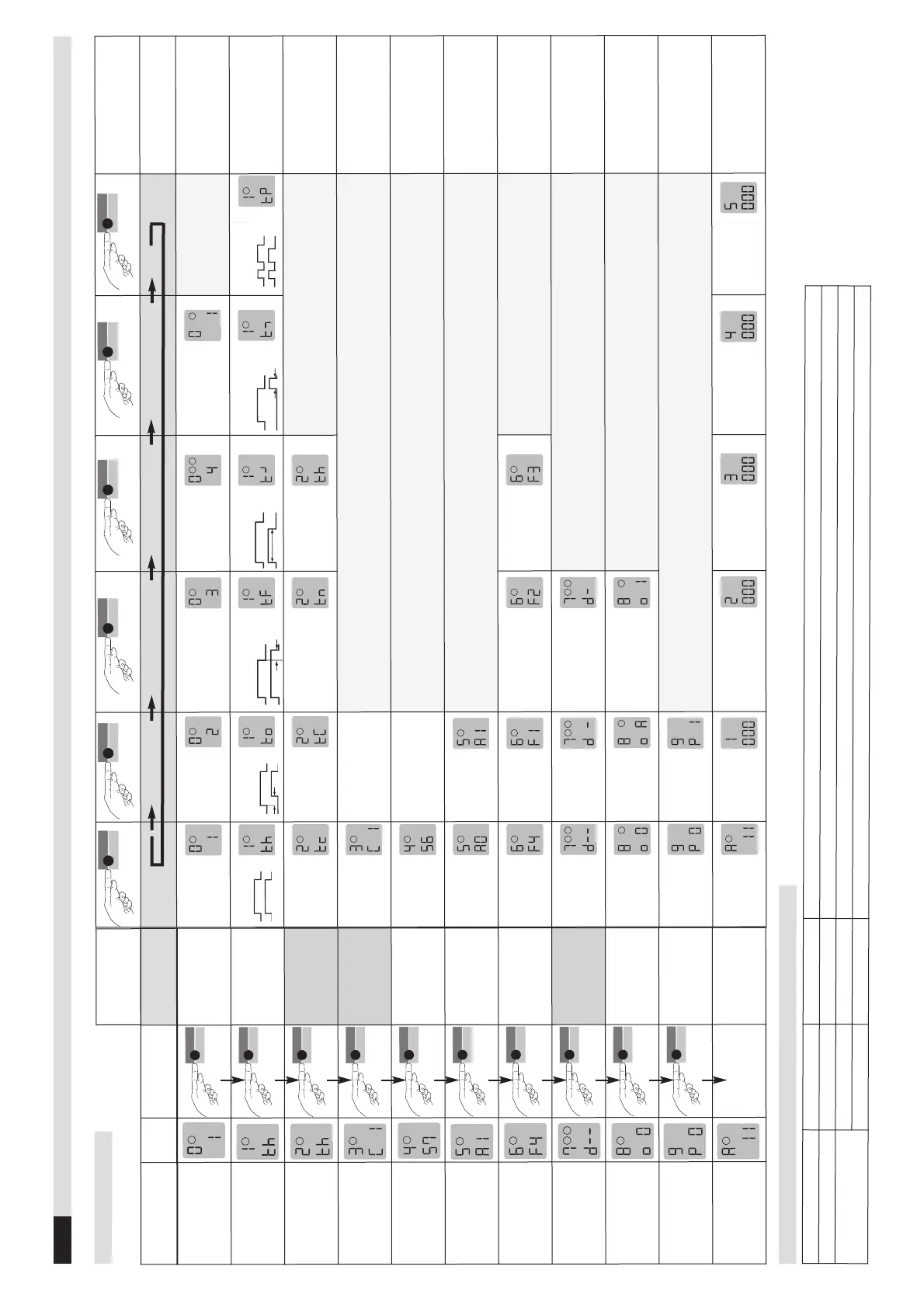
Table 4.11b Addition to function 8 (configuration of output 2) and function 0
*factory settings
Loop 2
Output 2
Bemerkung
1-loop device, 2 relays
–
1/0/A*
1 = Output 2 active; 0 = Output 2 off; A = Output as alarm output
2-loop device, 2 relays
active
–
Parameter 8 is not possible and is not displayed
deactivated
1/0*/A
1 = Output 2 active; 0 = Output 2 off; A = Output as alarm output
Function
LCD
display
Button operation
functions
0 - Basic function
This display does
not appear with
time function th ()
3 - Time factor
This display does
not appear wih time
function th ()
4 - Sensitivity
5
= Sensitivity
5 - Automatic
Sensitivity Boost
ASB
ASB stands for
Automatic Sensiti-
vity Boost
6 - Frequency
This display appears
only with a
2-loop device
8 - Output 2
configuration
9 - Protection
against supply
voltage failure
Only 2-loop device:
Loop 2
activated: «1»*
deactivated: «0»
With deactivation of Loop 2
the output 2 becomes
configurable g 8
*
Time funct. pulse
when loop is exited
The time unit multiplied by
the time factor gives the
set time.
1*
Set value between 1
and 99 by touching or
holding the «Data»
button
4*
Set value betw. 1 (lowest)
and 9 (highest sensi.)
by touching or holding
the «Data» button
Setting restrictions:
rotection against supply
voltage failure (with P1):
Value 1-5
Switched off*
The direction logic function
can only be implemented
with 2 loops and a 2-loop
device
Output 2 is
switched off
Output 2 is
connected as
an alarm output
Output 2 is bound
to loop 1
Loop 2 has to be
deactivated «0»
g Basic function
Supply voltage
failure:
Switched off*
Switched on
If parameter 9 =
P 1
parameter 5 must be set to off
(
5
=
A0
).
Operating
mode
Error memory
slot 1
Error memory slot 2
Error memory
slot 3
Error memory
slot 3
Error memory
slot 5
Possible displays in case of
error: see chapter 6 of these
operating instructions
Button operation
parameter
4.11
Configuration mode
Table 4.1a Settings
Note on 2-loop device: After loop 1 has been set, the parameters for loop 2 are set (make the settings using the same procedure) and the settings are not shown in the table with the exception of the direction logic


 To Next Page
 Loading...