Igrö
EN
7
SETTING THE ALARM AND SNOOZE FUNCTIONS
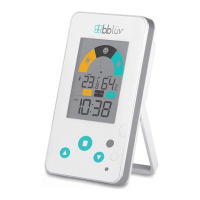
• Press the ALARM
E
key
to turn the alarm on
or off. A bell
symbol will appear between
the hour and minutes (below the double
dots) on the LCD screen when the alarm is
on.
• Press and hold the ALARM
E
key for
2 seconds to access the alarm setting mode.
The time will ash. A bell
symbol will also
appear between the hour and minutes
(below the double dots). Select the hour with
the UP and DOWN arrows
C
and press the
ALARM
E
key to switch to minutes. Select
the minutes using the UP and DOWN arrows,
C
then press the ALARM
E
key to exit setup.
• If no key is pressed for 20 seconds, the system
will automatically save the congured data
and exit the alarm setting mode.
At the set time, the alarm will ring for two minutes.
The device rings at the following rates:
• 0-10 seconds: one beep per second;
• 11-26 seconds: two beeps per second;
• 27-58 seconds: four beeps per second;
• 59-120 seconds: continuous beeping until
2 minutes pass.
When the alarm is ringing, press the SNOOZE
D
button
to activate snooze mode. A ‘sleep’ zz
z
symbol will appear on screen between the hour
and minutes (above the double dots). Another
alarm will go off after 5 minutes. Press any other
key to stop the alarm.


 To Next Page