ENGLISH
EN
Igrö
6
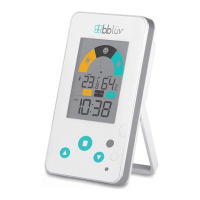
COMFORT LEVELS
Dry: Humidity below 37%
Comfortable: Humidity between 37% and 72%
Humid: Humidity above 72%
NOTE: The arrow indicating the comfort level will ash if the
humidity range is outside the comfort zone (37% to 72%) or if
the temperature exceeds the range of 68 °F to 79 °F.
BEFORE USE
Before switching the Igrö on, insert two AAA
batteries in the compartment
F
at the back
of the device.
TEMPERATURE UNITS - SETTINGS
• Press the SET key
B
to switch the unit of
measurement from ° C to ° F.
TIME SETTINGS
• Press the UP arrow
C
to switch the time
display from a 12-hour format to a 24-hour
format and vice versa.
• Press and hold the SET
B
key until ‘time set’
ashes. Set the hour using the UP and DOWN
arrows
C
and press the SET key
B
to switch
to minutes. Set the minutes using the UP and
DOWN arrows
C
and press theSET
B
key to
nish.
• If no key is pressed for 20 seconds, the system
will automatically save the congured data
and exit the time setting mode.


 To Next Page