ENGLISH
6
EN
Kräb
ACTIVATING YOUR DEVICE AND REPLACING THE BATTERY
Before rst use, remove the protective lm from the included CR2032
battery to activate your Kräb.
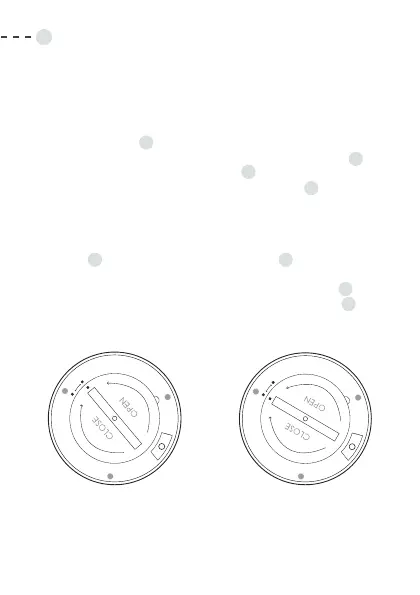
1. Insert a coin or similar object into the opening cavity of the
battery cover
F
.
2. Turn counterclockwise to align the cover alignment dot
D
with the left device alignment dot
C
.
3. Lift the battery cover using the opening notch,
E
making sure
not to remove the cover’s sealing ring.
4. Insert the included CR2032 battery or a replacement CR2032
battery into the compartment, making sure the at side faces up.
5. Put the cover back in place by adjusting the cover alignment
dot
D
and the left device alignment dot
C
.
6. Using the coin or similar object from step 1, turn the cover
clockwise to lock it in place. The cover alignment dot
D
should be aligned with the right device alignment dot
C
.
Battery cover is locked
Battery cover is unlocked


 To Next Page