7
4. The screen displays the message LO
When using the Termö, the message LO can
show on the screen. In this case,
the temperature analyzed is under
the measuring range selected, for example
less than 89.6 °F (32 °C) in BODY mode.
This message can also be displayed
for various reasons. Please nd below a list
of the possible issues:
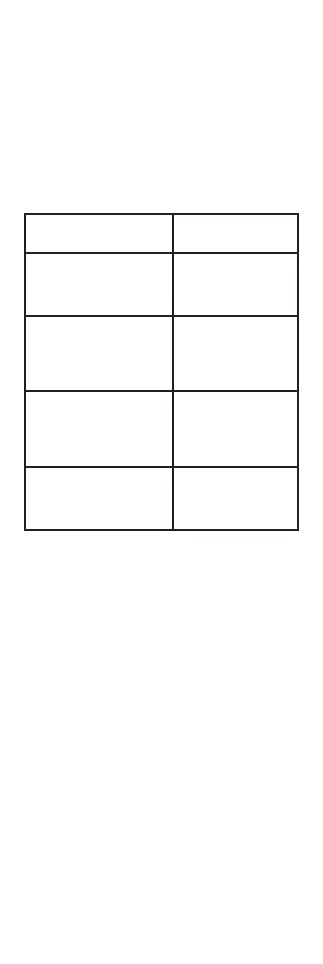
Reasons for LO message
display
Advice
Temperature reading
hampered by hair
or perspiration.
Make sure there is
no obstruction or
dampness prior to
taking temperature.
Temperature hampered
by an air draft or dramatic
change in ambient
temperature.
Make sure there is
no air blowing in the
area of use; this could
affect the infrared
reading.
Temperature readings are
too close together, and
the thermometer did not
had time to reboot.
Pause of 3 to 5
seconds minimum
between readings;
a 15 second pause
is recommended.
The measuring distance
is too far.
Take measurements
at the recommended
distance: approx. 1.2
to 2 in (3 to 5 cm).
Technical Specications
NORMAL USE CONDITIONS
• Ambient temperature: 50 °F to 104 °F
(10 °C to 40 °C)
• Relative humidity: ≤ 85%
BATTERIES
• 2 x AA batteries (Included)
UNIT SIZE
• 6.9 in x 1.9 in x 2 in (17.5 cm x 2.5 cm x 5 cm)
UNIT WEIGHT (including batteries)
• 0.32 lbs (0.15 kg)
TEMPERATURE DISPLAY ACCURACY
• 0.1 °F (0.1°C)


 To Next Page