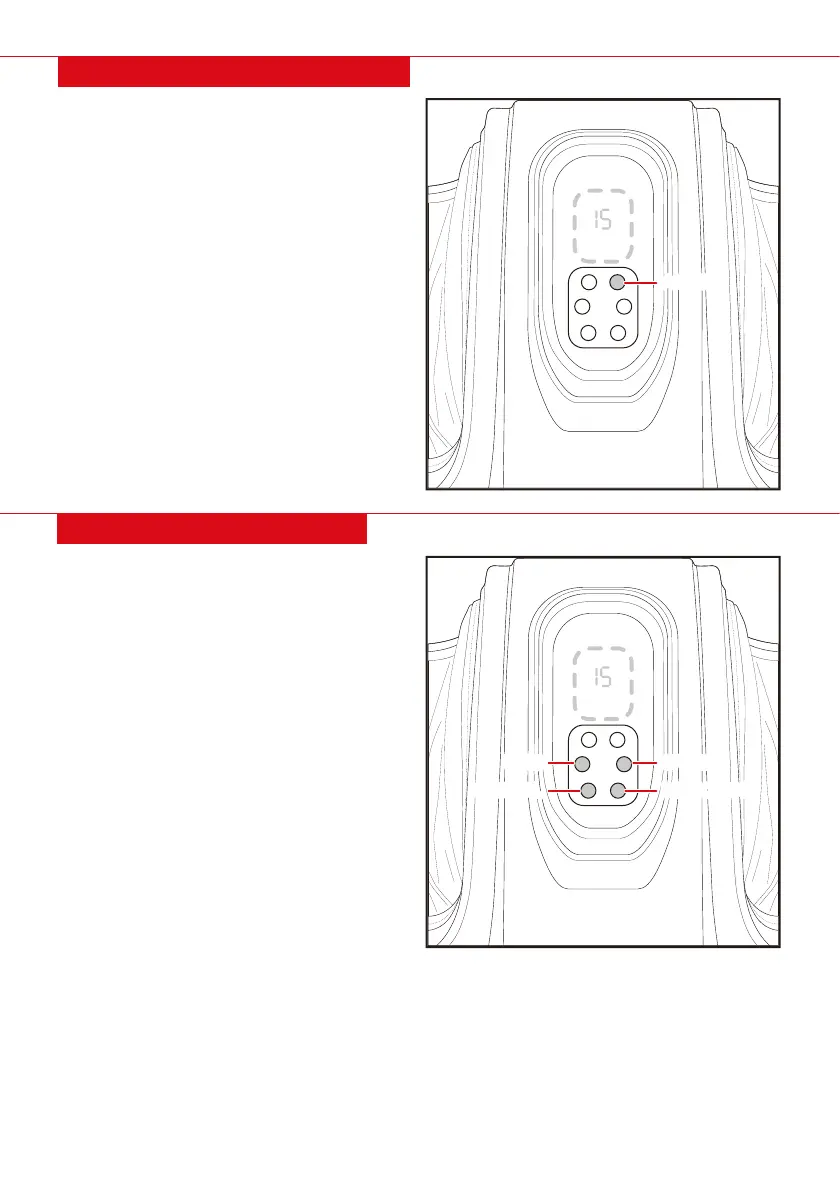
Press the AUTO button to cycle between massage
programs: M1, M2, M3.
• M1 Focus: All reflex points
• M2 Focus: Head, neck, lumbar spine, and shoulders
• M3 Focus: Intestines, liver, and stomach
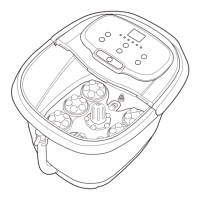
• Press the MANUAL button for a consistent
massage style.
• Press the SPEED button to increase the rate of
pressure. Indicated by 1 bar (low), 2 bars (Medium),
and 3 bars (high)
• Press the TIME button to increase or decrease
the duration of your massage. Starts at 15 minutes
and increases by 5 minutes up to 30 minutes.
• Press the DIRECTION button to change the
roller’s rotation. Switches between clockwise
& counter clockwise.
AUTOMATIC PROGRAMMING
MANUAL PROGRAMMING
4 |
ON/OFF
Time
Manual
Auto
Speed
Direction
ON/OFF
Time
Manual
Auto
Speed
Direction
SPEED
DIRECTION
TIME
MANUAL
AUTO


 To Next Page