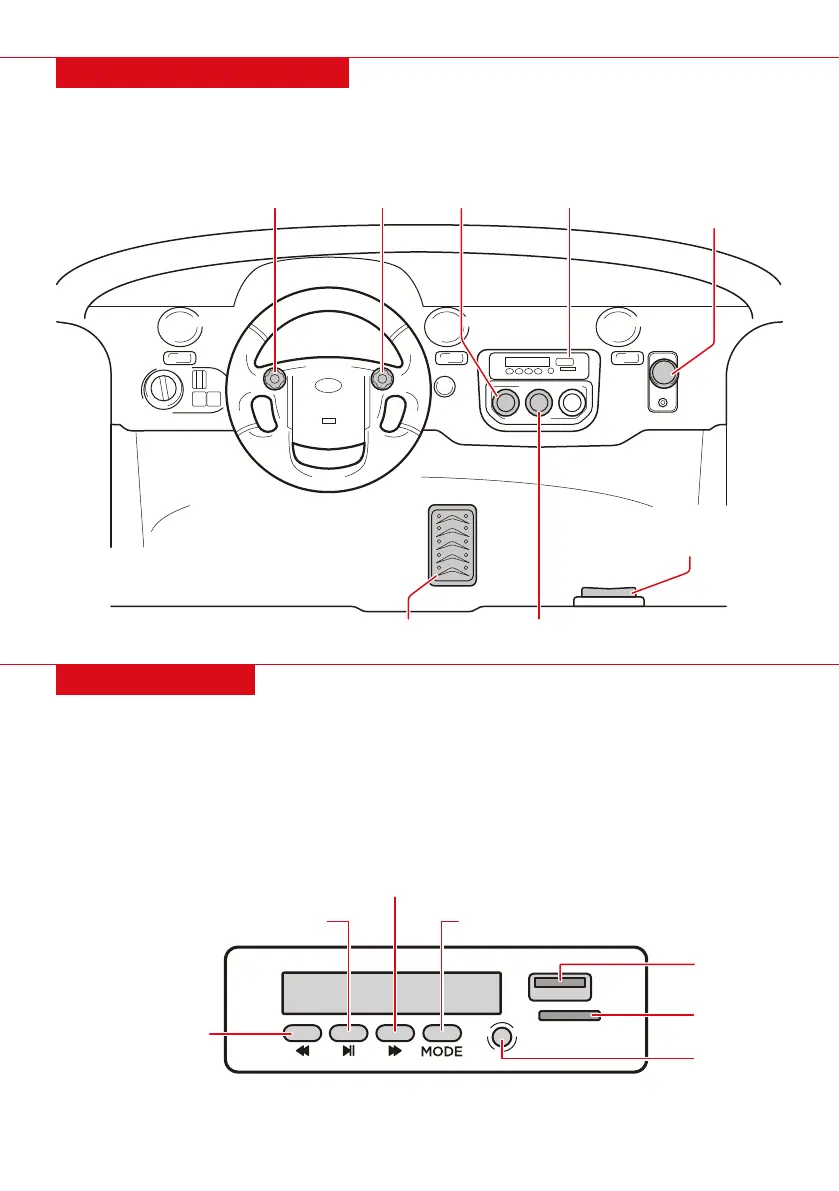
DASHBOARD DIAGRAM
MEDIA PLAYER
• Push down on the pedal to drive forward/reverse. Release the pedal to slow down and stop.
• Lights: Turn headlights on/o
• Music: Cycle through music
| 13
AUX INPUT
PLAY/PAUSE TRACK
NEXT TRACK/
INCREASE VOLUME
PREVIOUS TRACK/
DECREASE VOLUME
USB PORT
MICROSD
(TF) PORT
MODE
NOTE: By default, buttons play music included with the vehicle. Press and hold buttons for
secondary function.
• USB Port: Play music from a USB drive
• MicroSD (TF) Port: Play music from a MicroSD card
• AUX Input: Use AUX cable to plug in a music player to play music
• Mode: Press to toggle between music and FM radio
POWER SWITCH
LIGHTSMUSIC HORN FORWARD/PARK/
REVERSE
MEDIA PLAYER
PEDAL
LOW SPEED/HIGH SPEED;
CHARGING PORT


 To Next Page