14 |
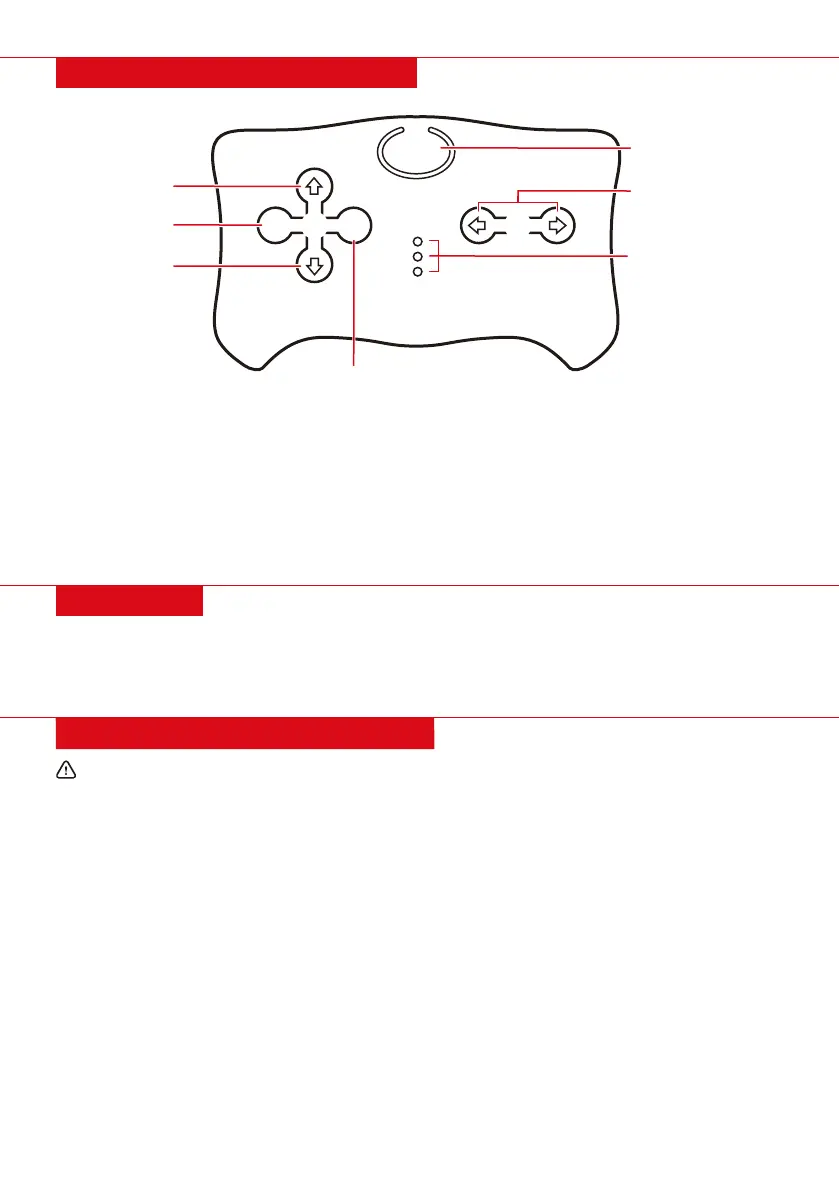
REMOTE CONTROL DIAGRAM
FEATURES
FREQUENCY KEY
TURN LEFT
TURN RIGHT
BRAKE/PARK
REVERSE
FORWARD
SPEED SELECT
SPEED INDICATOR
LIGHTS
P S
• Install 2 AAA batteries into the remote control.
• After 10 seconds of non-operation, the remote will go into power-saving mode.
Linking the remote control:
1. Press and hold the frequency key for 2-4 seconds. The speed indicator light will flash.
2. Turn the vehicle on. The speed indicator light will turn solid to indicate a successful link.
3. If the speed indicator light continues to flash (indicating an unsuccessful link), remove and reinsert
the batteries and repeat steps 1 and 2.
• Compress switch to open door
• Extra storage in the hood
• Convenient handle to transport car
CALIFORNIA PROPOSITION 65
WARNING: Battery posts, terminals, and related accessories can expose you to chemicals including
lead and lead compounds, which are known to the State of California to cause cancer and birth defects or
other reproductive harm, and are toxic and corrosive. Wash hands after handling. For more information go
to www.P65Warnings.ca.gov



 To Next Page