EFFECT CHANGE
LESSON MODE
Dual Timbre
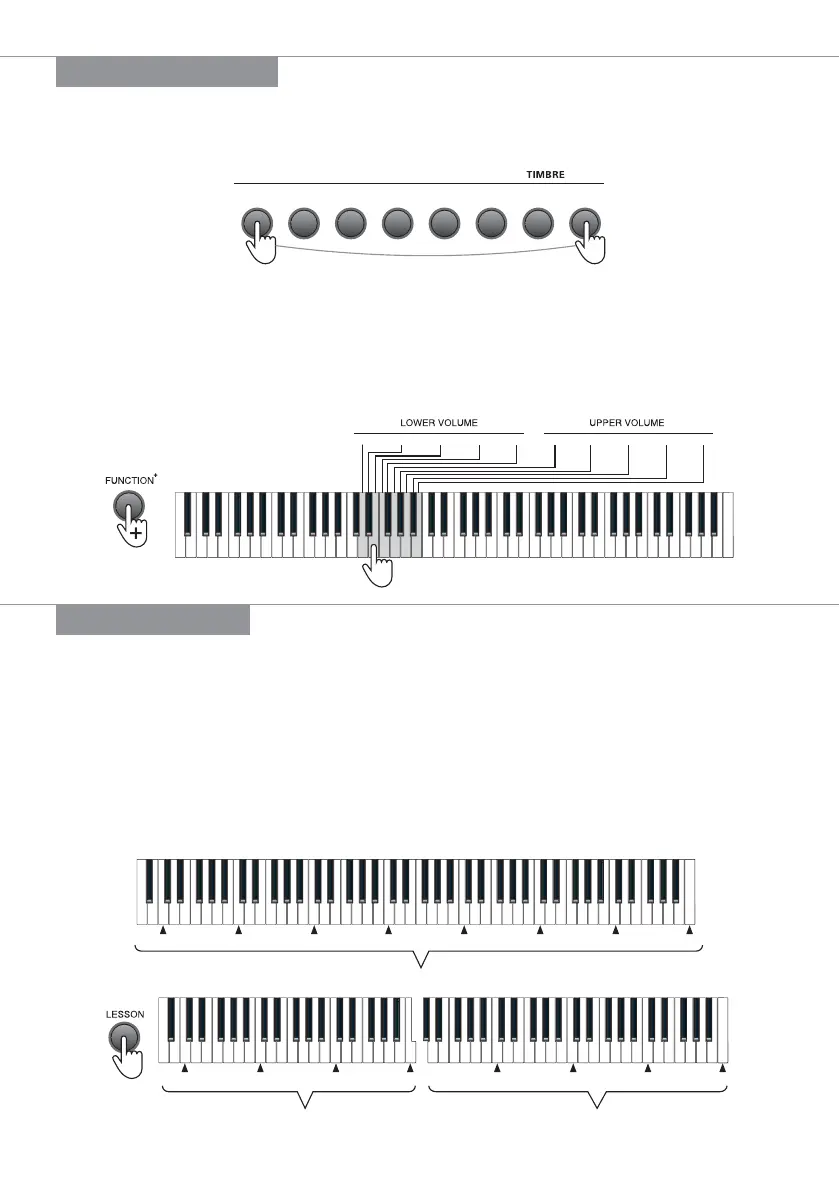
Press any two timbre buttons simultaneously to enable the dual timbre function, in this case, the
two selected timbre will be overlaid.
When overlay of other timbres are required, press the [GM TIMBRE] button + the [DEMO
SONG/GM TIMBRE] key to select other timbres, and then press the [GM TIMBRE] and other
[TIMBRE] buttons simultaneously.
Both volumes for the upper layer and the lower layer have 5 grades: the volume of the first
selected timbre is adjusted via the upper volume by pressing the [FUNCTION+] button + the
[UPPER VOLUME 1 - 5] keys on the keyboard; the volume of the later selected timbre is adjusted
via the upper volume by pressing the [FUNCTION+] button + the [LOWER VOLUME 1 - 5] keys;
Grand
piano
Church
organ
Guitar
Bass
String
Percussion
Electrical
piano
GM
TIMBER+
1 2 3 4 51 2 3 4 5
Lesson Mode
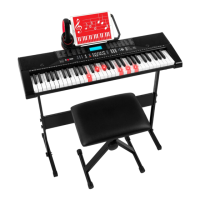
In the lesson mode, the 88 keys are split into two zones with identical tone and timbre, which
facilitates the demonstration by a teacher to student. Two people can play the piano
simultaneously.
Press the [LESSON] button for the first time to activate the lesson mode, press the [LESSON]
button again to disable this function.
Under the lesson mode, the scales of Keys A0 - C5 in the left zone will change to the scales of
Keys A2 - C6, while the scales of Keys C4# - C8 in the right zone will change to the scales of Keys
C2# - C6.
C1 C2 C3 C4 C5 C6 C7 C8
(Before lesson mode enabled)
Left zone
Right zone
C3 C4 C5 C6 C3 C4 C5 C6
(After lesson mode enabled)
| 9


 To Next Page