EasyManua.ls Logo

BCP SKY5588 - Front Panel Controls; Speaker; Power Button; Master Volume Control

BCP SKY5588
16 pages
Print Icon
To Next Page IconTo Next Page
To Previous Page IconTo Previous Page
Loading...
4 |
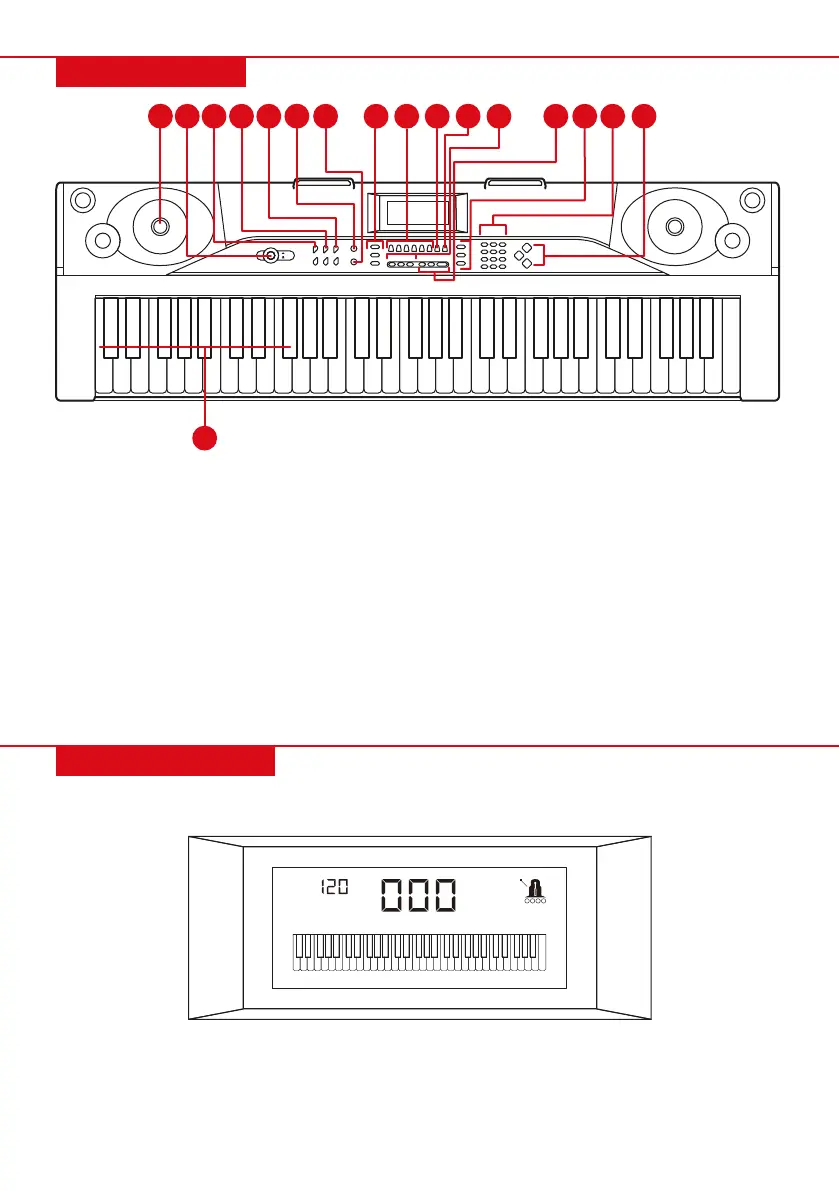
FRONT PANEL
DIGITAL DISPLAY
NOTE: When turned on, keyboard will default to 000 timbre and 000 rhythm with 120 beats per minute (BPM) tempo.
On standby, screen will display the tempo. Press “START/STOP” to play the selected rhythm. Press “TEMPO +” or
“TEMPO –“ to increase or decrease the tempo.
1. Speaker
2. Power
3. Master Volume
4. Accompaniment Volume
5. Tempo
6. Single
7. Fingered
8. Sync
Fill-in
Start/Stop
9. Media Player Controls
MP3 Volume Control
Previous/Next
Play/Pause
Sequence/Random/Single
10. Split
11. Key lighting
12. 3-Step Lesson
One Key
Follow
Ensemble
13. Sustain
Vibrato
Keyboard Percussion
14. Record
Program
Play
15. Numbers
16. Timbres
Demo Song
Rhythm
17. Chord Keyboard: For use
with single-finger chords
ON
OFF
TEMPO
TONE
1
2 3
4
5 97 8 10
11
13
6
12
17
14 15 16

Related product manuals