8 9
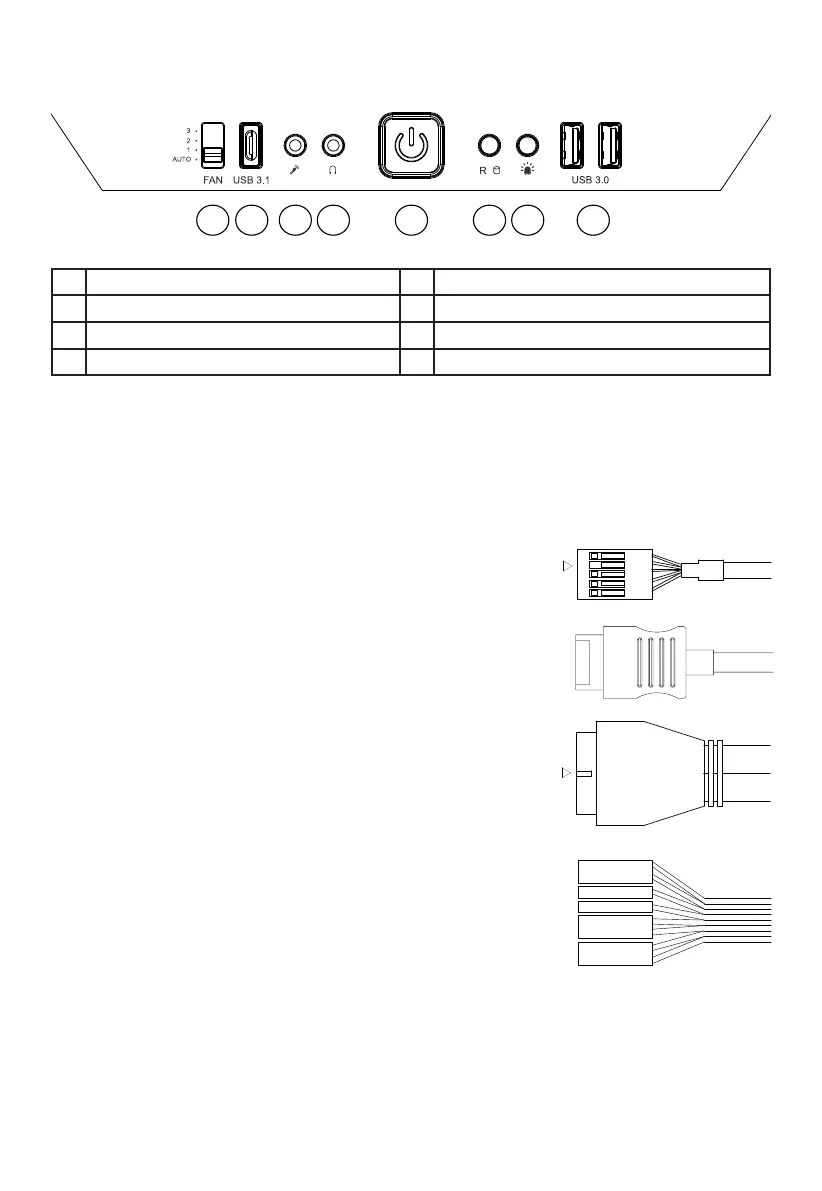
4.1 FRONT I/O AND MEDIA PORTS
A
B C D E F G H
A Fan Controller Switch E Power Button
B USB 3.1 Type C F HDD LED / Reset
C Microphone G LED Switch
D Headphone H USB 3.0
4.2 I/O PORTS
The Front I/O ports provided require connections to your motherboard. Refer to your motherboard handbook
for information on pin assignments and sockets.
HD audio (headphone jack/microphone jack)
Find the HD audio pin connectors on your motherboard and attach
the HD audio cables to the designated sockets.
USB 3.1 Type C
Find the USB 3.1 Type C pin connectors and attach the USB 3.1
Type C cables to the designated sockets.
USB 3.0
Find the USB 3.0 pin connectors on your motherboard and attach
the USB 3.0 cables to the designated sockets.
On/O Switch, Power On LED, Disk Operating LED, Reset
Button
TheplugsillustratedconnecttheOn/OSwitchandLEDlampsof
the case to your motherboard. Take care you observe the correct
polarity with the LEDs.
KEY
POWER SW
POWERLED +
H.D.D LED
RESET SW
POWERLED -
KEY



 To Next Page